Telegram AI commenting
Configure comments for new posts with selected accounts, sources, and a prompt.
- Sources and new-post selection
- Prompt and pre-launch check
- Results and skip reasons
The module runs comments for matching new posts from selected sources. Before launch, the operator selects accounts, selection rules, and a text prompt.
Launch flow
- Select accounts and sources with available comments.
- Configure post selection and the prompt, then review the launch preview.
- Start the job and review results for every target.
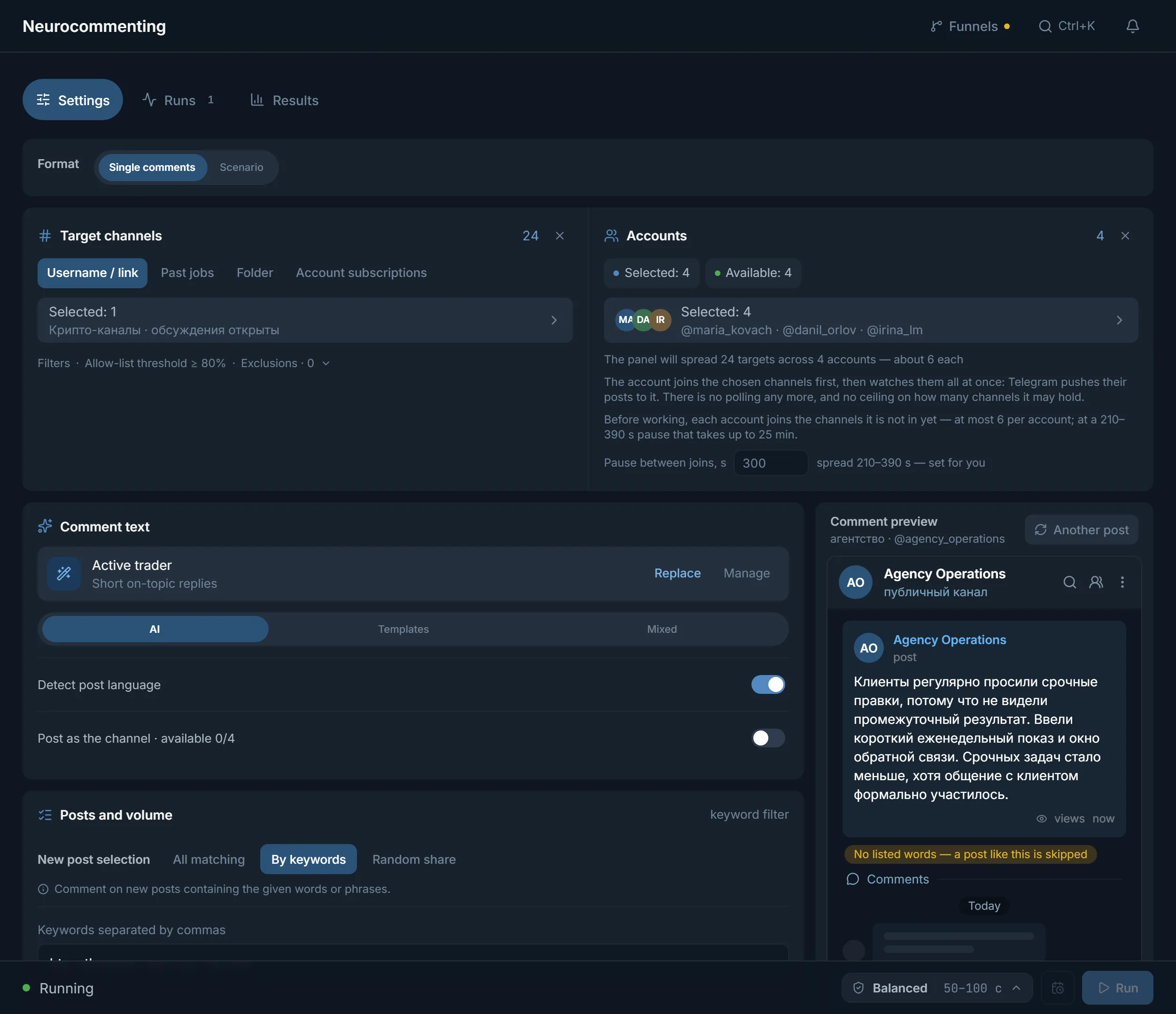
Before you launch
- Warmed accounts: fresh, empty ones are what Telegram restricts first.
- A proxy on every account.
- Access to a model: the shared panel provider works, or bring your own key.
- Channels with comments open: if discussions are off, the channel is skipped.
Where the channels come from
- «Username / link»: the target list typed in or picked through the source picker.
- «Past jobs»: the targets of a previous run.
- «Folder»: a t.me/addlist link: the panel reads the folder, takes every channel in it, and joins it in one request instead of one per channel.
- «Account subscriptions»: the target list is ignored and every account works its own subscriptions where comments are open. There is nothing to join, so this mode has no join phase at all.
Joining before work
Telegram pushes new posts only to a member of the channel, so before work the account joins everything it is not in yet and only then starts listening. A join is the most restricted action there is: 300 seconds between joins by default with a 210–390 second spread, and the panel states above the account list how many channels each one will join and how long that takes. Channels the account is already in are skipped without asking Telegram, so accounts prepared in advance (by a folder from the account manager, or by a previous run) start straight on comments. A channel that could not be joined leaves the run with its own reason: the panel will not poll an unsubscribed channel, because that is exactly how restrictions are earned.
New-post selection
- «All matching»: a comment for every new post from the source.
- «By keywords»: only posts containing the words or phrases you set.
- «Random share»: a share of new posts gets a comment; the operator sets the share.
Which posts to comment
The «Which posts to comment» switch in the «Posts and volume» block decides where posts come from. «New only» is the default: on start the module records what the channel has already published, then waits for fresh posts, polling the sources every few seconds. A comment under a post that just went out sits at the top of the discussion where readers see it, while a reply under yesterday's post sinks down the thread. «Existing» takes the posts the channel already has: «Recent posts per channel» (1–100) sets how many, and new posts that arrive during the run are not commented. «Existing first» works through the archive and then switches to new posts. The practical rule for «New only»: if your sources publish rarely, a short watch window can end without a single comment: that is an absence of matching posts, not a failure. When you need results right away, pick «Existing first».
Accounts and allocation
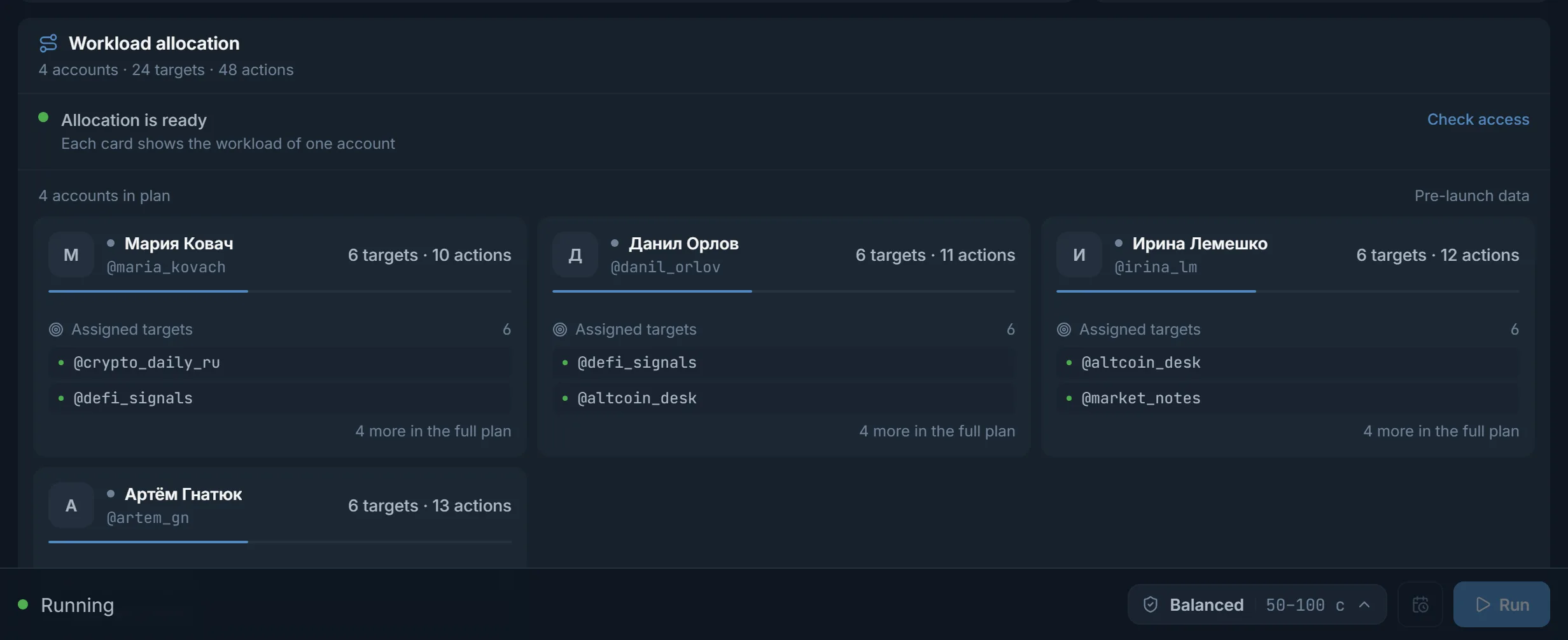
Your plan limits how many accounts run at once in this module; neighbouring modules have their own limit. Before launch the panel builds an allocation: how many targets and actions each account is assigned and which sources it watches. You see it before the start, so the load can be rebalanced up front. The panel does not cut your channel list: channels are split evenly between the accounts you chose, and you can set your own cap with the «Maximum targets per account» slider, up to 500. An account makes at most 30 new joins per run, a channel together with its discussion group counts as two joins, and joining takes no more than 40% of the run window. The rest goes to the next run or to preparing the accounts with a folder, and the plan states up front how many channels are left for the next run. Channels on the block list of the «Channel reputation» card stay out of the run while «Apply the block list» is ticked. Fewer accounts does not mean fewer channels: it means each one carries more of them and has to comment more often. That is why a long list takes more accounts rather than a higher pace on the current ones.
Text source
- AI: the connected model writes the text from the selected instruction.
- Templates: the operator's prepared text is used.
- Mixed: the text type is chosen by the configured share and stored in the result.
Writing the prompt
- Describe who is writing and why they read this channel: the reply comes out meaningful instead of neutral.
- Ask for one or two sentences strictly on the post's topic: long comments read as unnatural.
- Explicitly forbid filler phrases like “nice” or “thanks for the post”: those are what give a bot away.
- Do not ask for links: comments carrying links attract reports fastest.
Run progress and results
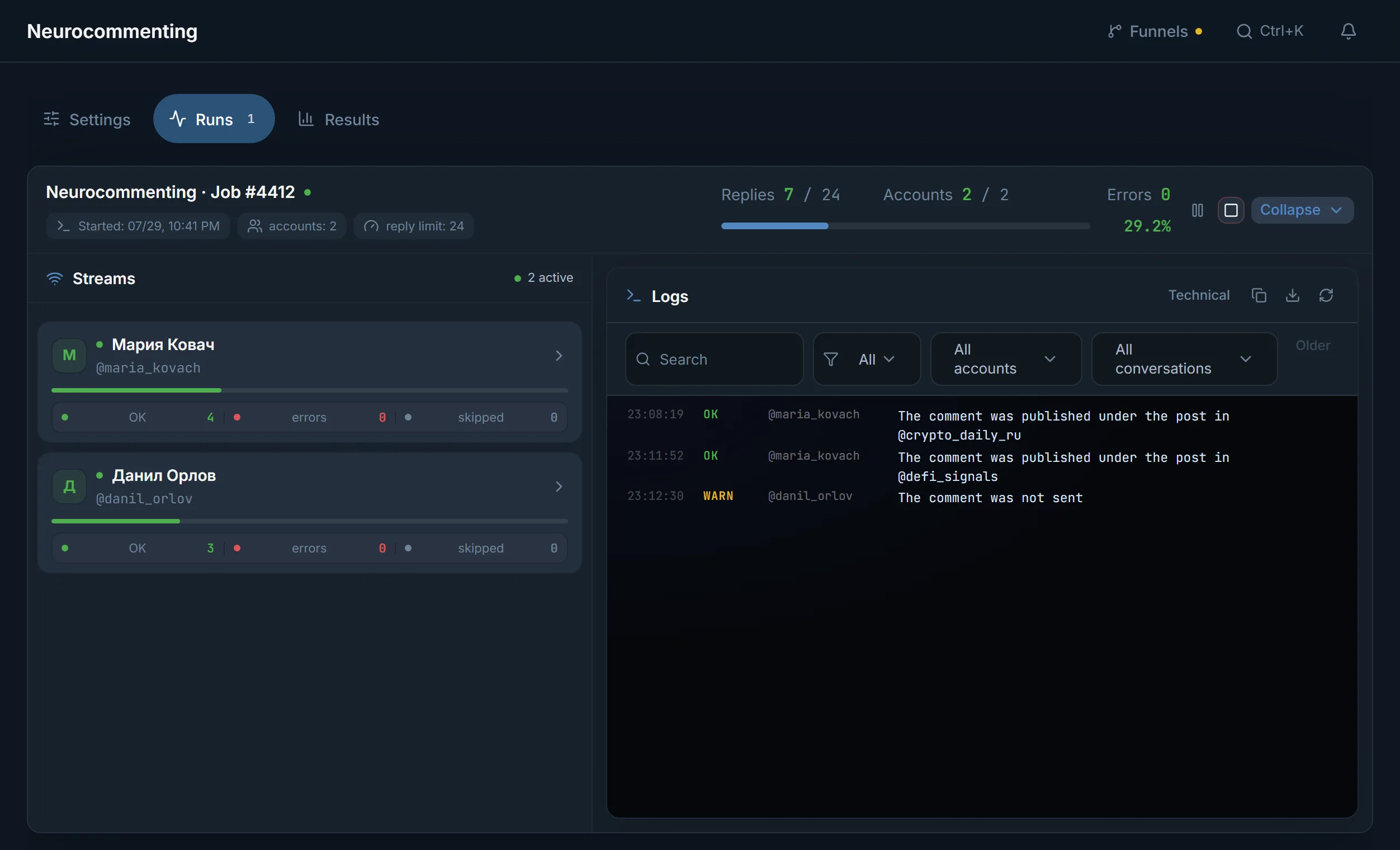
- The state of each account: completed actions, errors and skips.
- A per-account and per-target event log with filters and search.
- The text of every sent comment, tied to its source.
- Pause and stop can be applied to a single account without touching the rest.
Why a target can be skipped
- The source published no new posts during the watch window.
- The post did not match the keywords or fell outside the random share.
- The account reached its own comment ceiling or is waiting out a pause.
- The model did not answer or returned empty text, so no comment is sent.
- Telegram restricted the action, or the target has comments closed.
Account protection
- The pace profile decides how fast an account works: the calmer the profile, the longer the gaps between comments, and every gap differs a little from the last.
- You set the limits: «Comment limit» for the whole run (1–500), «Per account» (0–500, 0 means no ceiling) and «Per hour, per account» (0–200, sliding hour). The module has no daily limit and no night break: the pace profile and these ceilings set the pauses.
- When Telegram asks to wait (FloodWait), the account pauses instead of pushing the account further.
- Protection can stop a specific action before sending: the results show it as a skip.
Common mistakes
- Launching on accounts that were never warmed up.
- Too many new channels per account: it will not make more than 30 joins per run, and the rest goes to the next run.
- Identical text from every account: obvious to readers and anti-spam alike.
- Links in comments: better not to leave them at all, that is a direct path to reports and restrictions.
FAQ
Does the module comment on old posts?
Yes, if you pick «Existing» or «Existing first» in the «Posts and volume» block: the module takes the latest posts of the channel, and «Recent posts per channel» (up to 100) sets how many. The default is «New only»: the module notes what the channel has already published and waits for fresh posts, because a comment under a fresh post sits at the top of the discussion and more readers see it.
What happens if the model does not answer?
The comment is not sent and the reason stays in the results. Canned text never stands in for the model's answer, so one provider hiccup does not turn into a run of identical comments.
Can two accounts comment on the same post?
No. Within one job a post goes to a single account and the others skip it, so you will not see identical comments stacked under one post.
How many channels can one account handle?
The panel does not cut the list, it splits it evenly between the accounts: twenty channels on two accounts is ten each. But an account makes at most 30 new joins per run, and a channel with a discussion group costs two joins. The rest goes to the next run or to preparing the accounts with a folder. You can set your own ceiling with the «Maximum targets per account» slider, up to 500.
What if there are no comments at all?
First check whether new posts appeared during the watch window and whether keyword selection filtered them out. Then read the skip reasons in the results: they show whether it was the source, an account limit or the model.
Is Telegram Premium required?
Not for normal work. Premium is only needed if you want the comment to appear from the channel linked to the account instead of the account itself.
Can it run without an AI provider?
Yes. Template mode sends your prepared text and needs no model. AI and mixed modes need model access: the shared panel provider or your own key.
Is it noticeable that a model writes the comments?
It depends on the instruction. Short on-topic replies read like ordinary comments; generic phrasing, identical text and off-topic answers are what reveal automation.
Ready to open the panel?
Review the scenario constraints before launch.
Read next

Neurochat: accounts talk in group chats
Accounts sit in topic chats as ordinary members: they reply on topic, keep the conversation going and start new topics by your instructions. After the chat, a Dialogs campaign can handle the DMs.

Telegram account warmup
Run a warmup profile for selected accounts with observable results.
 Guide
GuideTelegram AI commenting: setup, folders and why accounts should join channels in advance
A step-by-step look at launching AI commenting: how the module picks posts, why accounts need preparing in advance and how folders save join limits.