Telegram account warmup
Run a warmup profile for selected accounts with observable results.
- Account and profile selection
- Pre-launch plan
- Action results and statuses
Warmup runs the actions defined by a profile for selected accounts. The operator sees the plan, job progress, and actual statuses instead of a promise that an account is ready.
Launch flow
- Select accounts and a warmup profile.
- Review the launch preview and eligible accounts.
- Start the job and monitor results and restrictions.
Before you launch
- Accounts with proxies: an account without one will not run.
- Accounts free of other jobs: they cannot be used in working modules while warmup runs.
- A sense of how long you can wait: from half an hour to a week.
Warmup duration
- Short presets: 30 minutes, one, two or three hours. A quick warm-up before a job.
- One day: the baseline for accounts that already worked somewhere.
- Three days and a week: for fresh accounts, where rushing costs the most. A week is the longest warmup there is.
- Your plan caps the maximum duration.
What the account does during warmup
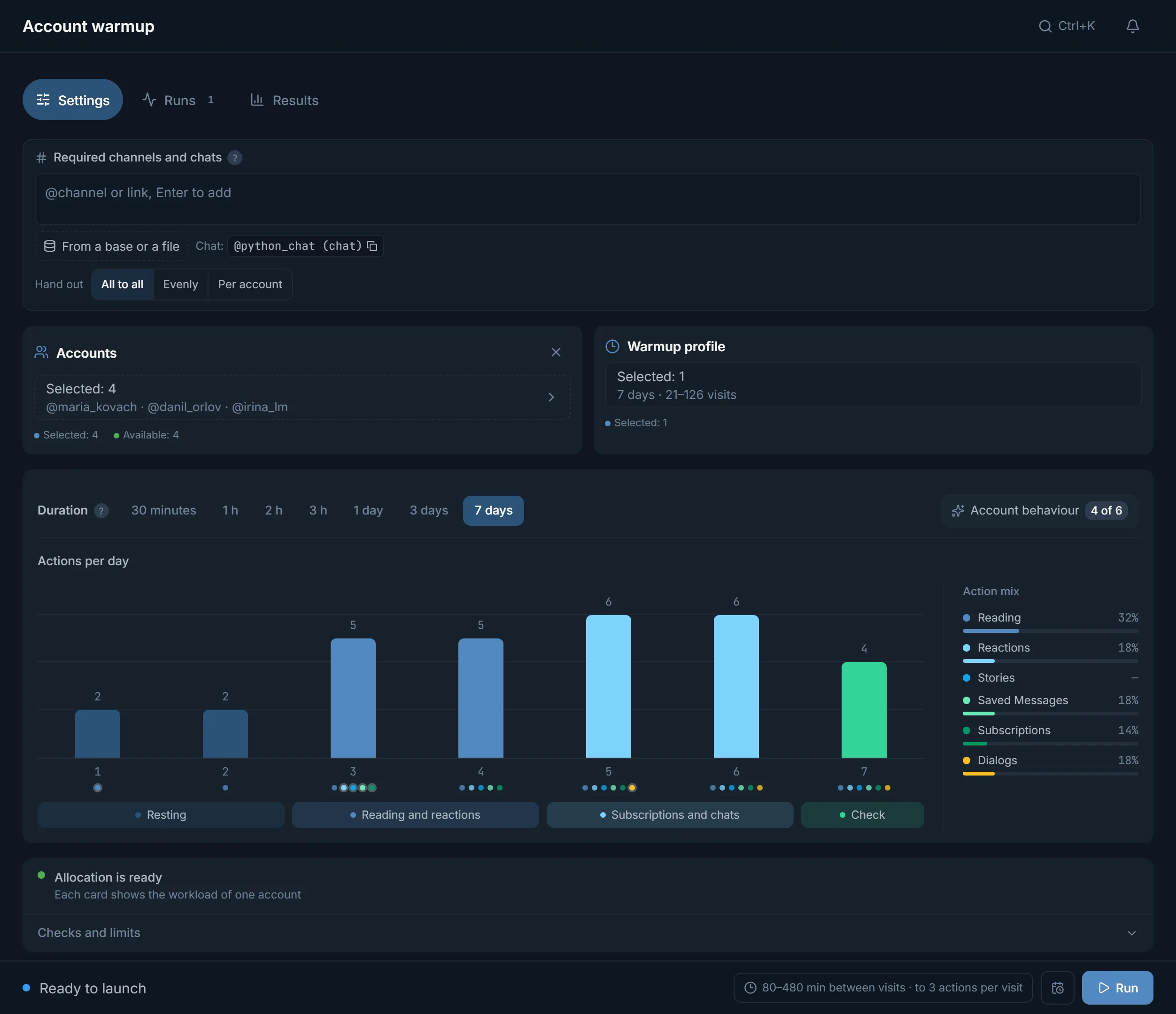
Warmup does not keep an account online for days. It splits the work into short visits: the account signs in, reads something, leaves a reaction, subscribes to a channel, saves a post to Saved Messages and leaves. Between visits the account is offline, like a real person. The gap depends on the programme: 8–60 minutes for the short ones, 90–360 for 1 day, 120–420 for 3 days, 80–480 for 7 days. The panel shows it on the launch bar, for example «80–480 min between visits».
- Account behaviour: reading, joining and keeping the Saved Messages note are always on. What can be switched off is Reactions to posts, Stories, Folder of required channels, Chats between accounts, Comments under posts and Messages in chats. The last two are off by default.
- Talking exists only in the 3 hour, 1 day, 3 day and 7 day programmes. In the half-hour one the account only reads.
- Required channels and chats: links the accounts join over the course of the warmup. They can be handed out All to all, Evenly or Per account.
- At night, 01:00 to 07:00 by default, the account sleeps and makes no visits.
- If you start a warmup at night, the panel offers Start at 07:00 or Now anyway. With the second there will be no visits before morning, while the programme clock is already running.
Warm-up programme by day
- Actions per day: one bar for each day of the programme, showing that day's action ceiling.
- The dots under a bar show which actions are open that day. In the 7 day programme the first two days are reading only, reactions, stories, Saved Messages and subscriptions open on day three, talking on day five.
- Phases under the chart: Resting, Reading and reactions, Subscriptions and chats, Check.
- Action mix: the share of reading, reactions, stories, Saved Messages, subscriptions and dialogs across the whole programme.
- The 7 day programme has one deliberately quiet day, and it falls on a different day for each account.
Run progress and results
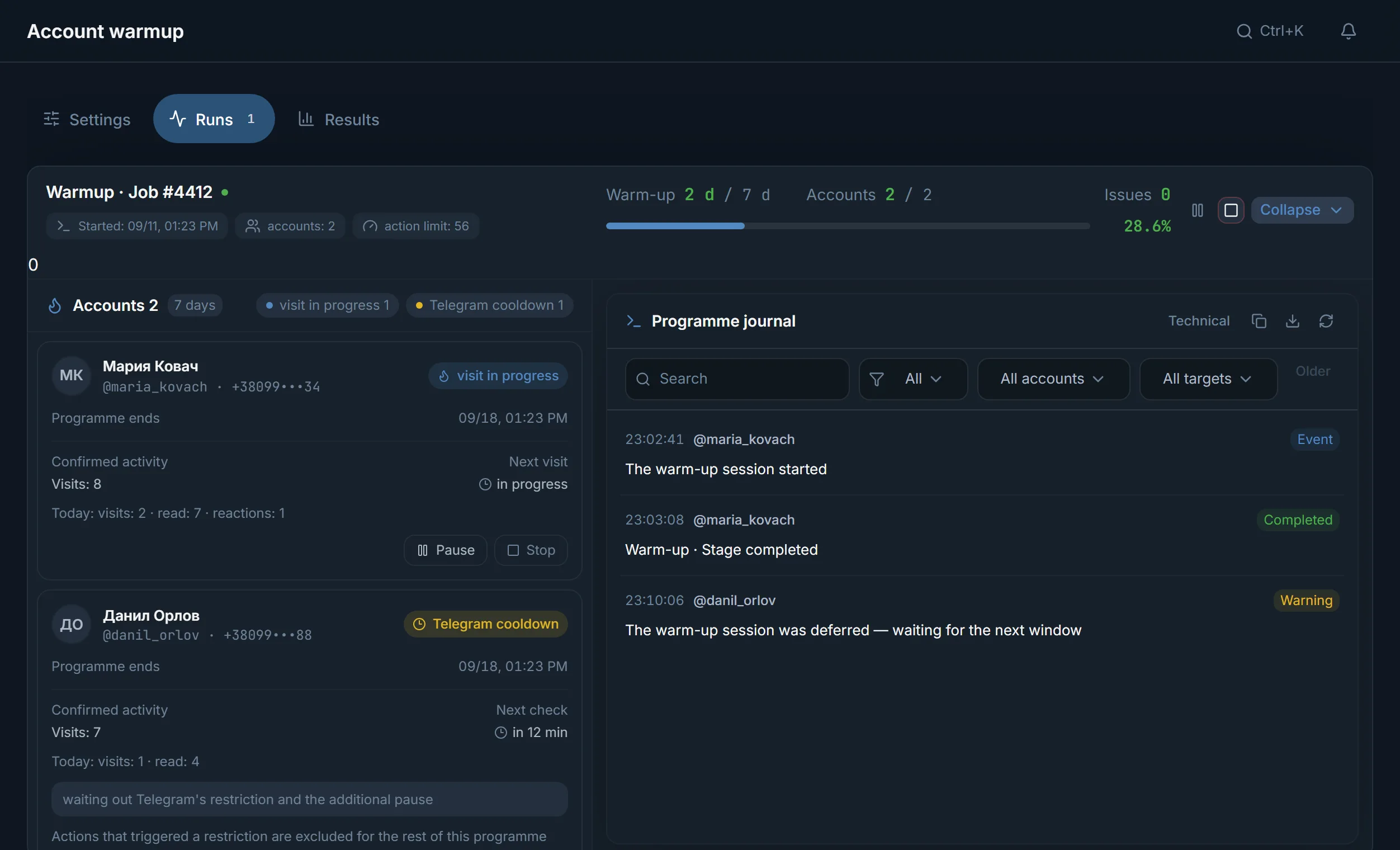
- The warmup day and how many actions each account has completed.
- Current state: a visit is running, or the account is on a break.
- An event log per account.
- Warmup can be stopped at any moment, and completed actions stay.
Why an action may not happen
- Telegram asked to wait (FloodWait): the account pauses and continues later.
- The action is unavailable to this account: no suitable channels to subscribe to, for example.
- The operator stopped the run.
- The account picked up a restriction: visible in its status.
Common mistakes
- Expecting warmup to heal an account that already has a restriction.
- Warming up with no proxy, or with one that keeps dropping.
- Duration that ignores account age: half an hour is far too little for an account registered days ago. It needs a day or more, while an account older than a month is usually fine with a short preset.
FAQ
How long does warmup take?
From 30 minutes to 7 days, you choose, and seven days is the ceiling. Short presets give a quick warm-up before a job; a day or longer builds a gradual activity history.
Can warmup be interrupted?
Yes, at any point. You can start again whenever you like.
Can I use other modules during warmup?
No. The account is busy warming up and cannot be used by another module. Warm up some accounts while the others work.
Will warmup clear a spam block?
No. Warmup builds ordinary activity history but does not undo restrictions Telegram already applied. For a temporary spam block and a geo spam block the account manager has a Remove spamblock action.
How many accounts can warm up at once?
As many accounts running at once as your plan gives the module. Warmup has its own limit: mailing and the inviter do not use it.
Will the account stay online the whole time?
No. It appears online only for the visit and signs out in between, like a person who opened the messenger and closed it.
Ready to open the panel?
Review the scenario constraints before launch.
Read next

Telegram AI commenting
Configure comments for new posts with selected accounts, sources, and a prompt.

Inviter: invites into a chat, a channel or your own channel network
Direct invites or invites via admin promotion, rights from your bot or main account only while the run works, a chat passport, dataset memory between runs and a channel network for large datasets.
 Guide
GuideWarming up Telegram accounts: from the purchase to the first real run
Which accounts to buy and which to skip, why an account should rest for a day, and how to pick a warmup programme in TeleTraff.