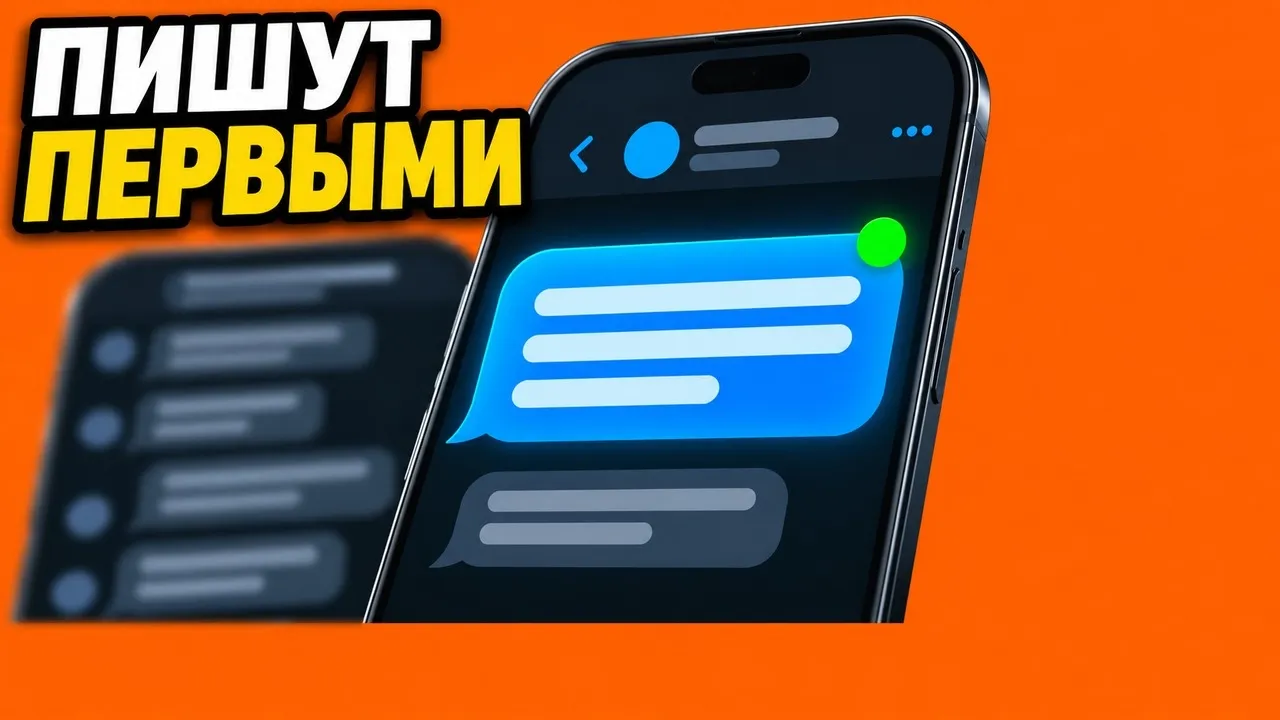
Like real members
Each account has its own persona. It reads the conversation, replies to specific messages and types at a human pace, and before sending it reads the latest messages so it does not reply out of place.
Neurochat
Neurochat in TeleTraff puts your accounts into Telegram topic groups as ordinary members: they reply to the point, keep conversations going and start topics. It suits crypto, betting, info products, services and city chats. Interested people write to DMs, where a Dialogs campaign meets them. The whole panel is from $29 per 30 days, with a free 3-day Trial.
Each account has its own persona. It reads the conversation, replies to specific messages and types at a human pace, and before sending it reads the latest messages so it does not reply out of place.
Up to 100 of your accounts per chat with different personas. One of them replies to a person's message, and they write to each other at most three messages in a row.
After the chat, a Dialogs campaign runs the DMs: stages, the person's dossier and a showcase with payment details that the panel sends.
Neurochat puts your accounts into topic groups: they follow the conversation, reply to the point and start topics of their own. It works best where people decide what to buy based on advice in chats.
Futures, signals and P2P chats. The account answers beginners' questions, and a file in «About the product» describing your channel or service gives the AI the facts for its replies.
Tipster and fan chats. «By triggers» mode replies to messages containing your keywords, such as «prediction» or a match name, and «Start discussions» brings up new topics at a set interval.
Marketing, media buying and remote work chats. «Join conversations» keeps the account in the discussion, and «Private dialogs» hands anyone who writes to DMs over to a Dialogs campaign with its stages and showcase.
Each account gets its own persona and way of talking in «Account instructions». «Conversation language» keeps replies in the right language, and «Working hours» rule out messages at three in the morning.
A walkthrough from the TeleTraff YouTube channel: a crypto chat with one account and a quiet betting chat where two accounts with different personas bring the talk back to life. Which chats to pick, modes and triggers, checking a reply without sending it, handing DMs to Dialogs and three common mistakes. The video is in Russian.
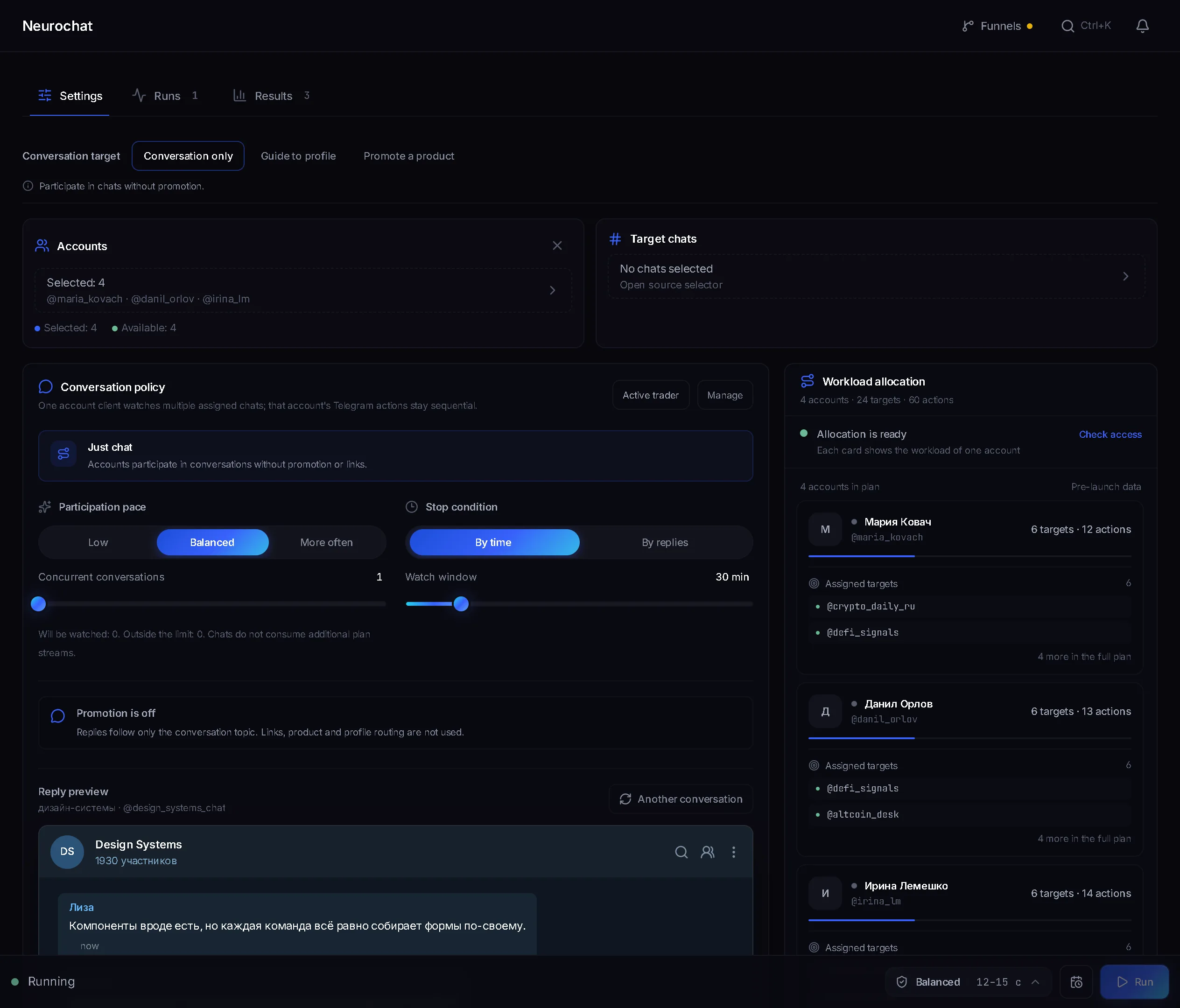
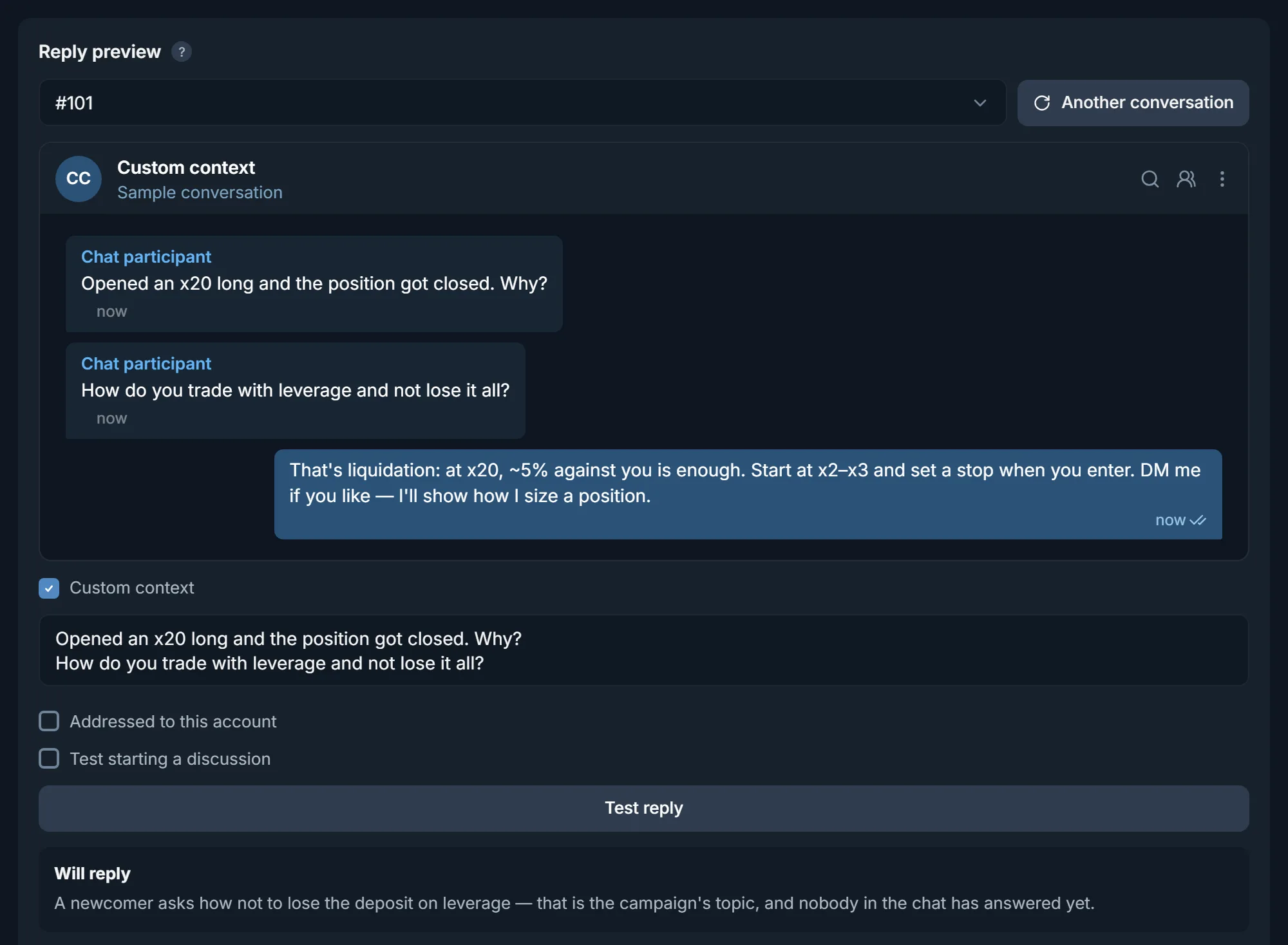
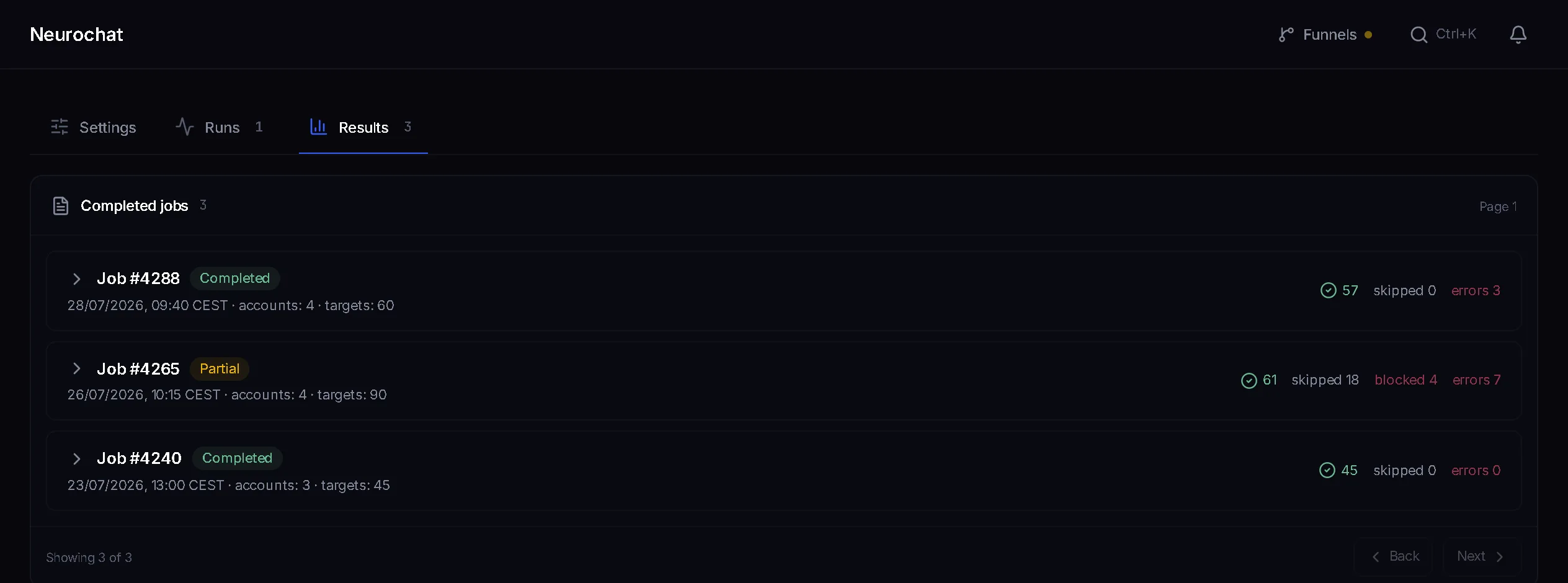
Campaign setup, a reply check before launch, and results by chat.
Both modules write from your accounts with AI-generated text, but they work in different places in Telegram and do different jobs.
| Feature | Neurochat | Neurocommenting |
|---|---|---|
| Where it works | In group chats the account belongs to | In the discussion under channel posts |
| What triggers a reply | Members' messages: a trigger, a fitting moment or a topic of its own | A new channel post |
| What the AI reads | The last 20 chat messages, up to 80 | The post text |
| Accounts per target | One per chat; 2 to 100 with the several-accounts option | By default one account and one comment per post |
| What the audience sees | Replies in the group's live conversation | A comment in the thread under the post |
Create a campaign: accounts, and groups as a list or from existing memberships.
Tick the modes, write the instructions and test a reply in the preview.
Set a duration of up to 72 hours and working hours, then launch.
If you don't have accounts or proxies yet, go in this order.
3 days free, no card. The Trial runs 3 accounts in Neurochat at once: enough for one chat with three personas, or a test across several groups.
Import your own, or on paid plans buy them in the panel marketplace. Attach a proxy on import or later in the proxy manager. What to buy and from whom is covered in the article where to get accounts and proxies.
An account with no history that joins groups and starts writing straight away gets restricted fast. Run it through auto warm-up first: warm-up has its own streams and doesn't eat into Neurochat's.
Add chats «From a list» or pick them from the accounts' «Existing memberships», then fill in «AI instructions» and «About the product». Paste a couple of lines into «Reply preview» to see whether the account will reply, skip or wait for more, and why.
Set «Working hours», the «Careful» pace and a 24-hour «Stop condition», then check the results by chat. The other fields are covered in the Neurochat guide.
Accounts, target chats, «AI instructions» and at least one participation mode are required. A campaign is saved first and launched after. The other fields work within these bounds.
| Setting | Allowed | Default |
|---|---|---|
| «Stop condition» | By time up to 72 hours, or by a number of messages for the whole run | By time |
| «Messages used to understand a conversation» | From 1 to 80 | 20 |
| «Working hours» | Start and end differ, plus a time zone | Off, 10:00 to 20:00 once turned on |
| «Accounts per chat» | 2 to 100, when several accounts in one chat are on | Off |
| «Reply to a person's message» | From 1 to the number of accounts per chat | 1 |
| «New topic interval, min» | Required with «Start discussions», counted for each chat | Empty |
| «Continue after completion, min» | Required with «Private conversations» | Empty |
| Reply pace | «Fast» 5 to 7 seconds, «Balanced» 12 to 15, «Careful» 25 to 33, «Auto» never faster than «Balanced» | Your choice |
| «Group join delay» | 210 to 390 seconds recommended, at most 30 joins per phase | Your choice |
Every action and its outcome is visible in the run results.
Detailed module guideA stream is one account working in chats right now. The plan unlocks the whole panel, not just Neurochat: you get the same number of streams in mailing, warm-up, inviting and every other module. Starter at $29 gives you 10 accounts in Neurochat and, at the same time, 10 in every other module. An account can read any number of chats and joins at most 30 new groups per run. Accounts over the limit are left out of the run, and the panel lists each one with the reason. All plans are on the pricing page.
| Plan | Price | Accounts in chats at once | New groups per run, max |
|---|---|---|---|
| Trial | $0, 3 days | 3 | 90 |
| Starter | $29 per 30 days | 10 | 300 |
| Pro | $59 per 30 days | 50 | 1,500 |
| Team | $99 per 30 days | 150 | 3,000 |
The plan unlocks the whole panel: Neurochat, Dialogs for DMs, mailing, warm-up and every other module, each with the same number of streams. Accounts and proxies are paid for separately. A month on N accounts breaks down like this.
Plan: $29, $59 or $99 per 30 days.
Accounts: about $0.75 each, paid once.
Proxies: about $1.3 each per 30 days, paid every period.
Replacement reserve: a few spare accounts. Admins kick some accounts out of groups, and Telegram restricts others.
AI: the panel's shared provider works without a key of your own. If you connect your own key, add the provider's charges.
Example, 10 accounts across two chats with five personas each: Starter $29 + 10 × $0.75 + 10 × $1.3 ≈ $50 for the first month, not counting a reserve. After that it's about $42 a month, since accounts are a one-off purchase. Marketplace prices are live: «Buy» first fetches the current price and only then asks «Confirm purchase?».
Indicative figures: average prices from our own purchases in the panel marketplace, August to October 2026. The exact price is shown when you buy.
The panel counts what it read, the AI's decisions and the replies it found in the chat separately. Only a confirmed reply counts as a send.
| Figure | What it means |
|---|---|
| «Read» | Chat messages the panel has read. These are not sends |
| «Reply decisions» | The AI decided to reply. A decision is not counted as a send either |
| «Confirmed» | Replies the panel found in the chat after sending |
| «Outcome unknown» | Telegram did not confirm the outcome. The message may have gone out, and it is not retried automatically |
| «Removed after sending» | A reply deleted right after sending is not counted as confirmed |
Mailing writes to people in DMs first. Neurochat works in groups: it replies to on-topic messages and keeps the conversation going, and people write to the account in DMs themselves.
An AI model, following your instructions and each account's persona. Before launch you test a reply in the preview: the panel shows whether the account will reply, skip or wait, and why.
By default one account runs one chat. Turn on the several-accounts option and the chat gets 2 to 100 of your accounts with different personas.
No, if you turn on working hours, for example from 10 to 20. Outside those hours the accounts do not write or start topics, like ordinary people.
If private conversations are on, the selected Dialogs campaign replies: with its own rules, product knowledge, stages and a showcase with payment details.
No, the panel's shared provider works, and your own key is optional. Without access to a model, Neurochat has nothing to reply with.
Plans run from $29 per 30 days on Starter to $99 on Team. That price unlocks the whole panel, not just Neurochat, and the plans differ in the number of streams in each module. Accounts and proxies are paid for separately. The Trial is free for 3 days, with 3 accounts working at once.
Work it out from the chats: one account per set of chats, or 2 to 100 per chat if you want personas talking to each other. An account can read any number of chats but joins at most 30 new groups per run. On top of that, keep a reserve to replace accounts kicked out of chats.
No. The plan price buys the whole panel, with the same number of streams in every module. On Starter that means 10 accounts in Neurochat and, at the same time, 10 in mailing, 10 in warm-up and 10 in any other module.
For each chat, the campaign results show how many messages were read, how many times the account decided to reply, and how many replies were confirmed or removed. The «Private contacts after interaction» counter shows who wrote to DMs after your reply. Check sales in your own bot or CRM for the same period.
Ready lists of channels and chats by topic: how many a section holds, how active they are and the top 20 by subscribers.
Works together with
The free Trial plan covers the whole workflow: connect accounts, configure a launch and see the results with your own eyes.
TeleTraff editorial teamUpdated: