AI in Telegram DMs: sales, sign-ups, leads and bringing an old base back
What a Dialogs campaign can do in DMs: sell access, take a person to a sign-up through your ref link, collect a lead, bring people into a channel, answer questions about the product and bring an old base back. Rules, showcase, stages and dossier for each goal, and where to get people into DMs.
- Any goal for a campaign: payment, sign-up, lead, subscription or bringing a base back
- Links and payment details only from the showcase, the model does not see them
- Stages and dossier fit the goal, and you take the hot ones
People write to DMs after a mailing, after talking in a chat, after a comment. Nobody can answer everyone by hand. A Dialogs campaign answers for you, and its goal can be anything: sell access, take a person to a sign-up through your ref link, collect a lead, bring people into a channel, answer questions about the product or bring an old base back. Below are scenarios for your niche and the setup for each.
Where people come to DMs from
- Mailing: the first message goes without a link, and a Dialogs campaign picks up those who replied in the “Hand over to Dialogs” mode.
- Chat broadcast: the “Private conversations” card, the “Dialogs reply” option.
- Neurochat: the account talks in the group, and in DMs a Dialogs campaign takes over.
- Regular incoming messages: an “Everyone who writes” campaign replies to anyone who wrote to the account.
What Dialogs can do: campaign goals
- Selling access: a signals VIP, a model's private channel, a course. The AI warms the person up, hands out payment details as a card, and access opens after “Paid”.
- A sign-up through your ref link: a revshare casino, an exchange. The card with the link opens on the right stage, no “Paid” needed.
- Collecting leads: services, media buying teams, traffic buying. The dossier collects the niche, volumes and contact, and you take the hot ones with “Take over”.
- Bringing people into a channel, a bot or a webinar: the AI talks on topic and hands out the card with the link at the right moment.
- Answers about the product: an “Everyone who writes” campaign answers customers from the files in “What the AI knows about the product”.
- Bringing an old base back: the account writes to people it has already talked to, and only to those you picked.
Four of these goals have ready templates in the rules: “Traffic to a channel”, “Selling access”, “Collecting enquiries” and “Reviving an old base”. A template pastes in the whole rules text, and you add two or three lines about your product.
Rules: the person first, the offer after
The most common mistake: the AI drops a link or a price in the first message and the conversation ends. Write in the rules that it has to get to know the person first.
- Who you are. A real person with details, not a “sales manager”.
- One goal per campaign: payment, sign-up, lead or channel subscription.
- What to find out before the offer: experience, budget, what they are looking for.
- When to send a card: payment details, a link, a file.
- When to call you: ready to buy, asks for special terms, gets into a fight.
- Bans stated plainly: do not promise income, do not make up discounts.
- Manner: short, like in DMs.
A full example of rules for selling access to a VIP channel with predictions is in the article about the Dialogs module.
Product knowledge
Everything the model has to know exactly goes as files into “What the AI knows about the product”: the price list, terms, what access includes, answers to common questions. Rules are about behavior, files are about facts. Then the model does not invent terms you do not have. Support runs on the same thing: a customer asks, the AI answers from the files.
Showcase: links and payment details kept away from the model
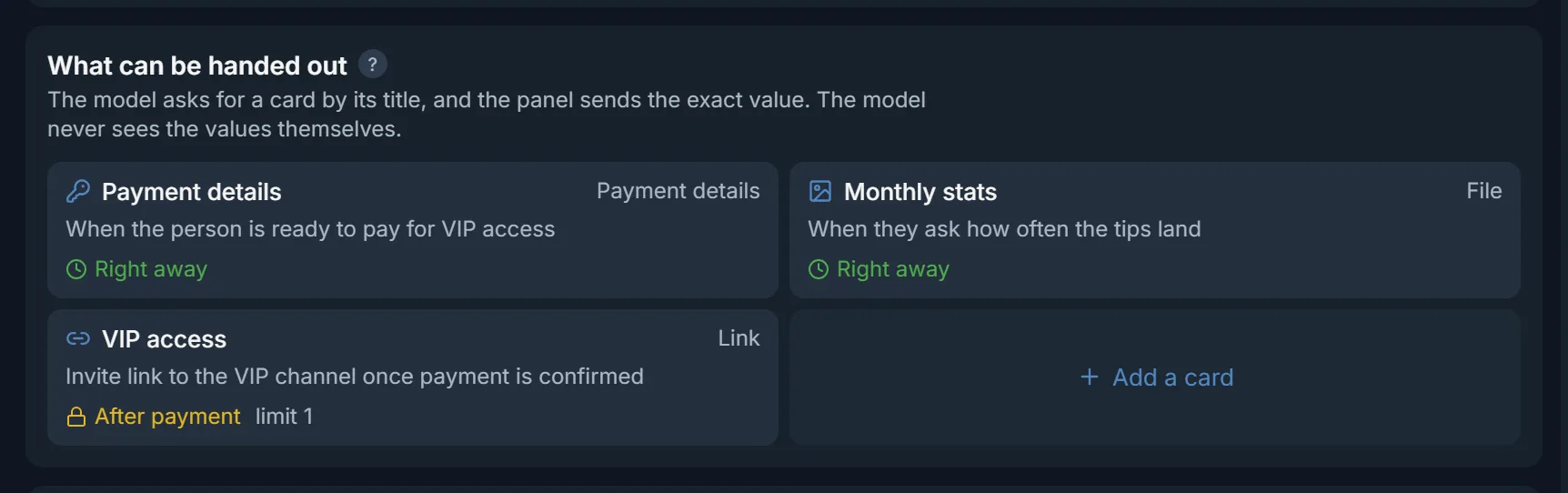
Do not write payment details or links into the rules. Create cards in the showcase: the model sees only the title and when to hand a card out, and the panel sends the value. The model has nothing to mix up the digits of a wallet or a ref link from.
- “Payment details”: a card number or a wallet. Open “Right away” or at the payment stage.
- “Link”: a ref link, a channel, a bot, a webinar. Opens on its own stage, for example on the “Sign-up” stage.
- “File”: screenshots of wins, signal stats, a price list, photos. A picture goes out as a photo.
- “Text”: a ready text, for example a promo code or a first-deposit guide.
- “After payment”: access to the private channel or the VIP. Set “How many times per person” to 1.
- “Operator only”: things only you hand out manually, for example a bonus for a big client.
Stages: a ladder for the goal
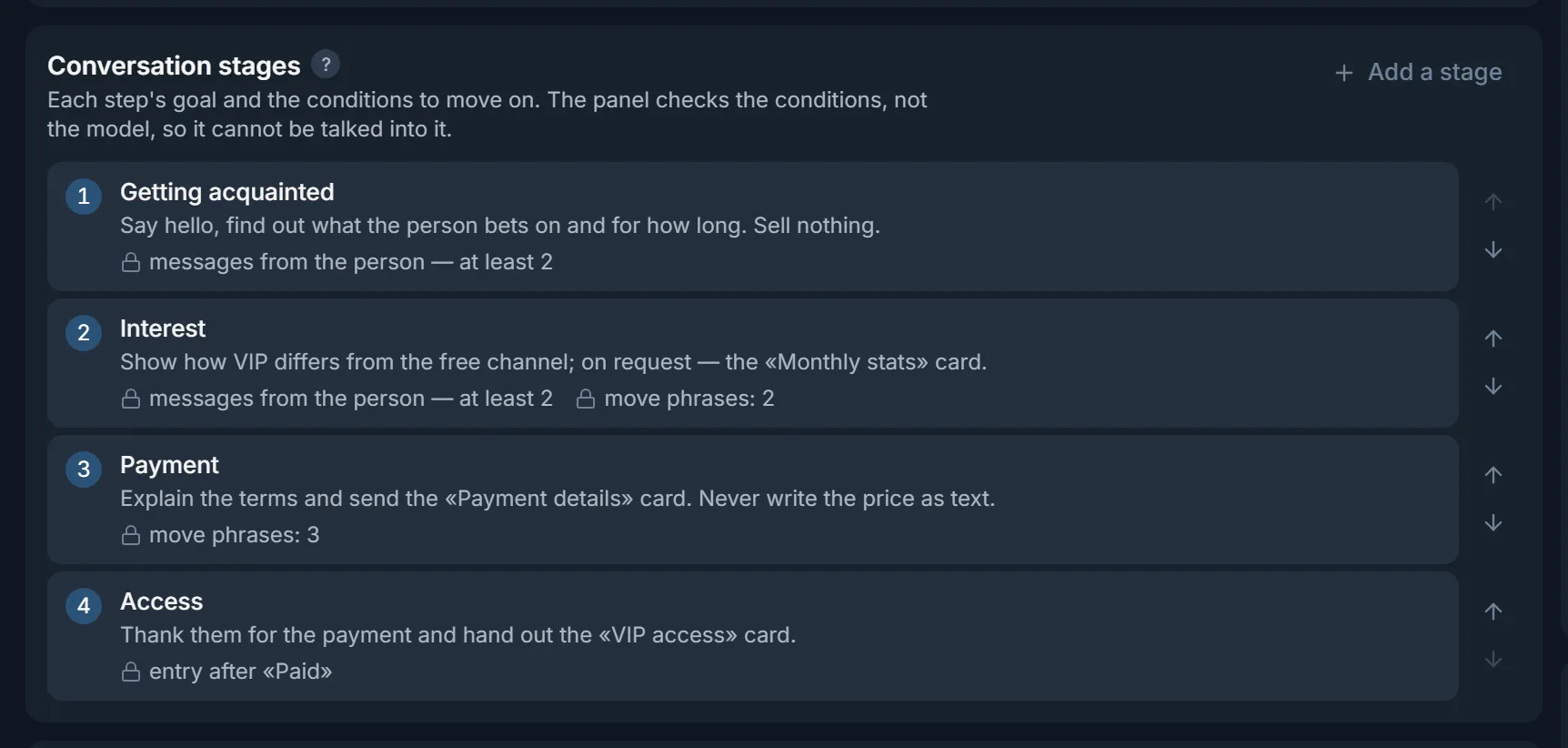
Stages set the path of the conversation. A stage has a goal for the model and locks the panel checks: how many messages from the person or hours to hold the stage, entry only after “Paid”, phrases that move the person here at once. The model cannot talk the panel into anything. The ladder depends on the goal:
- Selling a VIP or a private channel: “Introduction”, “Warm-up”, “Payment” with the “Payment details” card, “Access” only after “Paid”. The phrases “how do I pay” and “how much is it” move the person to the “Payment” stage right away.
- A sign-up through your ref link: “Introduction” (where they play, how much experience), “Interest” (wins, stats), “Sign-up” with the link card, “First deposit” with a promo code.
- A lead for a service: “Introduction”, “Task” (niche, volumes, timing), “Handover”: the AI calls you, and you take the conversation with “Take over”.
Dossier: the AI remembers the person
Dossier fields are what the AI has to find out and remember from what the person says. It rereads them before every reply, and a person who comes back a week later does not tell everything again. You set the fields for the goal:
- Selling access: name, experience, budget.
- Gambling: where they play, experience, deposit budget.
- Crypto: experience, deposit, exchange.
- Lead: niche, volumes, timing, how to get in touch.
A character for each account
If twenty accounts work one base, the same manner stands out. The panel writes each account its own image from the campaign's rules, and for roles that work well there is a persona library: describe a role once and put it into any campaign. The name and gender come from the Telegram profile, so for a campaign that talks as a girl the account's profile has to be a woman's.
Bringing an old base back
An “Everyone who writes” campaign can write to people the account has already talked to. In “Fine-tuning” turn on “Answer old unanswered messages” and “Return to finished conversations”. In the run's inbox the “History” button shows these people: tick the ones you want and press “Write to the selected”. The account writes only to them. There is a ready template for this in the rules: “Reviving an old base”.
Check before launch
- Run three typical people through “Reply dry run”: an interested one, a doubtful one and one who asks the price or the link right away.
- Check that on a price or link question the AI sends the card instead of writing it itself.
- See what went into the dossier.
- The “Ready to launch?” block should be fully green.
Working the inbox
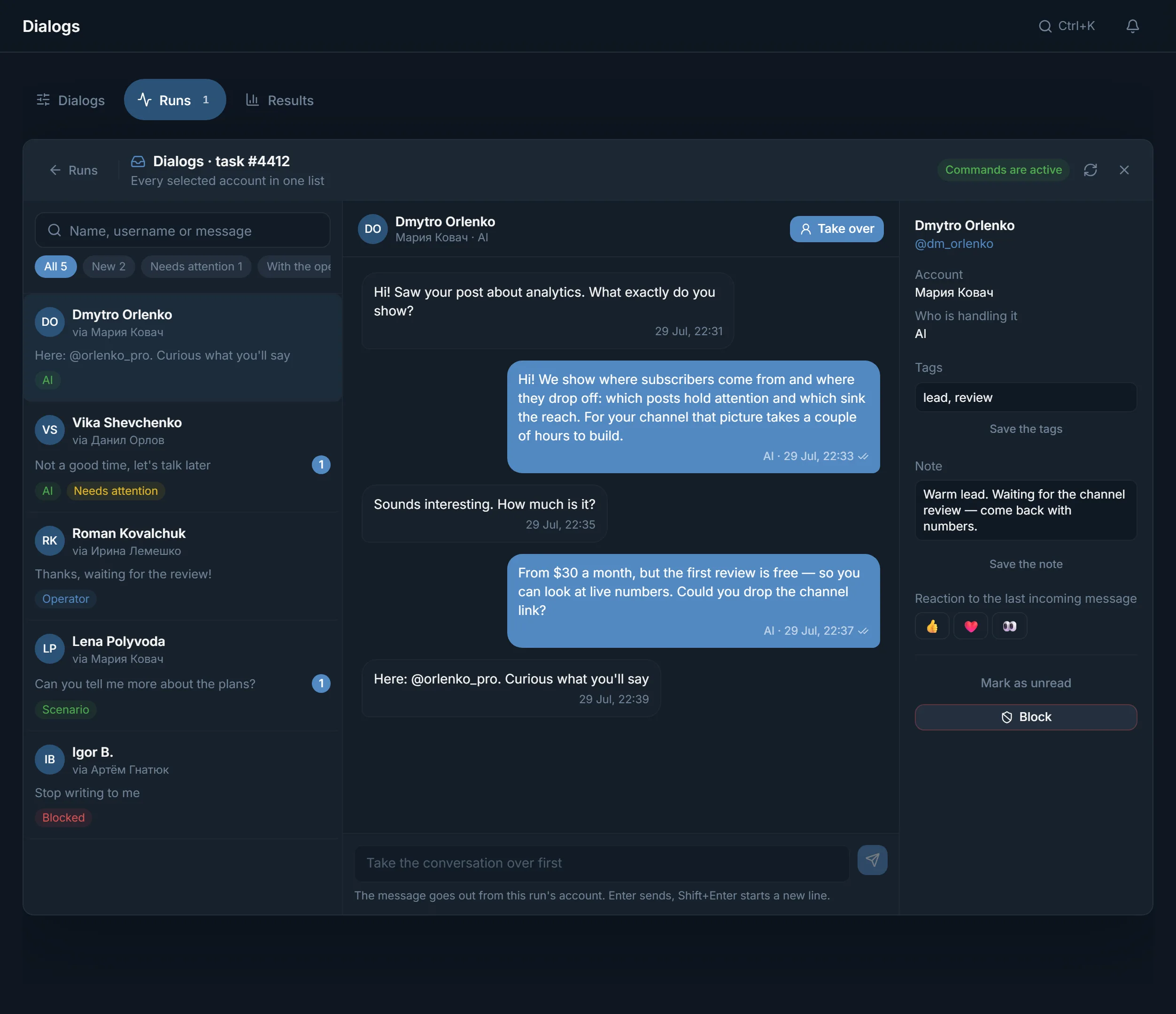
- Check “Needs attention” first: the AI stayed silent or called you as the rules say, did not find a safe reply or tried to write payment details bypassing the card.
- The person says they paid: check that the money arrived and press “Paid”. The “After payment” cards open and the AI hands out access.
- A hot lead, a big client or a tricky question: “Take over”, answer yourself, “Give back to AI”.
- The stage and the dossier are visible right in the conversation, and you can change the stage by hand.
Setup order
- 1
Create a campaign
Choose who we answer: all incoming messages or only people who replied to a mailing.
- 2
Pick the goal and the rules
A ready template for the goal or your own rules. Rules are about behavior, files are about facts.
- 3
Build the showcase
Payment details, links, files and texts for your goal.
- 4
Set the stages and the dossier
A ladder for the goal and the fields the AI has to find out.
- 5
Test with a reply dry run
Three typical people and a price or link question.
- 6
Connect a source
A Dialogs run, a mailing, a chat broadcast or Neurochat DMs.
Common mistakes
- A price or a link in the first message.
- Payment details and ref links in the rules text instead of a card.
- Several goals in one campaign: sell, sign up and collect a lead all at once.
- Rules two pages long: by the end the model is repeating itself.
- No knowledge files, so the model fills in the terms itself.
- An offer stage with no locks: the AI sells on the second message.
- An unattended inbox: “Needs attention” piles up while people wait.
FAQ
Can Dialogs only sell?
No. You set the goal: payment, a sign-up through your ref link, a lead, a channel subscription, answers about the product or bringing an old base back. Four of these goals have ready rules.
Can the AI make up payment details?
Not in a campaign with a showcase: the panel sends the card number or wallet from the card, and a reply where the model wrote payment details itself does not go out.
How does the AI know the person has paid?
It does not, that is your button. Check that the money arrived and press “Paid” in the inbox. After that the cards and stages waiting for payment open.
Can I run some conversations myself?
Yes. “Take over” moves the conversation to you and the AI goes quiet. Your reply goes out from the same account. “Give back to AI” hands the conversation back.
How many conversations does an account run at once?
As many as you set in “How many conversations to run at once”. The rest wait in line, and a place frees up when the person has been silent for half an hour.
Can one campaign serve both a mailing and Neurochat?
No, they need a different “Who we answer” mode. A mailing needs an “Only people the mailing wrote to” campaign, Neurochat DMs and chat broadcast need an “Everyone who writes” campaign. Make a copy with the “Duplicate” button and change the mode.
Ready to open the panel?
Review the scenario constraints before launch.
Read next

Dialogs: AI runs your DMs from the first reply to payment
Campaigns for replying in private messages: a character for each account, knowledge files, conversation stages, a dossier on the person and a showcase with payment details that the panel sends, not the AI.

Telegram mailing
A scenario builder for direct messages: up to five first-message variants, AI writing, an 'already contacted' memory, and a result for every recipient.
 Guide
GuideTelegram DM outreach: accounts, limits and the first message
How to run direct-message outreach people actually reply to: account prep, pace and ceilings straight off the panel, a first message with no link, and how to read the results.