Telegram DM outreach: accounts, limits and the first message
How to run direct-message outreach people actually reply to: account prep, pace and ceilings straight off the panel, a first message with no link, and how to read the results.
- The link belongs in step two, not the first message
- Ceilings are counted per account, not per run
- A skipped recipient and a failing account are different things
Direct-message outreach is not channel publishing. There is no 'send to everyone' button here: every message is written by a live account to a live person, and Telegram watches how it does that. The same list gives one operator replies and leaves another with restricted accounts by day two. The difference is almost always three things: who writes, at what pace, and what the first message says.
Who writes matters more than what you write
You pick the senders yourself: in the campaign you tick the accounts it will write from, one by one or a whole pool at once. An account under an active restriction on writing to strangers will not join the run, the panel leaves it out. Technically that is enough for the run to start. In practice a session imported half an hour ago looks to Telegram exactly like what it is: an account with no history that went straight to messaging strangers. The restriction lands on it, not on the account next to it that spent a month reading channels and chatting.
- A filled-in profile: name, photo, a couple of words about yourself. An empty profile gets closed before the first line is read.
- Its own proxy per account, and it does not change from run to run.
- Warmup before the first campaign. An account that has done nothing until now does not start life with cold messages to strangers.
- More accounts instead of a higher pace. Fifteen accounts at twenty messages last longer than three at a hundred.
- One account works in one module at a time. Mailing and the inviter on the same account at once end in a restriction fast.
Premium and regular accounts
Technically outreach runs from any account. A regular one sends exactly the same messages, and the panel does not ask for a subscription to do it. The one place Premium is mandatory is premium emoji in the text: only a Premium account can send those, and the run refuses to start, naming the accounts that lack the subscription.
In practice the difference between a regular account and a Premium one is noticeable. Telegram usually extends more trust to a Premium account: a spam block often comes off it much sooner than off a regular one, and outreach from such accounts tends to bring more replies. It is not an iron rule, a Premium account catches restrictions too and goes to the block just the same. But if you are choosing what to write a cold list from, Premium accounts usually pay for themselves.
On the recipient's side Premium matters more. Some people close direct messages entirely, some keep them open to Premium accounts only, some switch on a Stars charge for a message from a stranger. The panel classifies all three from Telegram's own answer and marks the recipient skipped, and it never pays for the paid ones. If you collect an audience from chats, the filters include 'Premium only': that is about how well the list can pay, not about deliverability.
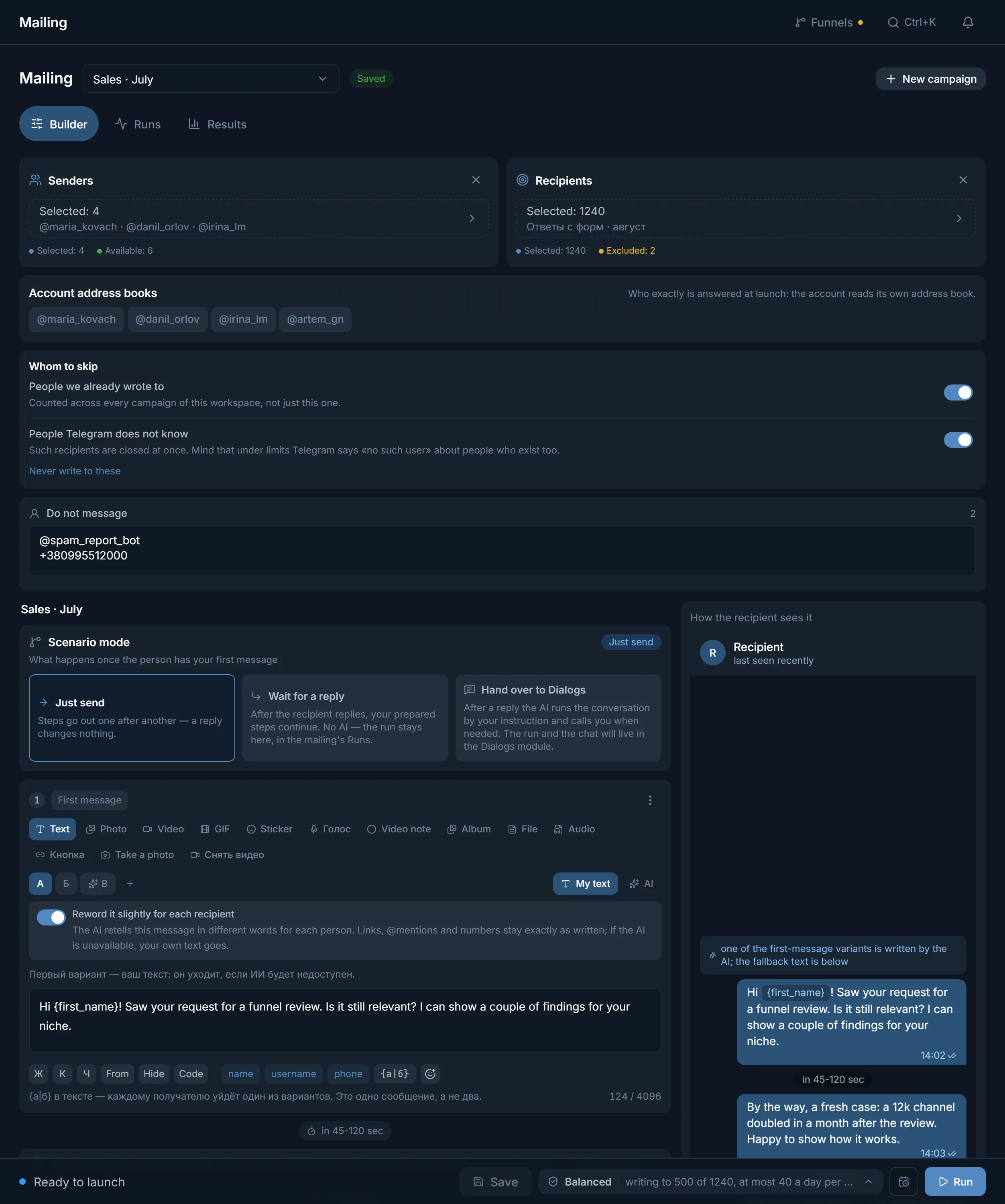
The first message: no link
The most common reason outreach brings no replies is the whole offer sitting in the first message. A stranger gets a paragraph of text with a link and a button, and has exactly two reactions: delete or report. Reports are the very signal Telegram restricts accounts on. So an aggressive first message hits twice: the replies and the accounts themselves.
The order that works is the opposite one. The first message is short, has no links or buttons, and is written so the recipient reads it as a message from a person rather than from a sender. Its job is not to sell but to get a reply. Everything else goes in step two, and only to those who answered.
- One or two lines. A long first touch reads as an ad from the first second.
- Make it clear where you came from: a form, a comment in a chat, a shared channel. The person needs something to place you by.
- End on a question that takes one word to answer.
- Use their name if the list has it: the panel fills in a name, a username or a phone as a variable.
- No links, no buttons and no files in the first message.
- No 'unique offer' and no 'free audit for a select few': people have long been immune to those.
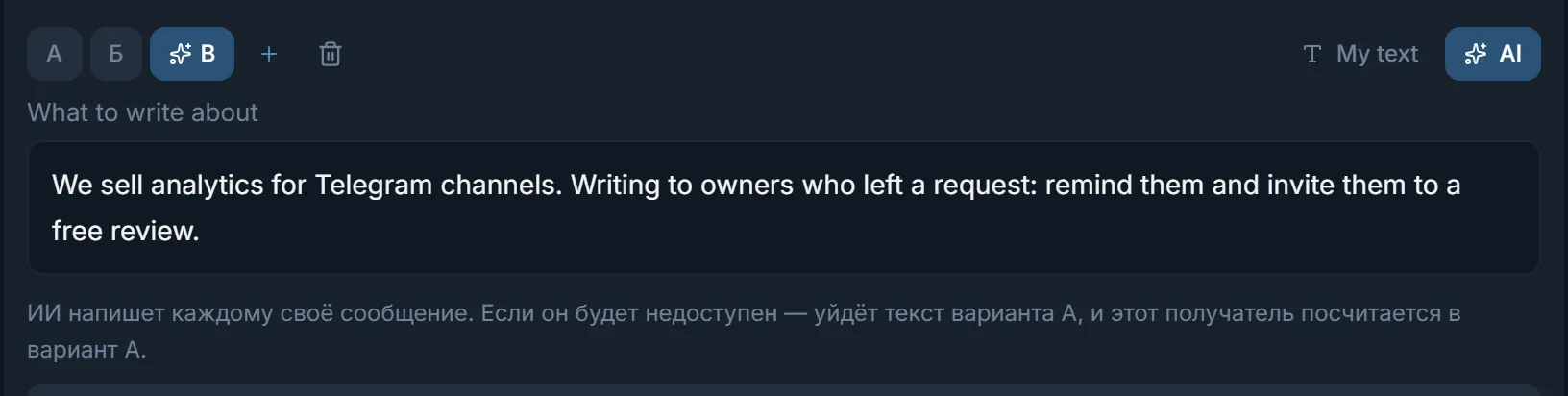
One text for the whole list is the other half of the same mistake. The panel varies it three ways, and they stack. Variants on tabs A, B, C, up to five: recipients are split evenly between them. Spintax {a|b} inside the text itself: each person gets one of the pieces, and it is one message, not two. The 'Reword it slightly for each recipient' toggle: the AI retells your text in different words for every recipient while leaving links, mentions and numbers as they are, and if the AI is unavailable your original text goes out. The separate 'AI' tab is no longer a retelling but a message the AI writes from scratch from your description of the task.
Where the link goes: the scenario mode
The 'Scenario mode' block answers one question: what happens after the person has received the first message.
- 'Just send': steps go out one after another and the recipient's reply changes nothing. Fine for your own list that is expecting you.
- 'Wait for a reply': the next steps go only to those who answered. The link lives in step two and reaches the interested ones.
- 'Hand over to Dialogs': after a reply the AI carries the conversation on your instruction and calls you when needed. The chat moves to the Dialogs module.
For a cold list the second or third mode is the sensible one: they exist for the 'reply first, offer second' scenario. In the same task settings there is an 'End the conversation once the link goes' toggle. Its meaning is written right under it: the offer has been delivered, and past that point the account is writing to a stranger for no reason, which is exactly what Telegram restricts accounts for.
Pace and ceilings
The panel counts ceilings for each account separately, and that is the point: Telegram looks at one account's behaviour. A run to a thousand people spread over twenty accounts looks nothing like the same run over two. Pace comes from the 'Protection' block, the same one every other module has: three presets, 'Fast', 'Balanced' and 'Careful', and your own pause between messages. A preset changes the pauses and leaves the hourly and daily ceilings alone: you set those yourself in 'Task settings'. With no pause of your own the preset holds the interval: the more careful, the longer the pauses. The ceilings sit on the page in 'Task settings':
- 'Per run': the shared ceiling across all accounts. Whoever does not fit is marked 'run limit' and is freed up for the next run.
- 'Per account': the account stops once it has worked through that many recipients.
- 'Switch account every': one means the accounts go round in a circle, one recipient each.
- 'An hour per account' and 'A day per account': after that the account rests until the end of the hour or continues tomorrow. The count is per account and survives a panel restart.
Protection in mailing works like in every other module. 'Typing simulation' is always on: the recipient sees 'typing…' for as long as a person would take to type that text. It cannot be switched off, on purpose. In 'Just send' mode the profile peek before the first message is always on too: the account opens the recipient's profile and pauses as if reading. That is one extra request per person, and the account's behaviour stops looking mechanical. The reply modes have no such step. The third part of protection is the 'Night pause': the hours in which accounts do not write to new people. The window is counted on the account's own clock. The panel works its timezone out from the phone country, the account language or the proxy country, as long as that country is one whose timezone it knows. Otherwise the window is read on your browser's timezone, which the panel remembered when you turned the pause on. Conversations already started continue at night too.
When Telegram restricts an account
A restriction comes for recipient reports and for behaviour a live person does not have. The panel does not hide that state. In the 'Protection' block, under 'Flood limits', you decide in advance how it behaves: 'Delay on a flood limit (min)' is the wait on top of what Telegram itself asked for, and 'Flood limits before quarantine' says at which limit the account leaves the run. One takes the account off at the first limit, since there is nothing to wait for. With more than one, the panel waits and carries on first. The account goes to quarantine when that many limits have piled up, or when the wait plus your delay comes to more than six hours. PeerFlood, Telegram's refusal to let the account write to strangers, stops the account in this run at once, whatever the number.
There is a separate 'Ask @SpamBot about the limit' toggle. When an account is stopped, the panel writes to @SpamBot on its behalf. An answer of 'no restrictions' means the account simply rests and returns to its recipients. If there is a restriction, the panel records it together with the deadline Telegram named, instead of inventing one of its own.
There is also 'Failures in a row': an empty field means ten by default, and this safeguard cannot be turned off entirely. Only consecutive errors count, and any successful send resets the tally. Recipient refusals do not go in there, because they are not errors.
A restricted account is not thrown away. It cannot write to strangers for a while, but it stays perfectly usable for parsing, story views, reactions, comments and warmup. That is where it works until the deadline passes and it comes back to outreach.
Who does not get a second message
- 'People we already wrote to': counted across every campaign in the workspace, not just the current one. A second message from another of your accounts lands worse than the first.
- 'People Telegram does not know': those recipients are closed immediately. The nuance is written on the screen: under limits Telegram answers 'no such user' about existing people too.
- 'Never write to these': your own exclusion list, and it applies over every campaign.
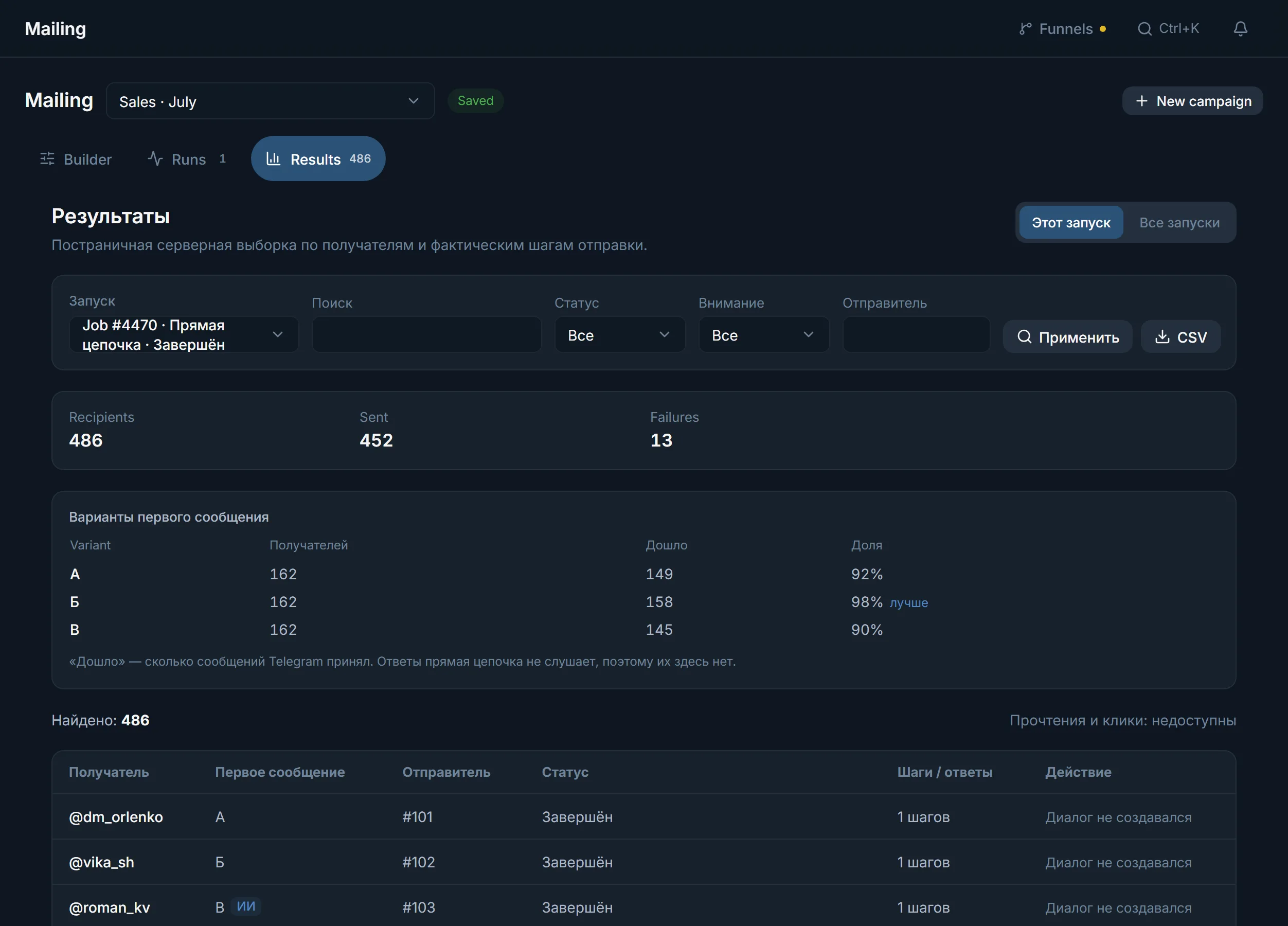
How to read the results
A skip and an error are different things, and the panel does not merge them. 'Skipped' comes with the reason in plain words: closed their private messages, charges for messages from strangers, does not accept messages from strangers, no such @username exists in Telegram. None of these says the account is broken, and retrying them is pointless: tomorrow Telegram answers the same.
The 'First-message variants' table shows how many messages Telegram accepted for each variant and marks the best one. Telegram gives read counts and clicks to nobody, so the panel does not show them. The 'Replied' tile appears only where the campaign listened for replies at all: a direct chain has no such tile, because a zero there would read as 'nobody answered' when the truth is 'nobody was listening'.
Launch order
- 1
Prepare the accounts
Proxy, a filled-in profile, warmup. Run them through the checker: an account under a restriction will not join the campaign, and it is better to learn that beforehand.
- 2
Collect the list
Parse competitors' chats, commenters, your own export. Work by usernames: it is the most reliable way to address people.
- 3
Write the first message
Short, no link, a question at the end. Make two or three variants and switch on 'Reword it slightly for each recipient'.
- 4
Set up protection and the task
On the first run use the 'Careful' preset, the night pause, and 'End the conversation once the link goes' on in the task settings. You can speed up later, on evidence.
- 5
Run a small test
Fifty recipients, then open the results. If reports and restrictions started on the first fifty, a thousand will do the same, only more expensively.
Common mistakes
- A link in the first message. The fastest way to collect reports and lose accounts.
- Fresh accounts straight into battle. Warmup costs less than a new batch of accounts to replace burnt ones.
- One text for the whole list. Identical messages are visible to recipients and to anti-spam alike.
- The whole list on two accounts. A big list needs more senders, not a higher pace.
- The 'Fast' preset on a cold list. That preset is for your own contacts who are expecting you.
- Leaving the 'already messaged' skip off. A repeat message from your own team annoys more than the first one.
- Reading skips as errors. Half the 'failures' are people with closed direct messages, and the account has nothing to do with it.
- Chatting on after the link has gone out. The offer is delivered, and further messages to a stranger only collect reports.
FAQ
How many messages a day can one account send?
There is no universal number: account age, list quality and the text matter more than the figure itself. You set the hourly and daily ceilings yourself in 'Task settings'; a pace preset does not fill them in. On new accounts take 'Careful' and small ceilings, and raise them on the results of the first runs.
Do I need Premium for outreach?
The panel does not require it: a regular account delivers the same messages and the run starts with it. Premium is mandatory only for premium emoji in the text. That said, Telegram usually extends more trust to Premium accounts: a spam block often comes off them faster, and a cold list answers them more readily. It is not an iron rule, but it is worth weighing when you buy accounts.
Why does a result say 'Skipped' rather than 'Error'?
Because the account worked fine and the recipient refused: closed direct messages, messages from known contacts only, or a Stars charge for a message from a stranger. That is not a fault and not a reason to retry the target, since Telegram answers the same tomorrow.
Can I put the link in the first message?
Technically yes, the panel does not forbid it. In practice it is the main source of reports, and reports are what accounts get restricted for. It is safer to move the link into step two and switch on the 'Wait for a reply' mode.
What do I do when an account catches a restriction?
Nothing urgent. In advance set 'Flood limits' in the 'Protection' block: how long to wait and after how many limits to take the account off. Switch on 'Ask @SpamBot about the limit' and let the account rest. While the deadline runs it works fine in parsing, reactions, comments and warmup.
Does the 'already messaged' skip work across campaigns?
Yes, across the whole workspace. Someone written to from one campaign will not get a message from another while the toggle is on.
Ready to open the panel?
Review the scenario constraints before launch.
Read next

Telegram mailing
A scenario builder for direct messages: up to five first-message variants, AI writing, an 'already contacted' memory, and a result for every recipient.

Dialogs: AI runs your DMs from the first reply to payment
Campaigns for replying in private messages: a character for each account, knowledge files, conversation stages, a dossier on the person and a showcase with payment details that the panel sends, not the AI.
 Guide
GuideWarming up Telegram accounts: from the purchase to the first real run
Which accounts to buy and which to skip, why an account should rest for a day, and how to pick a warmup programme in TeleTraff.