Telegram mailing
A scenario builder for direct messages: up to five first-message variants, AI writing, an 'already contacted' memory, and a result for every recipient.
- Step-by-step scenario with up to 5 first-message variants
- 'Already contacted' memory and a blacklist
- Task settings on the page, protection like in other modules
Mailing writes direct messages to people on behalf of your accounts. A campaign keeps everything in one place: who writes, to whom, which steps go out and within which boundaries. Before launch the panel checks the list and shows the plan; afterwards it breaks the result down per person: delivered, replied, or why not.
Launch flow
- Select sender accounts and build the recipient list.
- Assemble the scenario: steps, first-message variants, task settings and protection.
- Start the job and review replies in the results or right in Dialogs.
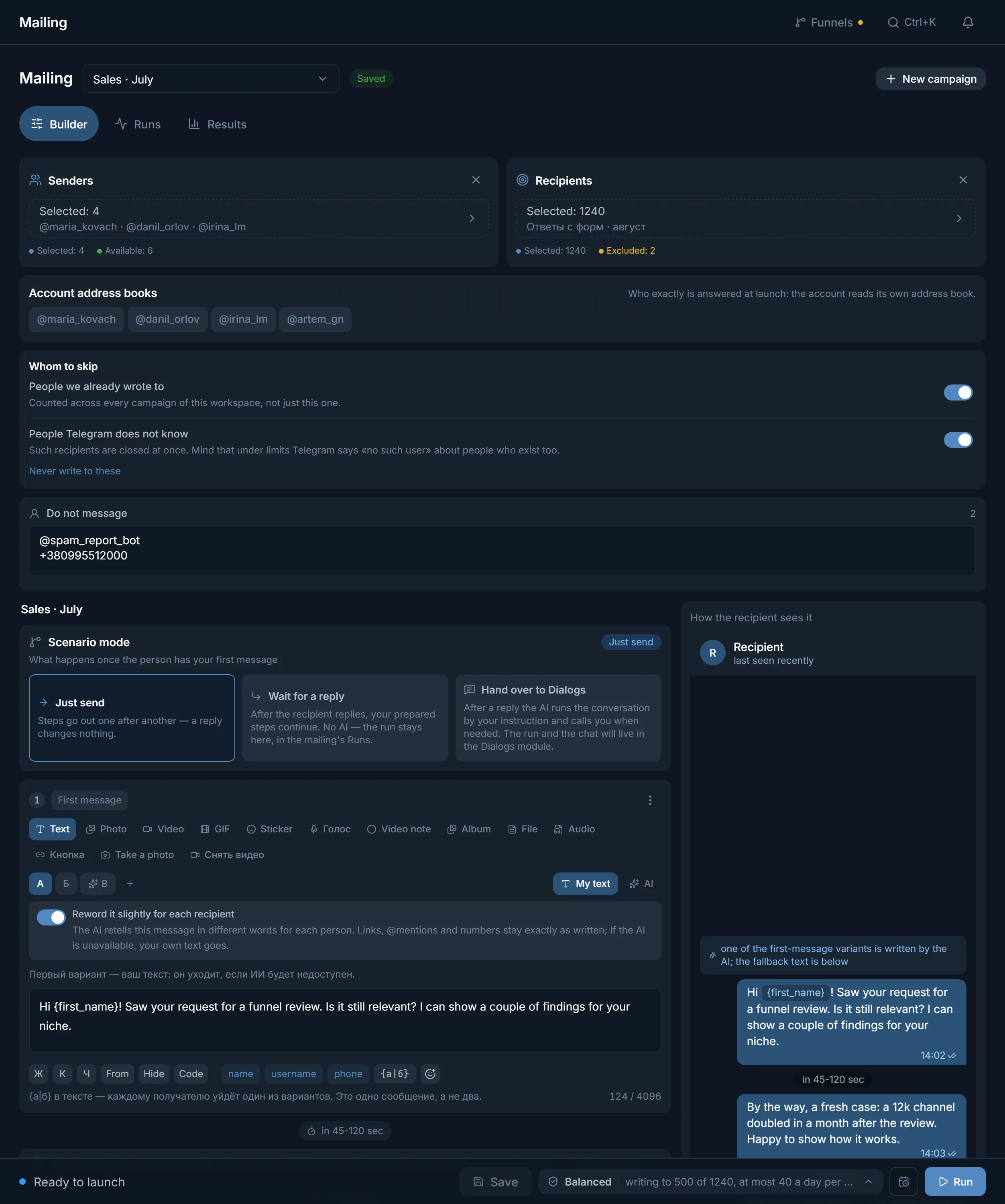
Who to write to
Build the recipient list however you like: paste @usernames by hand, drop a chat link, upload a file, or pick a ready dataset from the parser. If the list contains a chat link, the panel offers to collect its members right at launch, with filters: no bots or deleted accounts, photo only, @username only, Premium only, recently active only. The fifth source is the senders' own address books: each account reads its contacts at start.
Who to skip
- 'Already contacted': shared memory across all campaigns of the workspace: a person you have already messaged will not get the same opener twice.
- 'Never write to': a blacklist that fills itself (blocked the account, closed their DMs, filed a report), plus anything you add by hand.
- 'Not on Telegram': usernames that do not exist are dropped before launch and never burn account limits.
What the recipient gets
A scenario step is more than text: photo, video, GIF, sticker, file, audio, an album of several photos, a voice note or a round video. The last two are recorded right in the browser so each one sounds alive. Text is formatted the way Telegram does it (bold, italic, spoiler, monospace), and variables insert the recipient's name, @username or phone. Spintax {a|b} gives each person one of the word variants so messages are not carbon copies. You can also attach a link button: how that works is covered in the questions below.
First-message variants
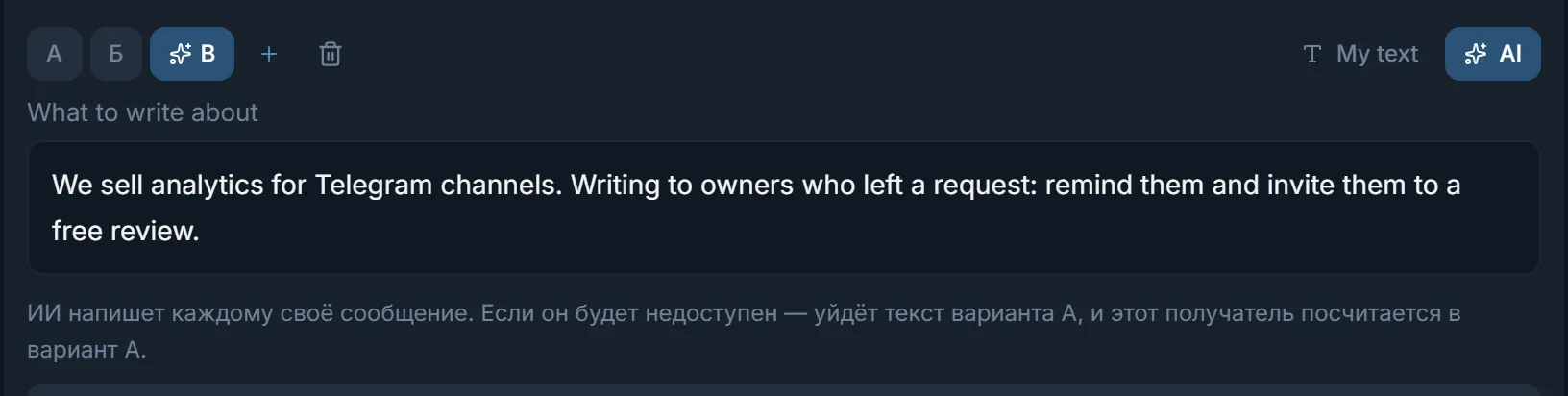
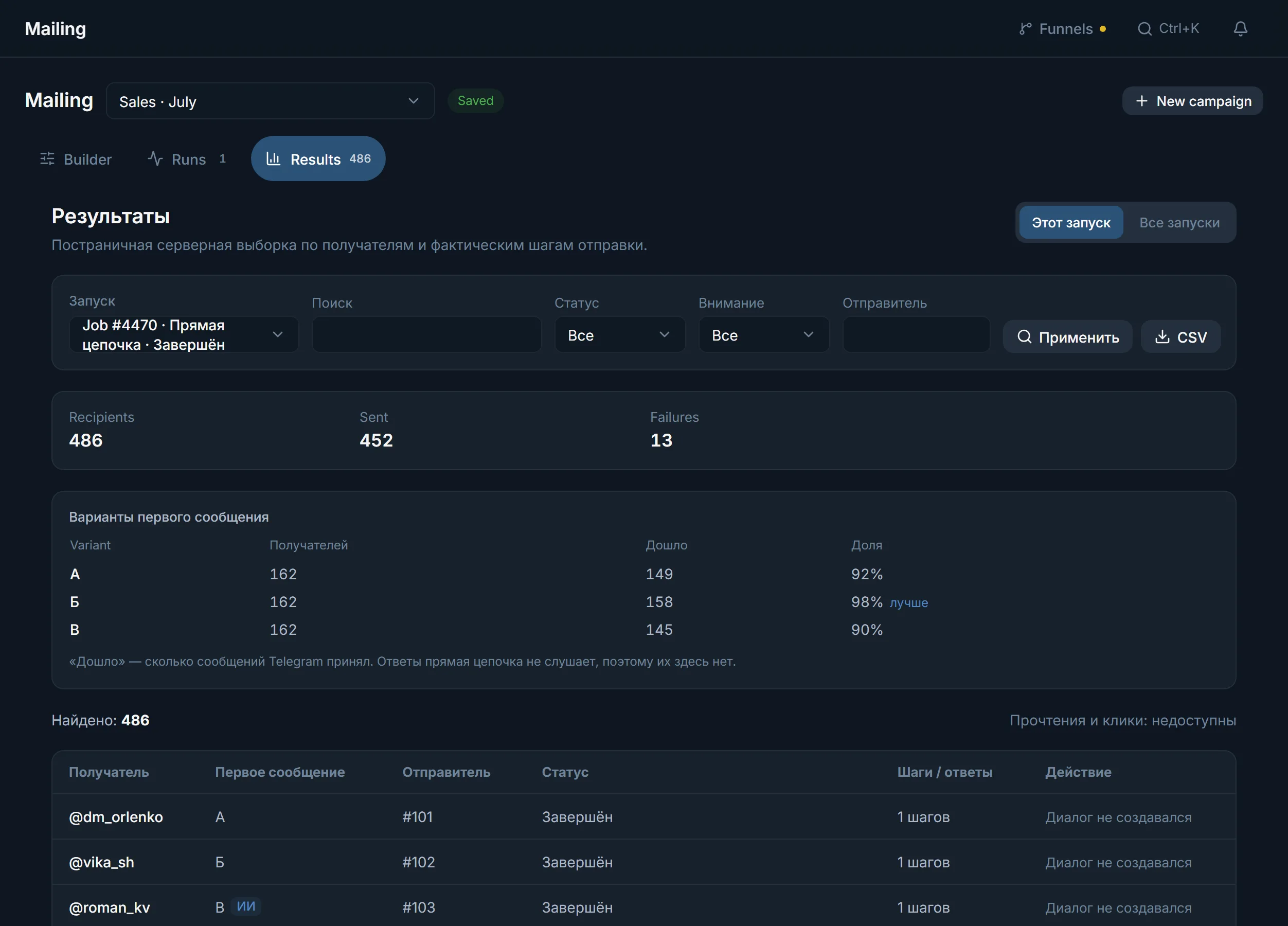
The first message matters most, so it can have up to five variants: A, B, C and further. Each recipient gets exactly one, and the results show a per-variant table with a 'better' mark: you learn which text works on numbers, not gut feeling. A variant can be written by AI: you describe what the message is about, and the model writes a unique one for every recipient. If AI is unavailable, your fallback text goes out instead. The 'slightly rephrase for each' switch retells your own text in different words without touching links, @mentions or numbers.
Three scenario modes
- 'Just write': steps go out one after another; a reply changes nothing. For announcements and short touches.
- 'Wait for a reply': after the recipient answers, your prepared steps continue. A conversation on rails, no AI.
- 'Hand over to Dialogs': after a reply, AI runs the conversation by your instruction and calls you when a decision is needed. The chat lives in the Dialogs module.
Task settings and protection
Launch settings are split in two. 'Task settings' sit on the page as a card and read as a phrase like 'writing to 500 of 1,240, at most 40 a day per account'. Inside are three groups. 'How many people': a ceiling per run, per account, and how many recipients an account takes before the turn passes on. 'An hour and a day': caps per account, and the counters survive even a panel restart. 'When to stop': a deadline, errors in a row, 'End the conversation once the link goes' and the @SpamBot check. The second part, 'Protection', is the same block every other module shows: a pace preset ('Fast', 'Balanced', 'Careful'), your own pause between messages, flood limits and a 'Night pause'. A preset sets the pace and the pause. The hourly and daily caps stay as you set them in the task settings. Typing imitation (the recipient sees 'typing…' for as long as a human would need) is always on and has no switch. In 'Just write' mode the profile peek before the first message is always on too; the reply modes have no such step. 'Flood limits' say how long to wait after a Telegram restriction and after how many limits the account goes to quarantine: one takes it off the run at the first limit. The night pause is counted on the account's own clock when the panel knows its timezone (from the phone country, the account language or the proxy country), and on your browser's timezone when it does not: at night the account writes to nobody new, and conversations already started continue.
The check before launch
The preview shows the conversation through the recipient's eyes: message bubbles, pauses, replies, the forward header: before launch you see exactly what the person will see. The check recounts the list: duplicates are written once, broken lines are dropped with an explanation, and the panel shows how many recipients survive all filters. Launch right away or on schedule, at a chosen date and time.
Results
Every recipient gets a status and a reason in plain words: delivered, replied, closed their DMs, charges for messages from strangers. The panel does not show reads and clicks: Telegram does not share that data, and those fields read 'unavailable'. Any slice exports to CSV, and the 'All runs' tab keeps the history: who was contacted, from which account, how many messages and whether they replied.
FAQ
How is spintax different from variants?
Spintax {a|b} swaps words inside a single message: light uniqueness, no statistics. Variants are up to five different first messages, and the panel counts delivery for each one separately so you can see which text performs better.
What happens if AI cannot write its variant?
The recipient gets the fallback text you wrote as variant A. In the statistics that send is counted as variant A, not as AI, so the comparison stays clean.
How does the 'already contacted' memory work?
The panel keeps a shared journal: who was messaged, from which account and when, across all campaigns of the workspace. Turn the switch on and everyone you have already introduced yourself to is dropped before launch. The memory can be narrowed to the current campaign.
Why does a message with a button arrive as 'forwarded from a channel'?
A regular account cannot attach a button to a message: only bots can do that in Telegram. So the platform bot publishes a post with the button in your public channel, and the account forwards it to the recipient, who sees the 'Forwarded from…' header and a working button.
Can I avoid messaging people at night?
Yes, turn on the 'Night pause' in the 'Protection' block and set the window, say 23:00 to 08:00. The window is counted on the account's own clock. The panel works the timezone out from the phone country, the account language or the proxy country, as long as that country is one whose timezone it knows. If it cannot be worked out, the window is read on your browser's timezone, which the panel remembered when you turned the pause on. In that time the account does not start new conversations. Ongoing ones continue: cutting a person off mid-sentence is worse than replying at night.
What about the people the run did not reach before the deadline?
They get an 'expired' mark and no messages are sent to them. The list stays in the results, so you can pick these people up in the next run.
Ready to open the panel?
Review the scenario constraints before launch.
Read next
Dialogs: AI runs your DMs from the first reply to payment
Campaigns for replying in private messages: a character for each account, knowledge files, conversation stages, a dossier on the person and a showcase with payment details that the panel sends, not the AI.

Telegram parsers
Build datasets from Telegram: chat and channel members, channels and chats found by keyword, contacts from messages. A ready dataset goes straight to other modules.

Inviter: invites into a chat, a channel or your own channel network
Direct invites or invites via admin promotion, rights from your bot or main account only while the run works, a chat passport, dataset memory between runs and a channel network for large datasets.
 Guide
GuideTelegram DM outreach: accounts, limits and the first message
How to run direct-message outreach people actually reply to: account prep, pace and ceilings straight off the panel, a first message with no link, and how to read the results.