Dialogs: AI runs your DMs from the first reply to payment
Campaigns for replying in private messages: a character for each account, knowledge files, conversation stages, a dossier on the person and a showcase with payment details that the panel sends, not the AI.
- One campaign for Dialogs, Mailing, Chat broadcast and Neurochat DMs
- Stages, dossier and showcase: the panel sends the payment details
- An inbox for all accounts with “Take over” and “Paid” buttons
Dialogs reply to people who write to your accounts in DMs. The accounts do not write first, they only reply. Everything for the conversation lives in a campaign: who to answer, who speaks, the rules, product knowledge, stages, the person's dossier and a showcase with payment details and links. Mailing, Chat broadcast and Neurochat DMs pick up the same campaign. When a human is needed, you take the conversation over with one button.
How to launch
- Create a campaign: choose who we answer, and the accounts in the “Who speaks” block.
- Write the rules, add knowledge files, showcase cards, stages and dossier fields. Check a reply in “Reply dry run”.
- Save the campaign and launch it. Conversations open with the “Dialogs” button on the “Runs” tab.
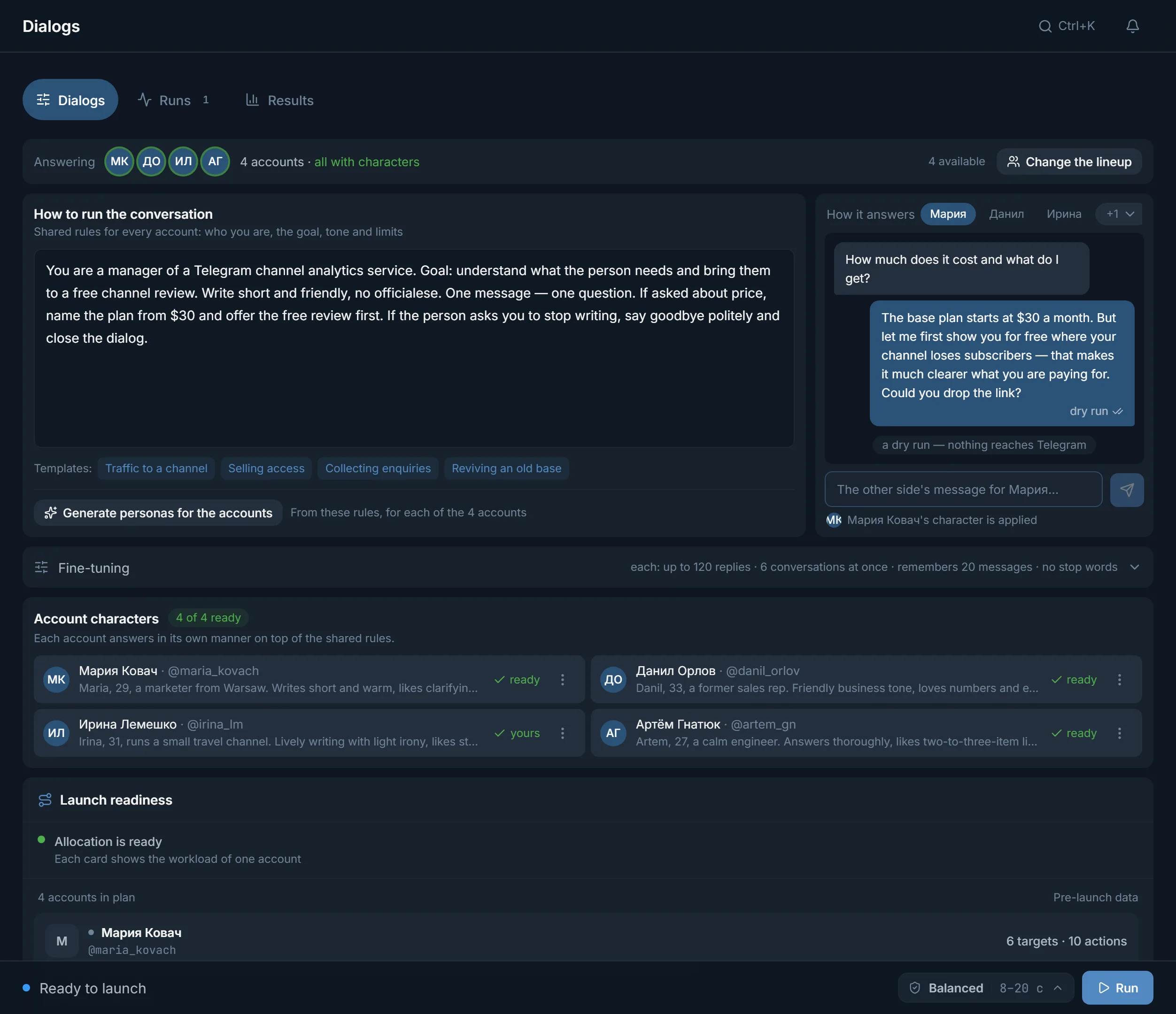
Campaign
- A campaign holds everything at once and goes to work only after “Save”. There is no autosave, so a draft will not launch by accident.
- An edit does not change a run that is already going. To make it take effect, restart the run.
- A campaign can be duplicated, archived or made the “Main” one. The main campaign gives Mailing, Chat broadcast and Neurochat its stop words, memory and conversation limit until they have a campaign of their own selected.
- One account works in one campaign at a time. Archiving frees it for others.
- The “Where it is used” block shows which mailings and runs are replying by this campaign right now.
Who we answer
- “Everyone who writes”: the campaign is launched from the Dialogs page, and its own accounts reply. This is also the campaign Chat broadcast and Neurochat DMs select.
- “Only people the mailing wrote to”: the campaign is selected by a mailing, the mailing's senders reply, and the mailing itself sets how long it works.
- Groups, bots, Telegram service messages and “Saved Messages” never get a reply.
Who speaks
Twenty accounts with the same manner give the automation away at once. That is why every account has its own character. There are two options:
- “Own image”: the panel writes a character for the account from the campaign rules, a separate one for each. You can open any of them and edit it by hand.
- Persona: a role you describe once in the “Personas” window and put into any campaign. The name comes from the account's Telegram profile.
Launch opens up only when every account has its character ready. The “N of M ready” counter shows how many are left, and “Create the missing” finishes the rest.
Rules and product knowledge
- “How to run the conversation”: shared rules for all accounts. Who you are, the goal, the tone and the limits. You can start from the ready “Traffic to a channel”, “Selling access”, “Collecting enquiries” and “Reviving an old base”, or take a text “From prompt manager”.
- “What the AI knows about the product”: up to five TXT, MD or DOCX files. Price list, terms, answers to common questions. The model reads them together with the rules. Without files it knows only what the rules say about the product.
Example: selling access to a VIP channel with predictions
The full rules. Copy them and rewrite them for your project:
- You are the author of a football predictions channel and have been running it for the third year. You write yourself, no managers and no bots.
- Goal: get the person to pay for access to the VIP channel.
- First find out what they bet on and how big their bankroll is. Do not sell anything in the first two messages.
- Do not write the price or payment details yourself. When the person is ready to pay, send the “Payment details” card.
- When payment is confirmed, send the “VIP access” card and congratulate them on getting in.
- Do not promise a hit rate or winnings. If they ask about guarantees, answer that this is betting and everyone has losing streaks.
- Write short, like in DMs: one or two sentences.
- If the person says they are under 18, politely end the conversation.
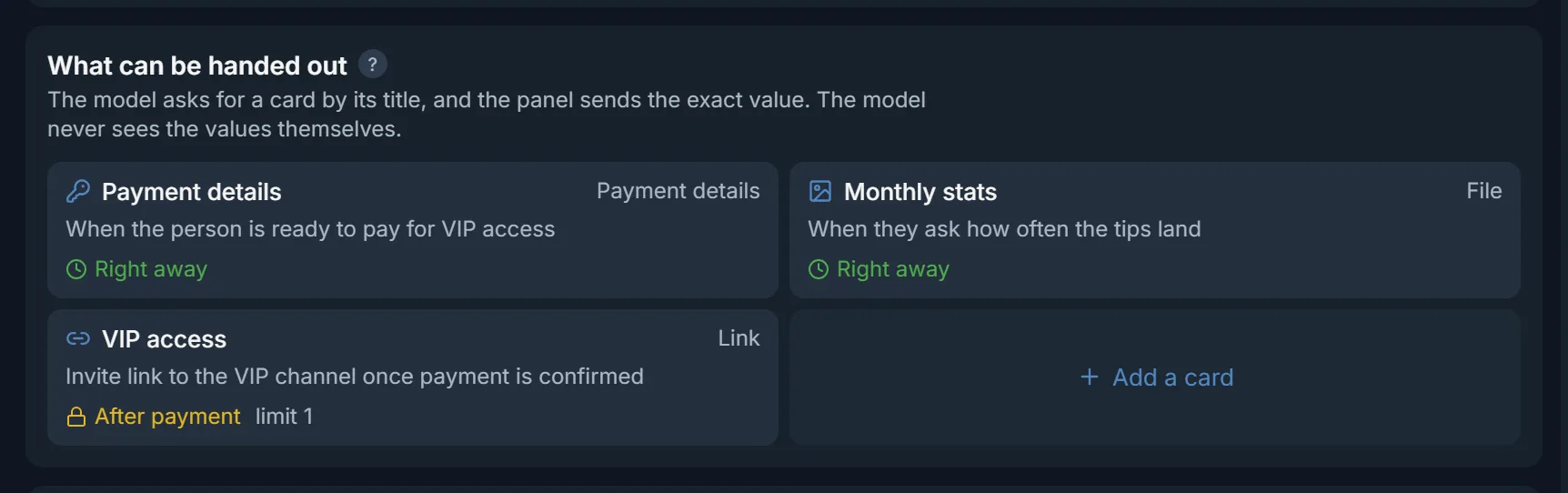
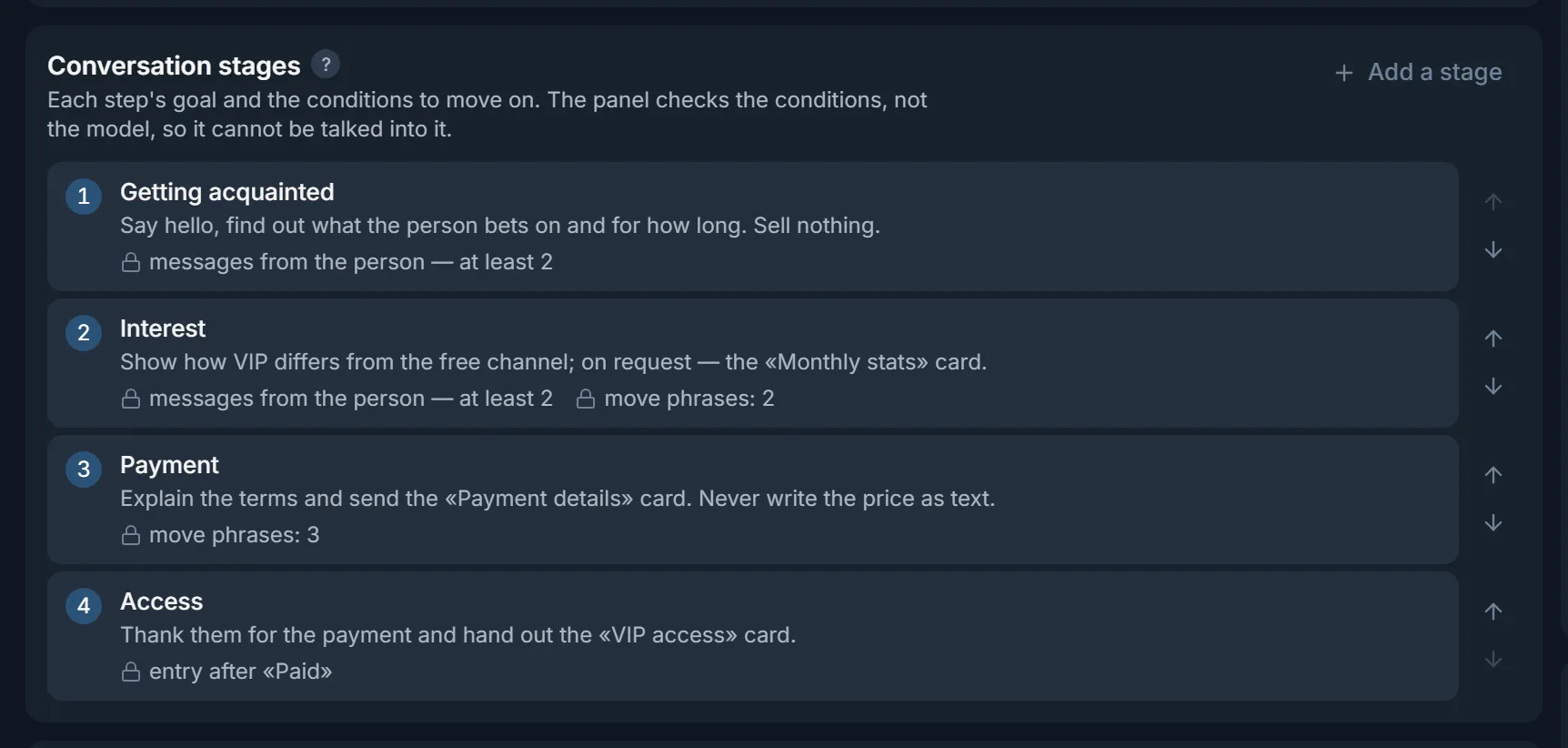
These rules come with three showcase cards: “Payment details” (open right away), “Monthly stats” (a file) and “VIP access” (a link, opens after “Paid”). Stages: “Intro”, “Interest”, “Payment”, “Access”. In the dossier: “Bets on” and “Bankroll”.
Showcase: what can be handed out
In the “What can be handed out” block you set up cards: payment details, links, texts and files. The model sees only the card's name and when to hand it out. It never sees the value itself: it asks for the card, and the panel sends it. A card number or wallet cannot get mixed up or made up.
- “When it is open”: “Right away”, “After payment”, “Operator only” or at a specific stage.
- “How many times per person”: so a link or bonus is not handed out twice. The count covers the whole campaign and survives a restart.
- If the model still writes payment details itself, that reply is not sent, and the conversation gets the “Needs attention” mark.
- Images go out as photos, other files as documents.
Conversation stages
Up to ten stages, for example “Intro”, “Interest”, “Payment”, “Access”. A stage has a goal for the model and transition conditions that the panel checks: how many of the person's messages or how many hours to hold on the stage, and whether to enter it only after “Paid”. The model can only ask for the next stage, and it cannot be talked into skipping ahead. Phrases from the person, such as “how do I pay”, move the conversation straight to the right stage.
The person's dossier
In the “What to remember about the person” block you set the fields: “Name”, “Budget”, “Bets on”, whatever you need. The model writes down what the person said about themselves and re-reads it before every reply. The dossier is kept per person in the campaign and survives a restart: a week later the account remembers what you agreed on. In the inbox it is shown with the “in the person's own words” mark, and it can be erased.
Reply dry run and readiness
Before you let the AI talk to real people, write a line as the other person and see how a specific account replies. The dry run queries the model the same way a live reply does, and shows the card, stage and dossier if the model touched them. Nothing goes to Telegram. The “Ready to launch?” block next to it shows what is missing: rules, saving, accounts or characters.
Inbox
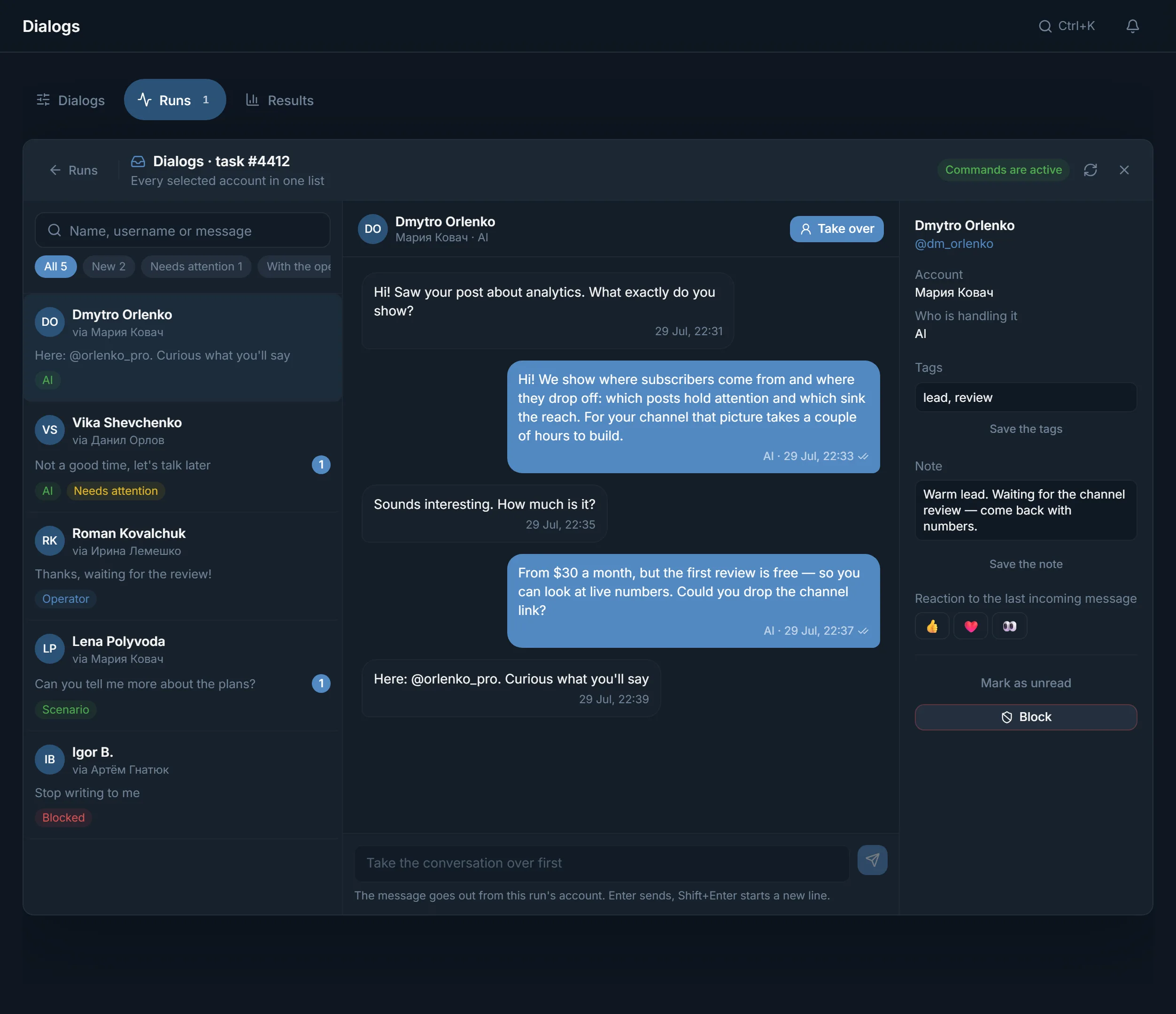
Conversations of all the run's accounts open with the “Dialogs” button on the “Runs” tab. Filters: “All”, “New”, “Needs attention”, “With the operator”, “Scripted”, “With the AI”, “Blocked”. “Take over” moves the conversation to you and the AI goes quiet. “Give back to AI” hands it back. Your reply goes from the same account, and the person notices nothing.
- “Paid”: the payment icon in the conversation header, next to the stage. Press it once the person has paid, and the “After payment” cards and the stages waiting for payment open up. The panel does not check the money: this is your button.
- “Send a card” in the “Cards” list: hand out a card manually, after “Take over”.
- The conversation stage: a list in the conversation header, which also moves the person to another stage. The person's dossier is on the “AI dossier” tab.
- Tags, a note, reactions and “Block”.
- “Needs attention” with a reason: the AI stayed silent by the rules, found no safe reply, or tried to write payment details bypassing the card.
How much and how long to work
- “How long each account works”: by time, from 30 minutes to 72 hours, or by number of replies. Once it has used up its share, the account stops on its own.
- “How many conversations to run at once”: the rest wait in the queue. A slot frees up when the person has been silent for half an hour.
- “How much history to remember”: 10, 20, 40 or 80 messages.
- “Answer old unanswered messages” and “Return to finished conversations”: pick up what was hanging before the launch.
- “Stop words” and “Who not to answer”: topics and people the AI will stay away from.
- “Pause before a reply” in the bottom bar: “Fast”, “Balanced” or “Careful”. During this time the account reads, “thinks” and types.
Together with Mailing, Chat broadcast and Neurochat
- Mailing: the “Hand over to Dialogs” mode, then in the “AI instruction” window choose “Dialogs campaign”. People who replied get answers from the mailing's senders, following the campaign's rules, knowledge, showcase, stages and dossier.
- Chat broadcast: the “Private conversations” card, the “Dialogs reply” option. The campaign replies in the breaks between rounds and after the last one.
- Neurochat: “Private conversations”, then “Dialogs campaign”. The account gets to know the person in a group, and in DMs the campaign leads the conversation.
The whole campaign carries over into Mailing and Chat broadcast except the characters: there, the senders write with their own personas.
FAQ
Can the AI mix up or make up payment details?
Not in a campaign with a showcase. The payment details sit in a card and the model does not see them: it asks for the card, and the panel sends it. If the model still writes a card number or wallet itself, that reply is not sent, and the conversation gets “Needs attention”.
Who confirms the payment?
You do. The payment icon in the conversation header (“Paid”) opens the “After payment” cards, such as the access link, and the stages waiting for payment. From there the AI hands out access by the rules on its own.
Do the accounts write first?
No, Dialogs only reply. The first message comes from Mailing or Chat broadcast, and Neurochat handles getting acquainted in groups. There is one exception: the “History” button in the inbox, where you can pick past conversations and “Write to the selected”.
Does the AI remember a person who comes back a week later?
Yes. The dossier is kept per person in the campaign and survives a restart, and the account re-reads the conversation within the “How much history to remember” setting.
Which campaign can I pick in Mailing, and which in Neurochat?
Mailing takes an “Only people the mailing wrote to” campaign. Chat broadcast and Neurochat DMs take an “Everyone who writes” campaign. The other campaigns in the list are shown with a note on why they cannot be picked.
When does the AI call the operator?
The conversation gets “Needs attention” with a reason when the AI stayed silent by your rules, replied with just a reaction, found no safe reply, or tried to write payment details bypassing the card. These conversations are collected under a separate filter.
Ready to open the panel?
Review the scenario constraints before launch.
Read next
 Guide
GuideAI in Telegram DMs: sales, sign-ups, leads and bringing an old base back
What a Dialogs campaign can do in DMs: sell access, take a person to a sign-up through your ref link, collect a lead, bring people into a channel, answer questions about the product and bring an old base back. Rules, showcase, stages and dossier for each goal, and where to get people into DMs.

Telegram mailing
A scenario builder for direct messages: up to five first-message variants, AI writing, an 'already contacted' memory, and a result for every recipient.

Neurochat: accounts talk in group chats
Accounts sit in topic chats as ordinary members: they reply on topic, keep the conversation going and start new topics by your instructions. After the chat, a Dialogs campaign can handle the DMs.