A base goes straight to work
A list collected by a parser is sent to a module from the dataset card. No files to download and upload again.
Commenting under posts, writing in private messages, inviting people, collecting a base: every such action has its own module in the panel. Below they are grouped by task, with screen names and links to the full guides.
In short
Telegram software features in TeleTraff are split into 15 modules, each with a full guide. Ten act on behalf of your accounts: AI commenting, Neurochat, mailing, dialogs, inviter, warm-up, mass reactions, masslooking, reporter and data parsing. Five more prepare and control the work: the account manager, pools, proxy center, automation and statistics. Everything runs in the browser.
TeleTraff editorial teamUpdated: Checked in the panel
A list collected by a parser is sent to a module from the dataset card. No files to download and upload again.
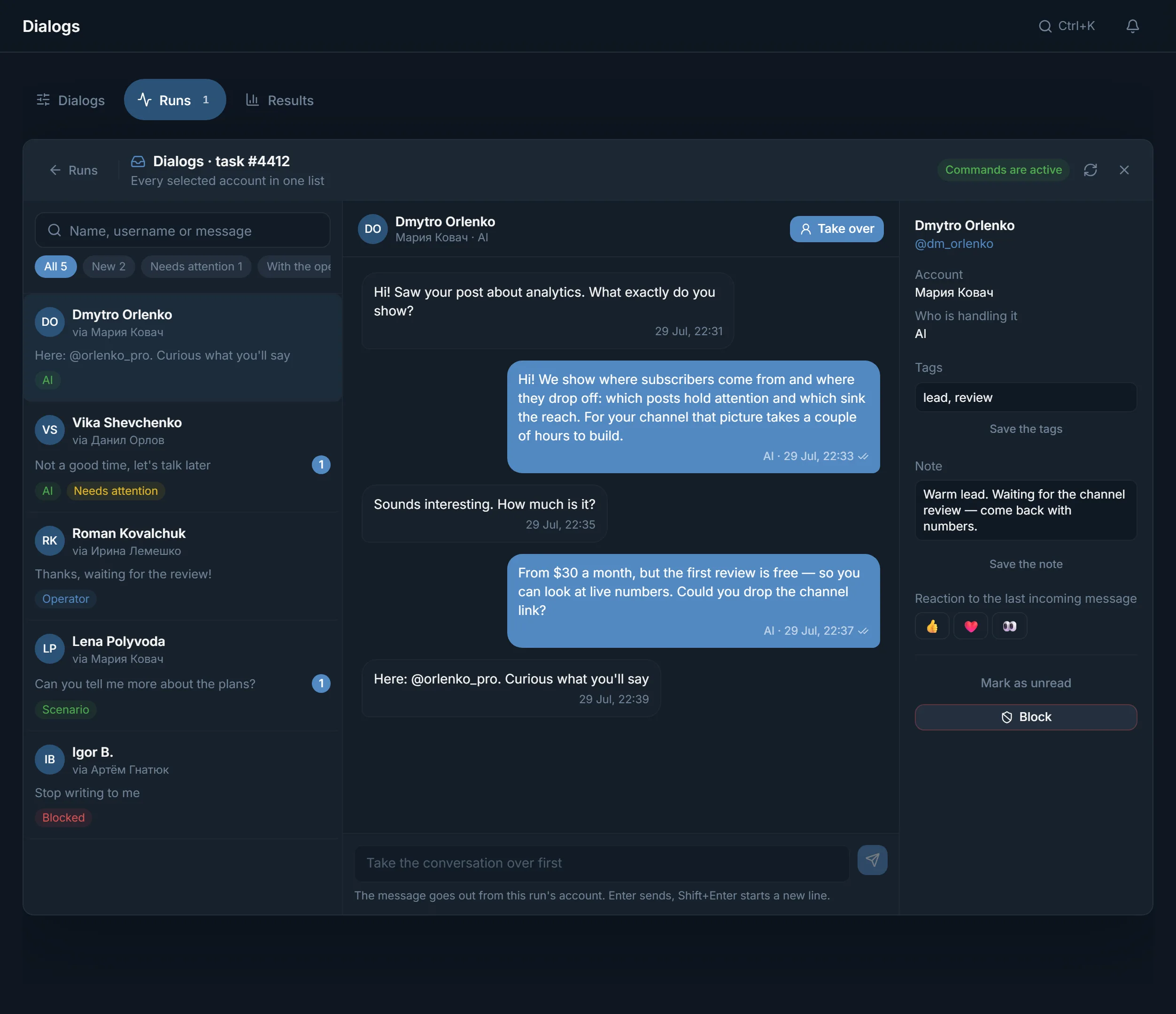
Private conversations of the chosen accounts are collected in Dialogs. Any conversation can be taken over with the Take over button.
In Automation, warm-up, mailing and other modules go into one schedule and start at the set time.
Find your task. Under each one is the module and a link to its guide.
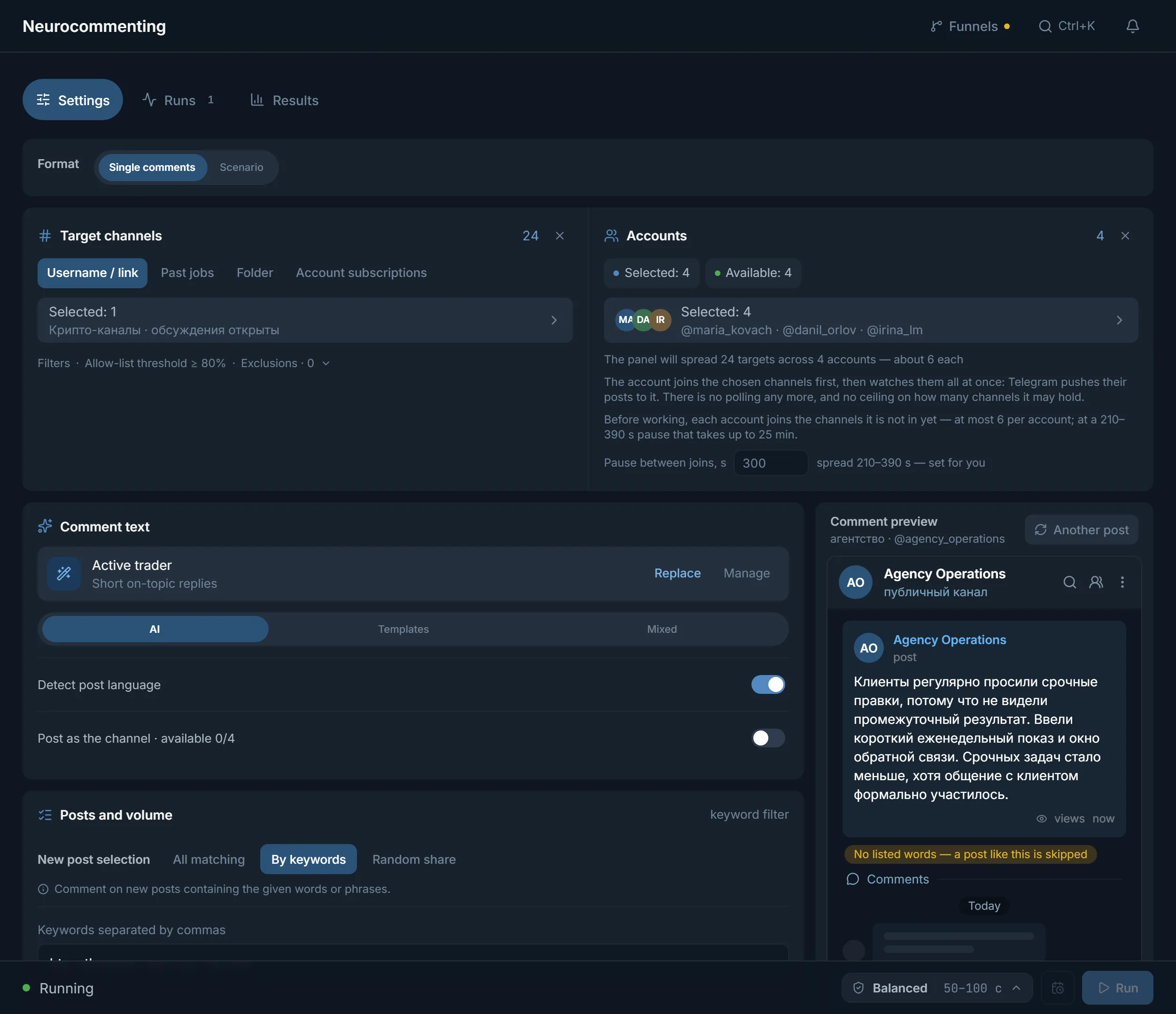
AI commenting leaves comments under new posts: AI-written text, your templates or a mix. The full story is in the AI commenting guide.
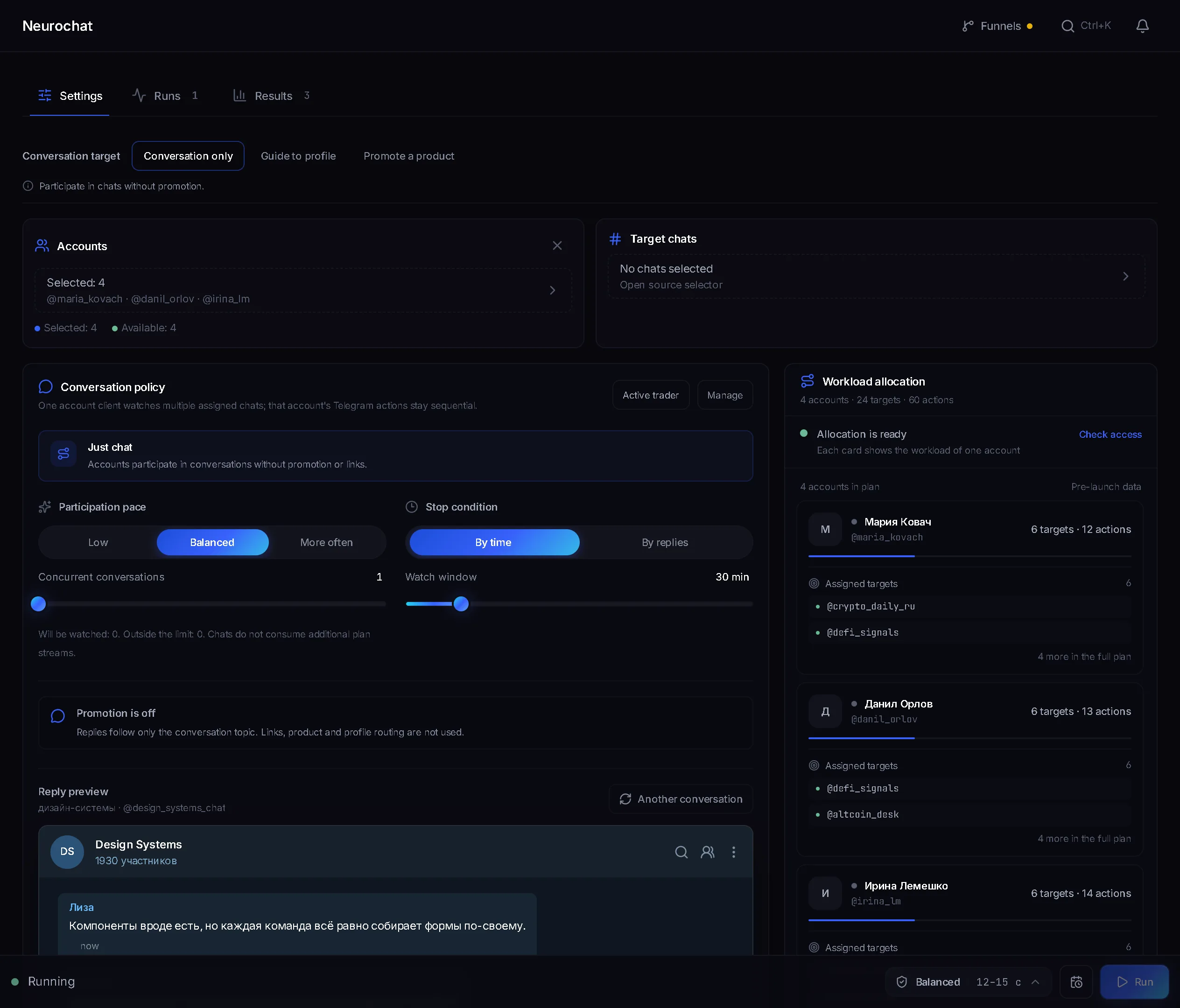
Neurochat keeps accounts in topic chats as ordinary members: they answer on topic and start new discussions by your instruction. Guide: Neurochat.
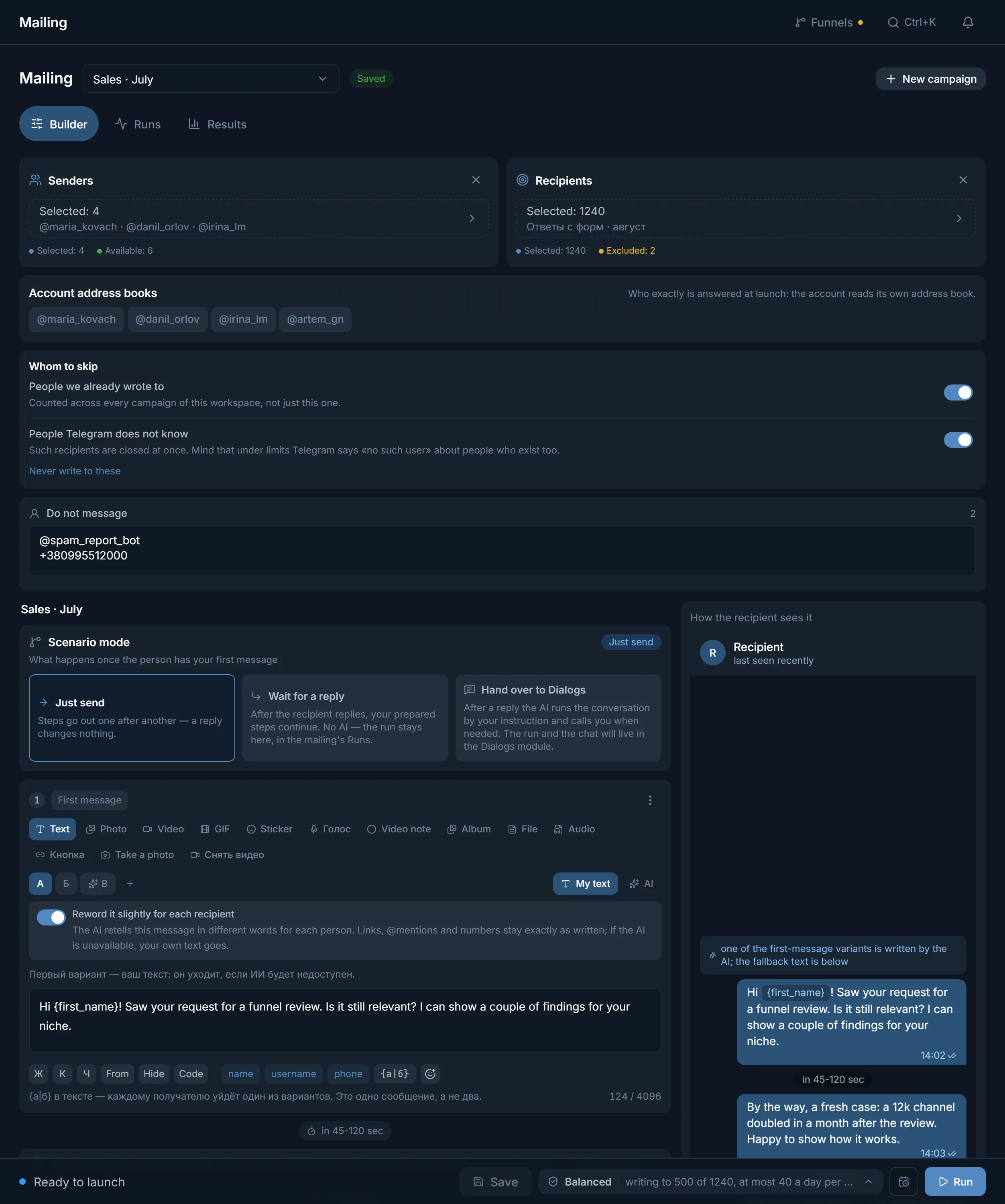
Mailing follows a scenario: just send, wait for a reply or hand the person over to Dialogs. The first message can have several variants, and the panel remembers whom it already wrote to. Guide: mailing.
The inviter invites people from a base and remembers previous runs so it does not invite the same people twice. Read the inviter guide.
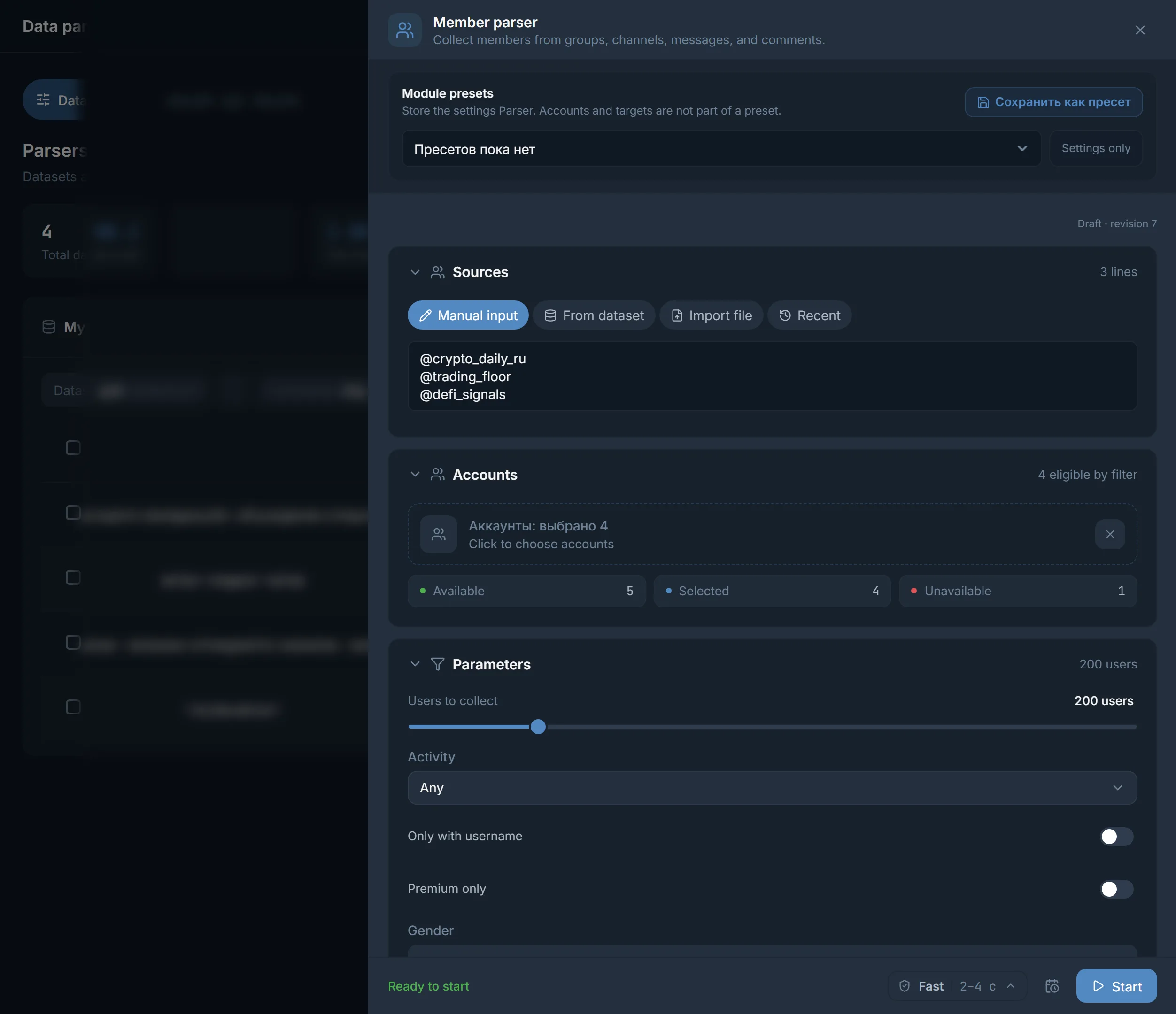
Parsers collect channels, chats, members and contacts from messages. You can also start with the open base of channels and chats: it holds about 2.8 million sources.
Warm-up takes new accounts through a programme whose length you choose before they go to work. Guide: account warm-up.
All fifteen modules with guides, one row each. The sidebar also has Chat broadcast. The full write-ups are in the modules section.
| Module | What it is for | What you see on the screen |
|---|---|---|
| AI commenting | Comments under new posts | What to write: AI, templates or a mixed mode; the Runs and Results tabs |
| Neurochat | Talking in chats with several accounts | When to participate, AI instructions, Reply preview |
| Mailing | Private messages to a base | Senders, Recipients, Scenario mode, How the recipient sees it |
| Dialogs | Private conversations of the chosen accounts | The New and Needs attention filters, Take over, AI dossier |
| Inviter | Invitations to a channel or chat | Base memory between runs, Channel network, results with reasons |
| Account warmup | Preparing accounts for work | Duration and a day-by-day programme, Programme journal |
| Masslooking | Viewing stories of people from your base | View settings and reactions to stories |
| Mass reactions | Reactions to people's comments and messages | A set of reactions, Reaction probability, Total reaction limit |
| Reporter | Reports on channels, chats and users | 12 report reasons |
| Data parsing | Collecting channels, chats, members and contacts | Collection mode for channels and chats, My datasets, the Use button |
| Account manager | Importing accounts and seeing their state | Status tiles, the account card, bulk actions |
| Account pools | Groups of accounts for projects | Counters and the Accounts and Proxies buttons |
| Proxy center | Checking and assigning proxies | Quarantine, Assign proxies, Check filtered proxies |
| My statistics | Run results and the people brought in | The Runs, Action log and Traffic tabs |
| Automation | Modules on a schedule | When, Execution order, Upcoming runs, Run history |
Every module runs on its own. Once it works steadily, you can put it on a schedule in Automation: for example, Account warmup and Mailing to a base in one schedule. Ten modules can be scheduled, every one except Dialogs.
By default the steps of a schedule start independently, without waiting for each other. If mailing must run only after warm-up, its Execution order is set to start after warm-up completes successfully. If warm-up does not finish, mailing does not start.
In the When block you pick the repeat: once, every day, on weekdays, on chosen weekdays, once a month or at an interval. The time zone is set there too. Upcoming runs shows when the task will start, and Run history of a saved schedule shows what has already run.
An order in which nothing has to be redone.
The account manager takes a tdata folder, .session and .json pairs, ZIP or RAR archives. The proxy is assigned right in the import wizard.
Import the remaining proxies into the Proxy center, check them and hand them out with Assign proxies.
With a parser or from the open base. Send the finished list to a module with the Use button on the dataset card.
A couple of accounts and a few targets. Watch the run log and what people replied.
Four screens from different modules: from collecting a base to replies from people.
Telegram promotion software needs accounts and proxies. Bring your own or buy them in the marketplace inside the panel: bought proxies are added at once, and accounts appear after an import step. Targets come from parsers or from the open base.
The plan counts streams: how many accounts work at the same time in each module. Starter for $24 gives 10 streams, Pro for $59 gives 50, Ultimate for $117 gives 100, each for 30 days. Streams are not shared between modules. Details on the pricing page.
Terms on this page
Yes. Every module runs separately. A schedule exists only when you put modules into Automation yourself.
Yes. A base from parsing is sent to a module from its card with the Use button, and mailing in the Hand over to Dialogs mode passes the people who replied to Dialogs.
Nothing. The panel opens in the browser, on a computer and on a phone.
Four: channels, chats, members and messages. The channel and chat parsers have a Collection mode: Search by keywords, Similar from a sample and Deep, which combines both.
In the marketplace inside the panel. Bought proxies appear at once, accounts after an import step.
No, the number in the plan applies to each module separately. Ten streams on Starter mean ten accounts commenting and another ten mailing at the same time.
Read next
Other sections
The TeleTraff trial opens every module for 3 days, no card needed. Start with what you need right now.