Telegram parsers
Build datasets from Telegram: chat and channel members, channels and chats found by keyword, contacts from messages. A ready dataset goes straight to other modules.
- Four parsers: channels, chats, members, messages
- Collection filters and a time ceiling
- The dataset goes straight to other modules
Almost every task starts with parsers: to message, react or invite, you first need a dataset. Parsers collect available data from Telegram and save it as a dataset, and a ready dataset can be handed off to mailing, the inviter, reactions or another module in one move.
Launch flow
- Choose a parser, the sources and collection filters.
- Set the volume, the time ceiling and the dataset name.
- Run collection and hand the ready dataset off to work.
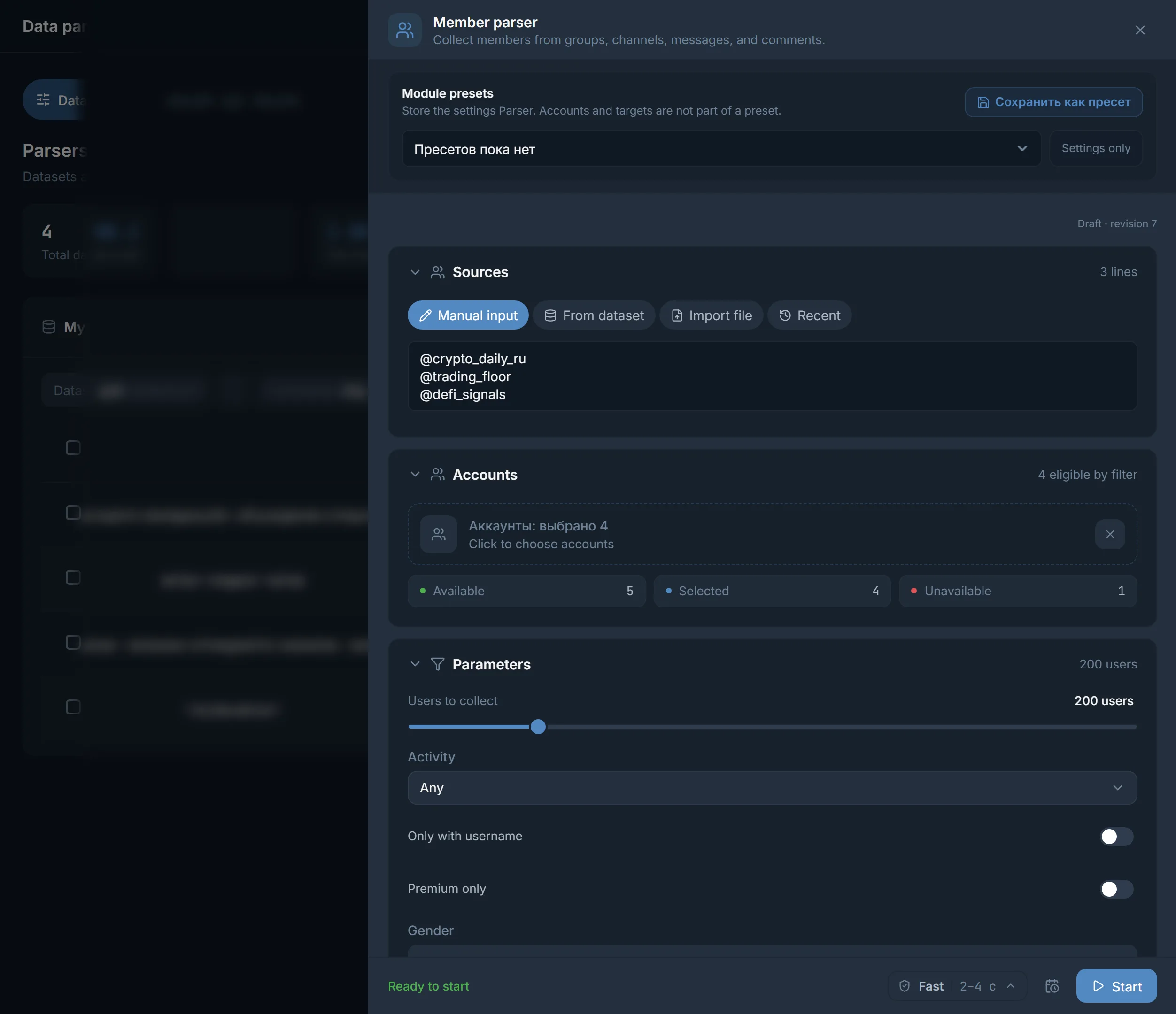
Four parsers
- 'Members': collects people from groups, channels, messages and comments. Chat members, a channel's audience and post commenters are all this one member parser.
- 'Channels': finds channels by keywords, links and similar channels.
- 'Chats': finds chats and groups by keywords, links and related discussions.
- 'Messages': pulls contacts and data out of messages: phones, @usernames, links, emails, crypto wallets. Full message text is not saved by default.
Collection mode for channels and chats
- 'Search': Telegram search by your keywords only.
- 'Similar': similar channels from the given links or a dataset only.
- 'Deep': search and similar together, wider reach, but slower.
Collection filters
Each parser has its own filters that cut the noise during collection:
- Members: how many to collect, activity, username only, Premium only, gender, recently online. A dataset of active and premium accounts is noticeably livelier than a random crowd.
- Channels: public only, comments-open only, minimum subscribers, minimum comments per post.
- Chats: public only, minimum members, similar groups.
- By language: for channels, chats and messages you can keep only the languages you need from the list.
A separate 'Do not parse those I already know' switch excludes everything collected before, or specific datasets, so you do not collect the same people twice.
The run ceiling
Collection runs until it reaches the target volume or runs out of requests, and on a large dataset that takes hours. The 'Stop after' slider sets a time ceiling: when the time is up, collection stops and saves what it managed to gather. The footer shows the expected volume and rough time, and if something blocks the launch, it names the reason and offers to fix it automatically.
The dataset and what to do with it
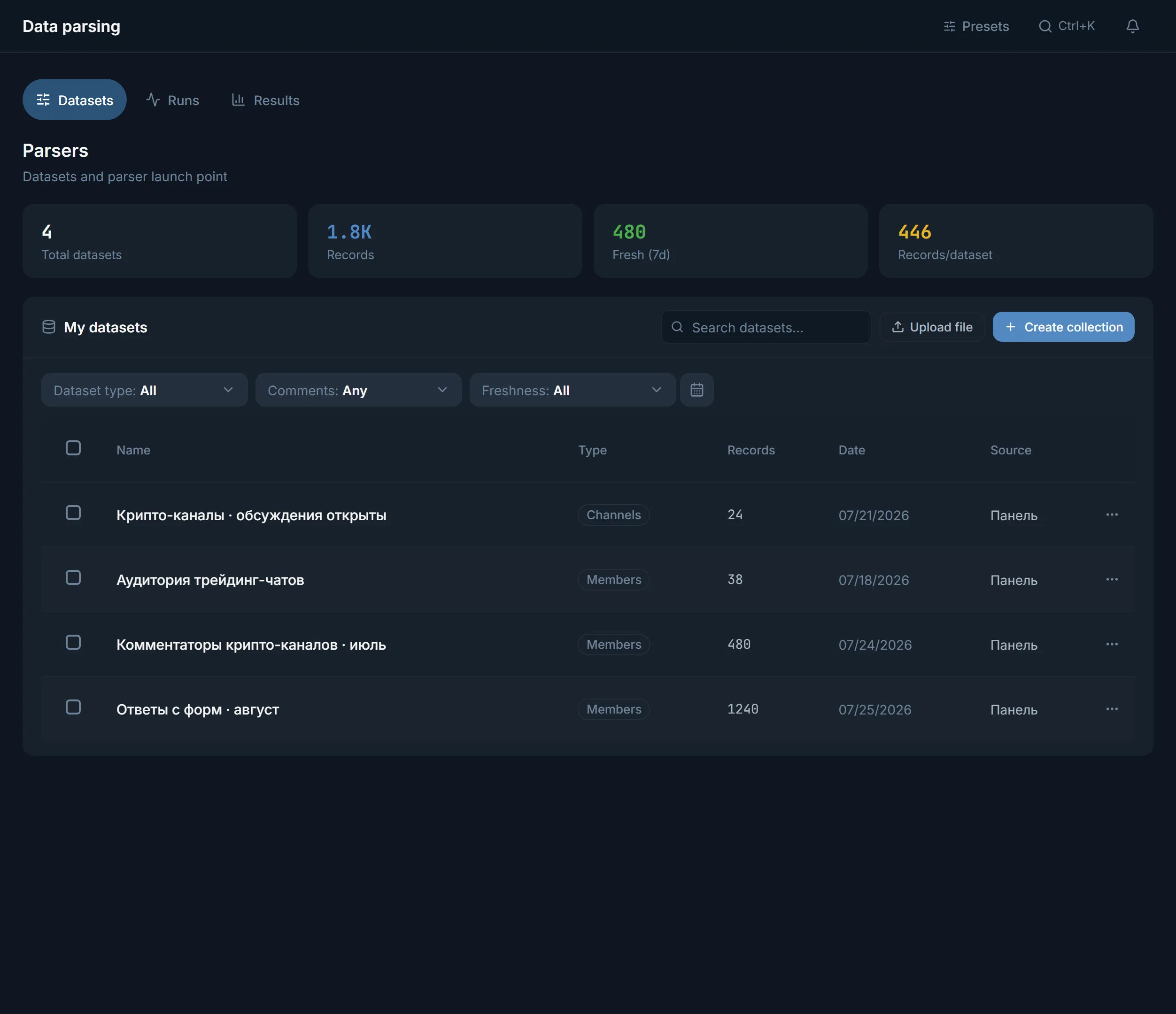
The result of collection is a dataset on the 'My datasets' tab: name, type, record count, date and source. For a dataset you can view it, collect more into the same one, find similar sources, dedupe it, merge it with another, and export to CSV, JSON or TXT.
The key one is the 'Hand off to work' button: a ready dataset goes straight to a fitting module. A dataset of people opens the inviter, mailing and mass story views. A dataset of channels opens neurocommenting, reactions, mailing, AI chat, warmup and the reporter. That is how a parser becomes the start of any funnel.
FAQ
How do I collect commenters and a channel's audience?
With the same member parser. Chat members, a channel's audience and post commenters are not different parsers but one: it collects people from groups, channels, messages and comments.
How do I collect an active dataset, not a dead one?
The member parser has a 'Last seen' filter: it reads the status Telegram shows under the name and keeps people who were online within the last 3 days, week or month. Next to it are 'Username only', 'Photo only' and 'Premium only'. A dataset of recently active people is noticeably livelier than a random sample: they open DMs and react more often.
How long does collection take?
It depends on the volume and sources: on a large dataset it is hours. To avoid waiting endlessly, set the 'Stop after' ceiling: collection will stop on time and save what it already gathered.
What do I do with a ready dataset?
Hand it off to work with the button right from the dataset list, collect more into it, find similar sources, dedupe it, merge it with another dataset, or export to CSV, JSON or TXT.
Can I avoid collecting the same people again?
Yes. The 'Do not parse those I already know' switch excludes everything already collected, or selected datasets. A new run brings only new records.
Ready to open the panel?
Review the scenario constraints before launch.
Read next

Inviter: invites into a chat, a channel or your own channel network
Direct invites or invites via admin promotion, rights from your bot or main account only while the run works, a chat passport, dataset memory between runs and a channel network for large datasets.

Telegram mailing
A scenario builder for direct messages: up to five first-message variants, AI writing, an 'already contacted' memory, and a result for every recipient.

Bulk story viewing
Accounts view the stories of people in your dataset. The view reaches the author by name, and that is a reason to open your profile.