Bulk story viewing
Accounts view the stories of people in your dataset. The view reaches the author by name, and that is a reason to open your profile.
- Views are seen by name
- One pass or standing watch
- Reactions as amplification
A cold DM almost always reads as spam. A story view works differently: the person opens their viewer list and finds your name there, without a single message. From there they either move on or open your profile, and everything depends on what that profile says. This module scales exactly that touch across a target dataset.
Launch flow
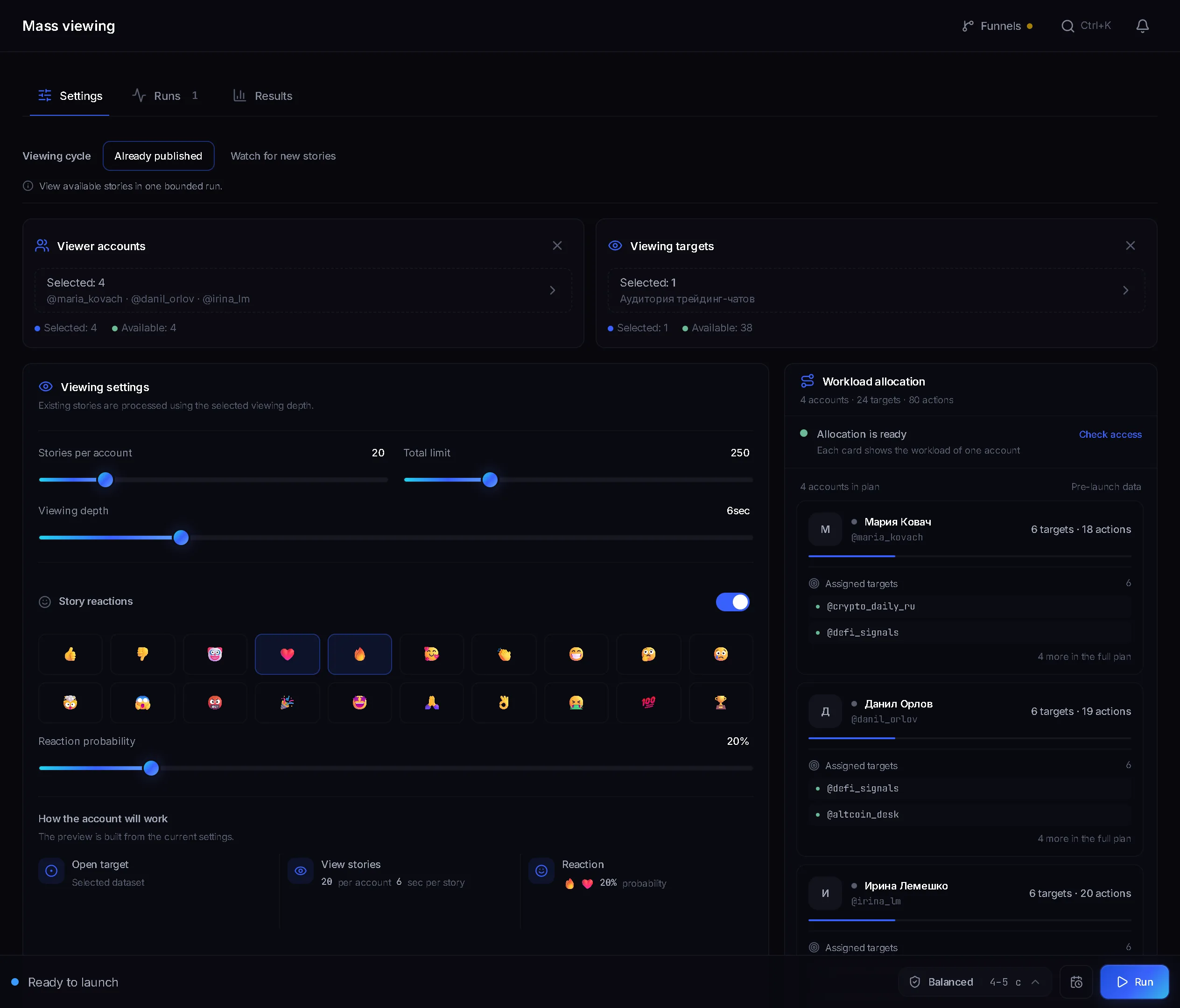
- Select viewer accounts and a target dataset.
- Set the viewing cycle, the limits and the view depth.
- Start the job and read the per-target log.
Why this works at all
The author of a story sees a named list of everyone who watched it. It is the one touch in Telegram that does not feel pushy: you wrote nothing, invited nobody, you were simply among the viewers. Which leads to the point that matters: the result does not come from the view but from the profile the person opens next. An empty profile with no avatar and no description makes the whole run pointless.
Before you launch
- Viewer accounts with a finished profile: a name, an avatar, a short description with a link or an obvious next step.
- A target dataset: a saved list of users. Build it with the parser and switch on the Premium only filter: those are the accounts that actually post stories, so the share of targets with a live story comes out noticeably higher.
- The start button stays disabled until both accounts and a dataset are selected.
Viewing cycle: which one to pick
- Already published. A single pass over the dataset: accounts view whatever is live right now and the job ends. Suited to a large cold list where reach is the point.
- Watch for new stories. The module keeps targets under watch for a set window and picks a story up shortly after it goes live. Suited to a small list you genuinely want to keep an eye on.
The difference is not only mechanical. In the first mode you land in the viewer list alongside a hundred others; in the second you arrive as one of the first, and authors look at their first viewers more carefully.
Limits and view depth
- Stories per account: 1 to 100. This is the share of the dataset one account takes on.
- Total limit: up to 1000 for the whole run. It acts as a ceiling: with five accounts at 20 each, 100 targets get reached even when the dataset is larger.
- View depth: 0 to 30 seconds per story.
- Watch mode adds a Watch window of up to 180 minutes and a Check interval of 1 to 30 seconds.
Depth is the one setting worth real thought. Zero is an instant swipe: the view counts, but the spacing between opens gives away a machine. A few seconds looks like someone who actually watched. You pay in time: 500 targets at five seconds a story stretches to roughly 40 minutes before any pauses are counted.
Story reactions
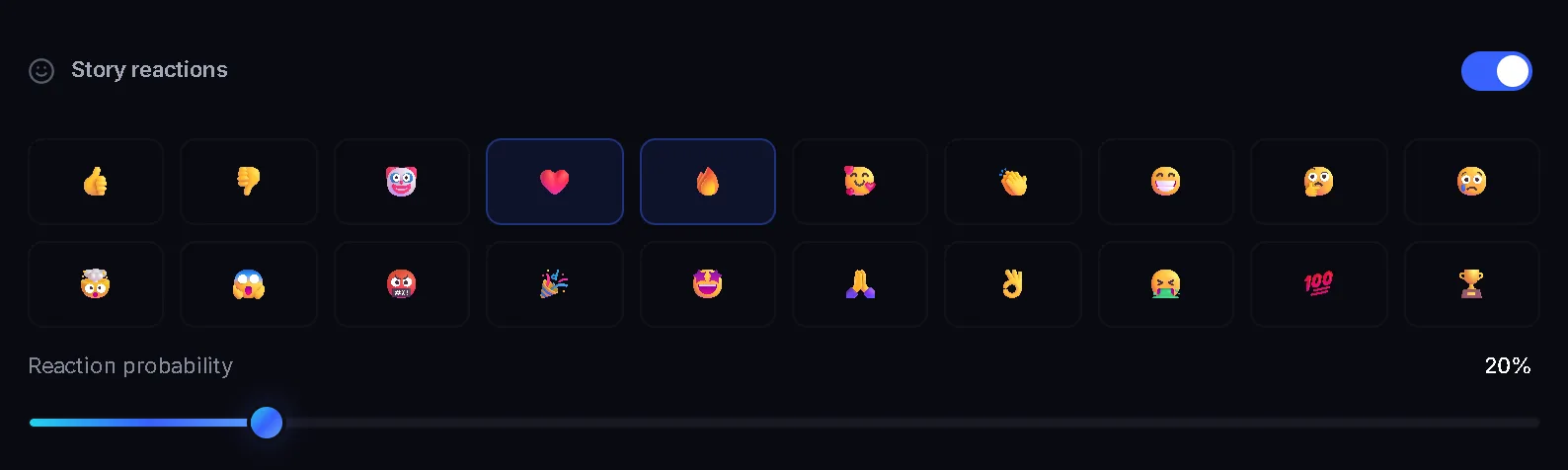
A view is a quiet touch; a reaction is a loud one, because it reaches the author as a separate notification. You choose the emoji set yourself, and the probability slider runs from 5 to 100 per cent in steps of 5.
- Keep the probability around 10 or 20 per cent. Reacting to every story in a row reads as automated instantly.
- One or two emoji that fit the audience beat the whole set: ten different reactions scattered about look random.
- A reaction amplifies the touch but also raises the odds of a report. On a cold list, start without it.
Viewing history
Next to the settings the panel keeps a Viewing history: people who really had stories, and the account watched them. Each row shows Stories, Reactions, Visits and Last viewed. There is a search by name and an Export CSV button.
Run progress
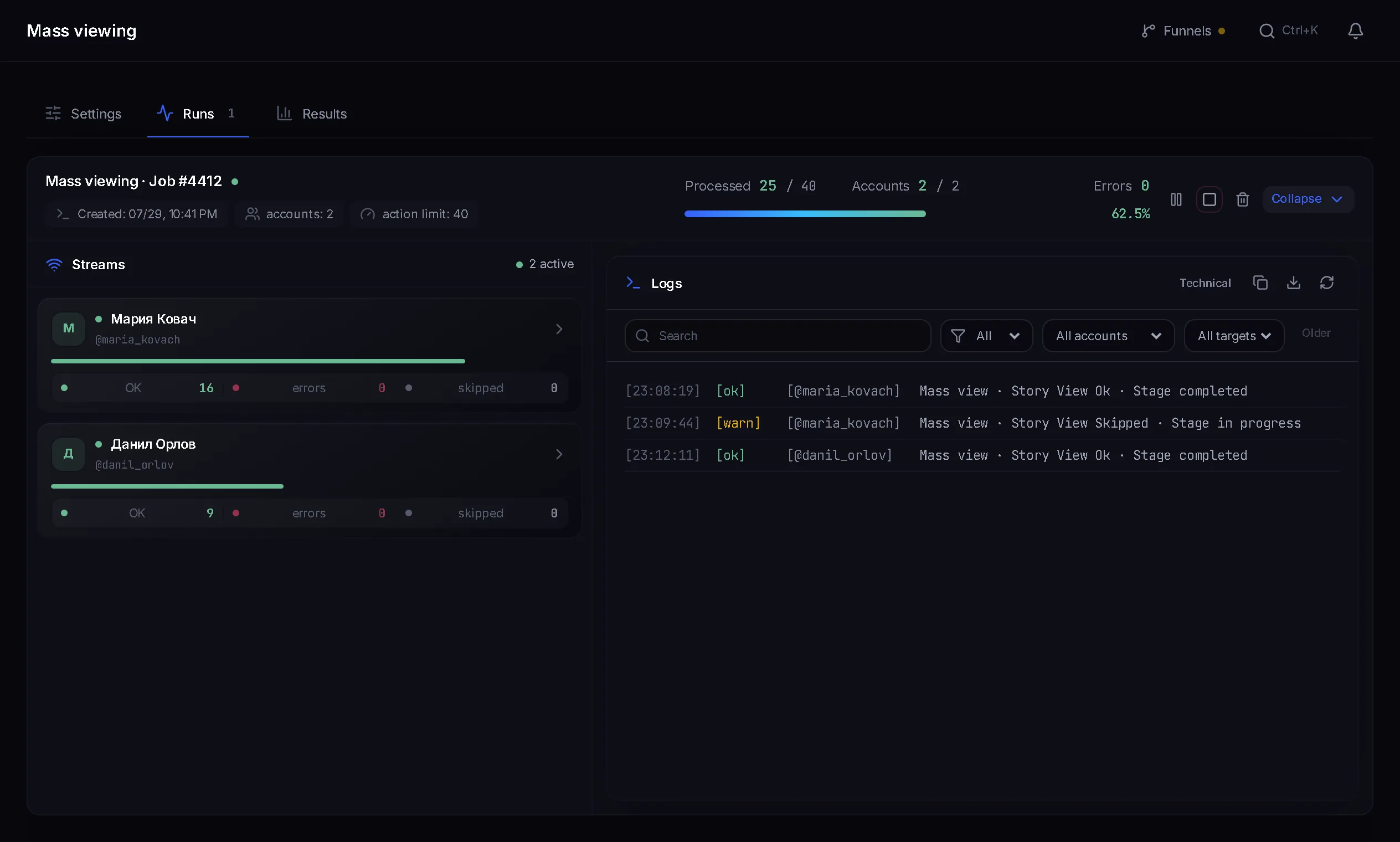
- Each account has its own lane with a view counter.
- The log shows every target: viewed, skipped, with or without a reaction.
- A skip always carries its reason.
- Pause and stop can be applied to a single account without touching the others.
Why a target went unviewed
- No stories: the most common reason by far. The person simply had no live story when the pass came round.
- Telegram privacy settings do not allow the action: stories are closed to non-contacts.
- Target not found or unavailable: the account was deleted, renamed or hidden.
- FloodWait: Telegram demanded a pause and the target was deferred. The account waits instead of pushing on.
- The per-account or total run limit was reached.
A pile of no-stories skips is not a fault, it is a property of the list. Only a minority of users post stories, so on a dataset collected without the Premium only filter the share of successful views is rarely high.
Common mistakes
- Empty profiles on the viewer accounts. The view landed and there is nowhere for the person to go.
- Zero depth for the sake of speed: the most visible sign of automation in this module.
- Spending the whole total limit on one account instead of spreading it.
- A short watch window against rare stories: there will be nothing to view and the run finishes empty.
- Reacting to a hundred per cent of stories from day one.
FAQ
How many stories can one run view?
Up to 100 per account and up to 1000 in total. Both limits are sliders, and the defaults sit well below the ceiling.
What view depth should I set?
A few seconds per story. Zero is an instant swipe and reads as mechanical; a very long depth stretches the run without much gain.
What does the check interval mean?
It is the pause between passes over your target list in watch mode. The module walks every target, and if no new stories turned up it waits out the interval before the next pass. A story that does appear is handled right away.
How does "already published" differ from "watch for new"?
The first is a single pass over what exists now, and then the run ends. The second keeps targets under watch for the chosen window and catches stories as they appear.
Why are so many targets skipped with no stories?
Only a minority of Telegram users post stories. Collect the dataset with the parser's Premium only filter switched on: Premium accounts post stories far more often, and the share of successful views goes up.
Do I need story reactions?
Not necessarily. A view is already a touch; a reaction amplifies it and reaches the author as a separate notification. If you enable it, keep the probability around 10 or 20 per cent.
Ready to open the panel?
Review the scenario constraints before launch.
Read next

Bulk Telegram reactions
Accounts react to comments and messages written by people in other people's channels and chats. The author sees the reaction in their notifications and can open the account's profile.

Telegram account warmup
Run a warmup profile for selected accounts with observable results.

Inviter: invites into a chat, a channel or your own channel network
Direct invites or invites via admin promotion, rights from your bot or main account only while the run works, a chat passport, dataset memory between runs and a channel network for large datasets.