Bulk Telegram reactions
Accounts react to comments and messages written by people in other people's channels and chats. The author sees the reaction in their notifications and can open the account's profile.
- Reactions to comments and messages from people
- The author's notification leads to the account's profile
- A reason behind every refusal
The module reacts to what people write: comments in a channel's discussion group and messages in chats. The author gets a notification about the reaction and can open the profile of the account that left it. The channel's own posts, bot messages, service rows and the account's own messages are skipped. It works either as a single pass over what is already written or as a watch over new messages.
Launch flow
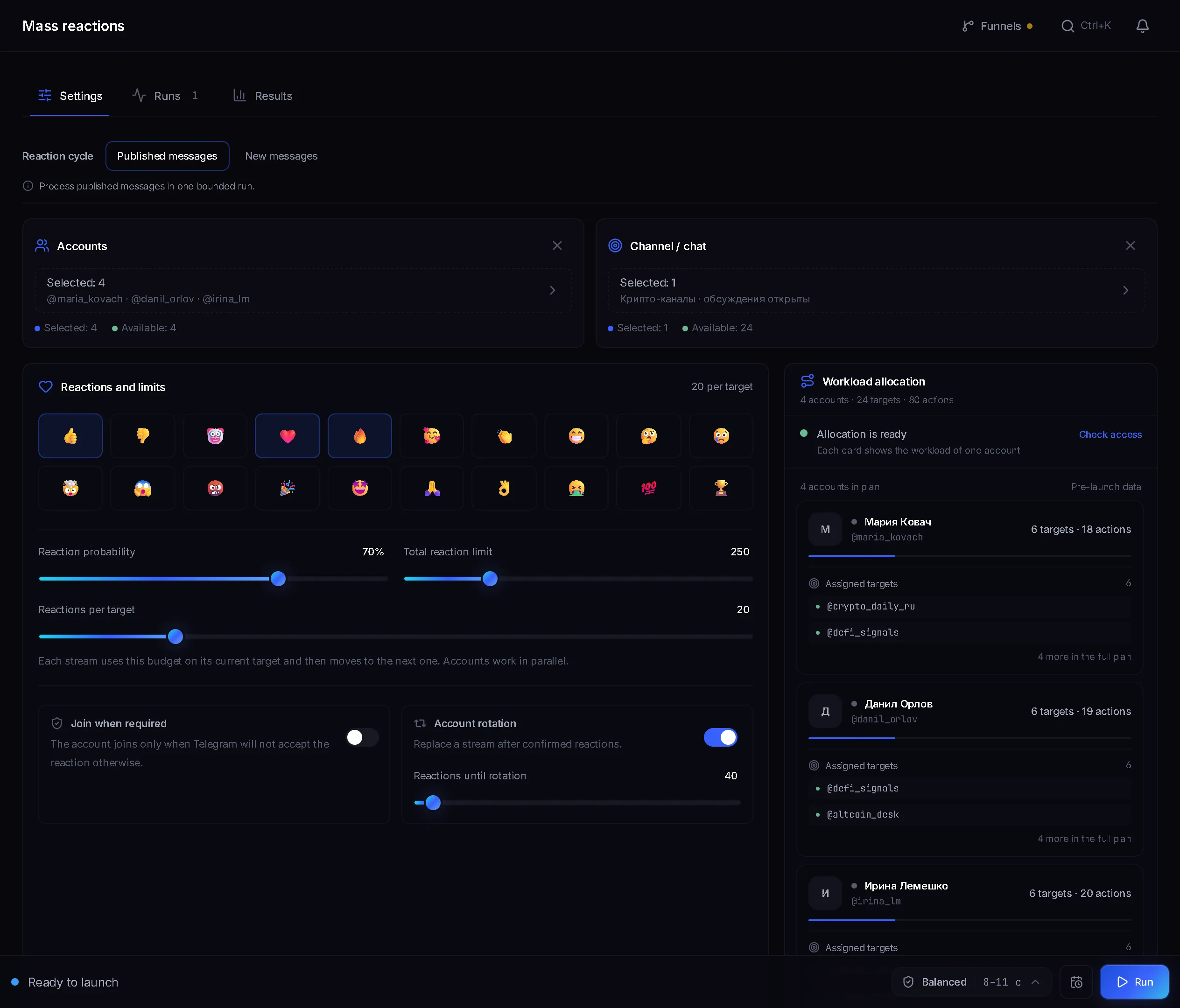
- Select accounts, a target dataset and at least one reaction.
- Set the reaction mode, the probability and the limits.
- Start the job and read the per-target refusals.
Before you launch
- Accounts with proxies, warmed up if possible.
- A target dataset of channels or chats. Build it with a parser, or add entries by hand when picking the source.
- At least one selected emoji. Without it the start button stays disabled: the panel will not launch a job without knowing what to react with.
Reaction mode: which one to pick
- Published messages. A single pass: accounts walk the targets and react to comments and messages people have already written. Suited to volume, where reaction speed does not matter.
- New messages. For a set window the module watches the targets and reacts to new messages from people as they appear. Suited to cases where the reaction should arrive while the author is still in the chat.
For a channel, reactions go under the comments in its discussion group; for a chat, onto the members' messages. The channel post itself is left alone in both modes.
Reaction probability

This is the main naturalness control. At a hundred per cent an account marks every message in a row, and it reads as exactly what it is. Around 70 per cent leaves part of the messages untouched, the way a real reader behaves. The panel draws from your selected emoji at random, so two or three that suit the audience work better than the whole list.
Limits: how they split across accounts
- Reactions per target: 1 to 100. An account spends that budget on its current target and then moves to the next one, and accounts work in parallel.
- Total reaction limit: up to 1000 for the whole run, a ceiling shared by every account.
- Reactions per target is there in both modes. In the New messages mode it caps an account's reactions in one chat over the whole window, and a Watch window of up to 180 minutes appears next to it. A Check interval of 1 to 30 seconds sits under Additional rules.
Joining and rotation

- Join when required. The account joins only when Telegram will not accept the reaction otherwise. Left alone, it joins nothing.
- Account rotation with a Reactions until rotation threshold from 10 to 500. After that many confirmed reactions the account hands over to the next one.
- With rotation off, the first account will happily drain the whole total limit while the rest sit idle. An even spread across the accounts is the entire point of the switch.
Channel reputation
The Allow-list threshold slider, 50 to 100 per cent, sits in the Channel reputation card. Targets below the threshold go to the block list, the rest to the allow list: after a run, targets are sorted by their share of successful reactions. The lists are shared across the whole workspace, not tied to one launch. The Block list and Allow list tabs show the channels themselves with a reason on each, such as Reactions removed or Added by hand. The Apply the block list checkbox keeps those channels out of the run, and Work by the allow list only leaves nothing but proven channels in it.
Run progress
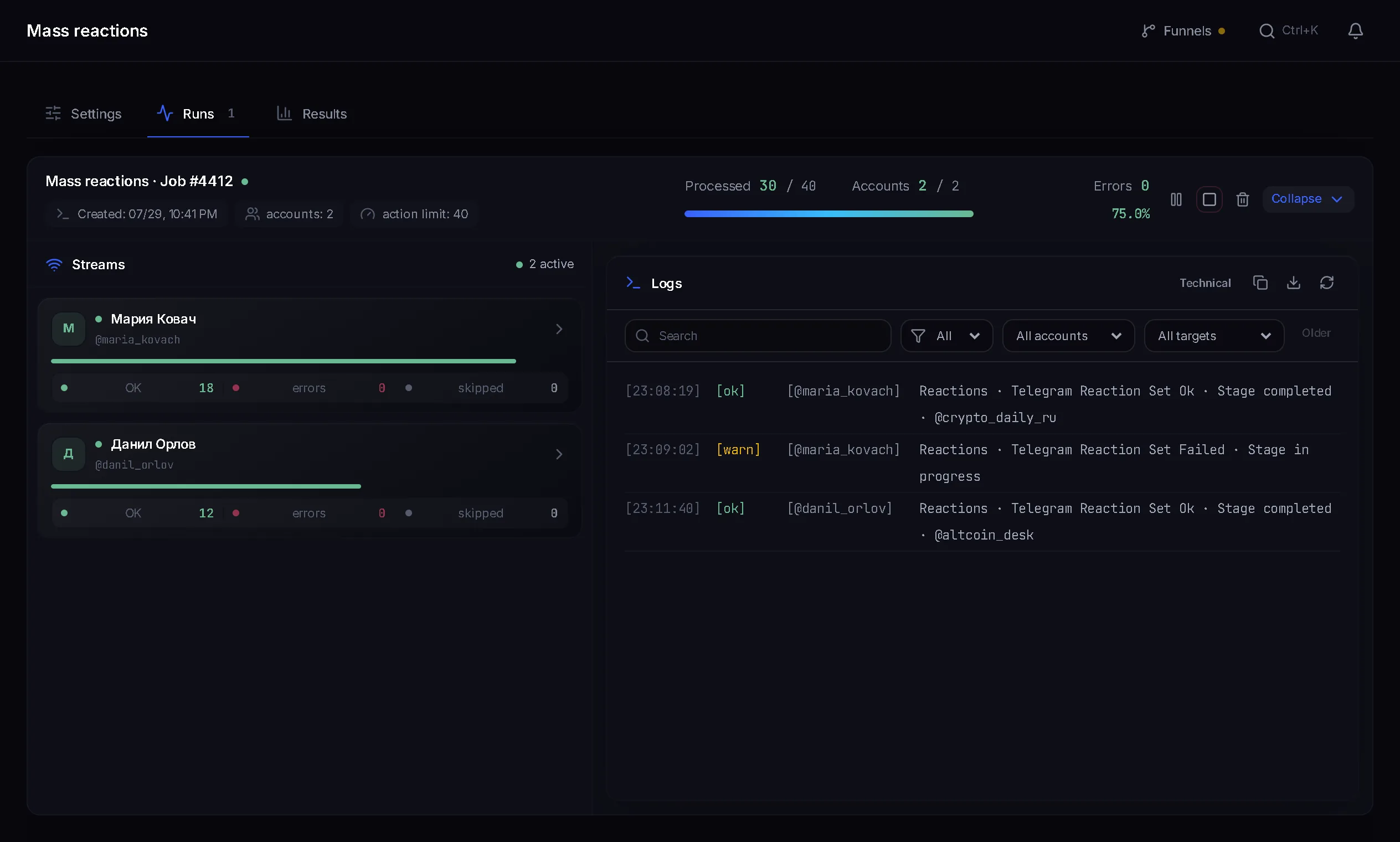
- Each account has its own lane with a reaction counter and its remaining budget.
- The log shows which reaction went to which target.
- Every refusal carries a reason, and it tells you at a glance whether the target or the account was at fault.
- Pause and stop can be applied to a single account without touching the others.
- In watch mode the log stays clean: the panel writes one start event and then only real reactions, errors and the window outcome.
Why a reaction did not go through
- Reactions are disabled in this target for everyone: the author closed them and nothing can be done.
- This account is barred from reacting in this target: a restriction on that specific account.
- Telegram did not accept the reaction because its own reaction limit was hit, not yours.
- Membership or access to the target is required first: switch on Join when required.
- The account is banned in that chat or channel.
- The available accounts hit their rotation reaction limit: the rotation threshold is lower than the run needs.
- FloodWait: Telegram demanded a pause, and the account waits instead of pushing on.
Common mistakes
- A hundred per cent probability: the most visible automation tell in this module.
- The whole emoji set at once. Ten different reactions under one message from different accounts look like a flood, not like readers.
- Rotation left off, so one account drains the entire total limit.
- Targets with reactions closed: the run burns through with nothing to show, and every log line carries the same reason.
- Too narrow a watch window in quiet chats and discussions: there will be nothing to react to.
FAQ
How many reactions can one run leave?
The total limit goes up to 1000 per run and up to 100 per target. Keep both below the ceiling: the point is an even spread, not volume.
Why did some reactions fail?
The usual causes: reactions are off in the target, this account is barred there, Telegram's limit was reached, or the account is not in the chat. The exact reason per target is in the log.
What probability should I set?
Around 70 per cent is a sensible starting point: some messages stay untouched, which reads naturally. A hundred per cent is best avoided entirely.
What is rotation for?
So one account does not eat the whole limit. After a set number of confirmed reactions it hands over to the next one and the load spreads across the accounts.
What does joining a target do?
Telegram sometimes refuses a reaction from someone who is not in the chat. With the switch on, the account joins in that case and then reacts. It never joins on its own without Telegram asking for it.
How do Published messages differ from New messages?
The first is a single pass over comments and messages people have already written. The second watches the targets for the chosen window and reacts to new messages from people as they appear.
Ready to open the panel?
Review the scenario constraints before launch.
Read next

Bulk story viewing
Accounts view the stories of people in your dataset. The view reaches the author by name, and that is a reason to open your profile.

Telegram AI commenting
Configure comments for new posts with selected accounts, sources, and a prompt.