Telegram masslooking: what it is and how to set up story viewing
What masslooking is in Telegram, why viewing stories brings people to your profile and how to set up mass story viewing in TeleTraff: audience, limits, reactions.
- Viewing a story leaves the account's name in the viewer list
- The account profile decides whether a person goes further
- The run summary shows who was viewed and why others were skipped
Masslooking in Telegram is mass story viewing: several accounts take turns watching the stories of people from your audience. In our experience, some people open the profile of an unfamiliar viewer and find out who you are and what you do. In TeleTraff the «Mass story viewing» module does it: you pick the viewer accounts and the audience, and the viewing runs on its own.
What is masslooking in Telegram?
It means viewing stories of many people from several accounts. You write nothing and invite nobody. An ad in DMs reads as spam, while a story view is a quiet touch: the only trace is the viewer's name in the list of views. The module can also add a like or a reaction to a story, but those are separate settings.
Why does viewing stories bring people to your profile?
The author of a story sees who watched it. An unfamiliar name raises the question «who is this», and some people open the profile. That is our observation, not a promise: the result depends on the audience, the niche and the account profile. The view brings a person to the profile, and the profile explains what to do next. If the profile has no avatar and no bio, the chain breaks.
How do you prepare an audience for masslooking?
- Collect people with the «Members» parser in the parsers module: chats and channels of your niche. Step by step: how to scrape an audience in Telegram.
- The «Photo only» and «Premium only» filters narrow the audience to filled-in profiles and accounts with a Telegram Premium subscription.
- The «Only people who wrote in the chat» filter keeps those who posted recently.
- The finished dataset sits in the «My datasets» tab. Click «Use» and pick the mass story viewing module.
- The dataset can also hold a chat or a channel itself. With «Collect people from channels and chats» on, the panel reads who is inside and views those people's stories.
How do you launch mass story viewing in TeleTraff?
- 1
Pick accounts
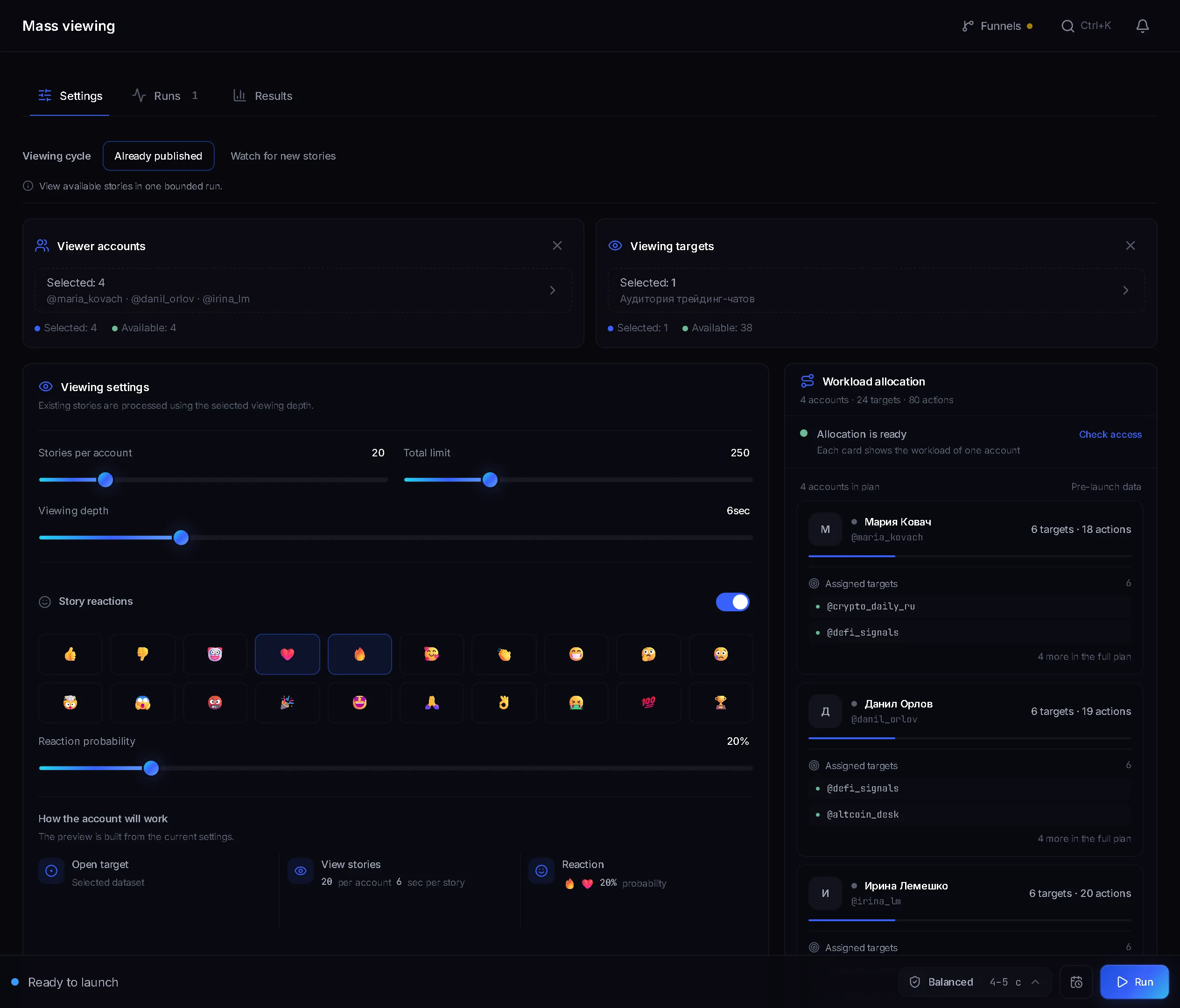
Open the «Mass story viewing» module. In the «Viewer accounts» block tick the accounts that will watch.
- 2
Pick the audience
In the «Viewing targets» block choose a saved dataset of people.
- 3
Pick the cycle
In the «Viewing cycle» field choose «Already published» or «Watch for new stories». The difference is described below.
- 4
Set the limits
In the «How much to view» block set «Stories per account», «Total limit» and «Viewing depth»: the volume and the length of viewing.
- 5
Start
Click the start button in the bottom bar. Each account gets its own lane with a view counter.
Which viewing cycle and which limits should you pick?
- «Already published»: one limited pass over the stories that are up right now. Fits a large cold audience.
- «Watch for new stories»: the module waits for new stories inside the «Watch window» and takes them as they appear. It does not walk the whole list: only those who post a story inside the window get a result.
- «Stories per account» is how many targets one account takes. «Total limit» is the ceiling for the whole run.
- «Viewing depth» is how many seconds each story is watched. The deeper it is, the longer the run takes.
- «Skip recently viewed» skips people you already watched. «Do not repeat within» sets the period in hours.
Should you add likes and reactions to stories?
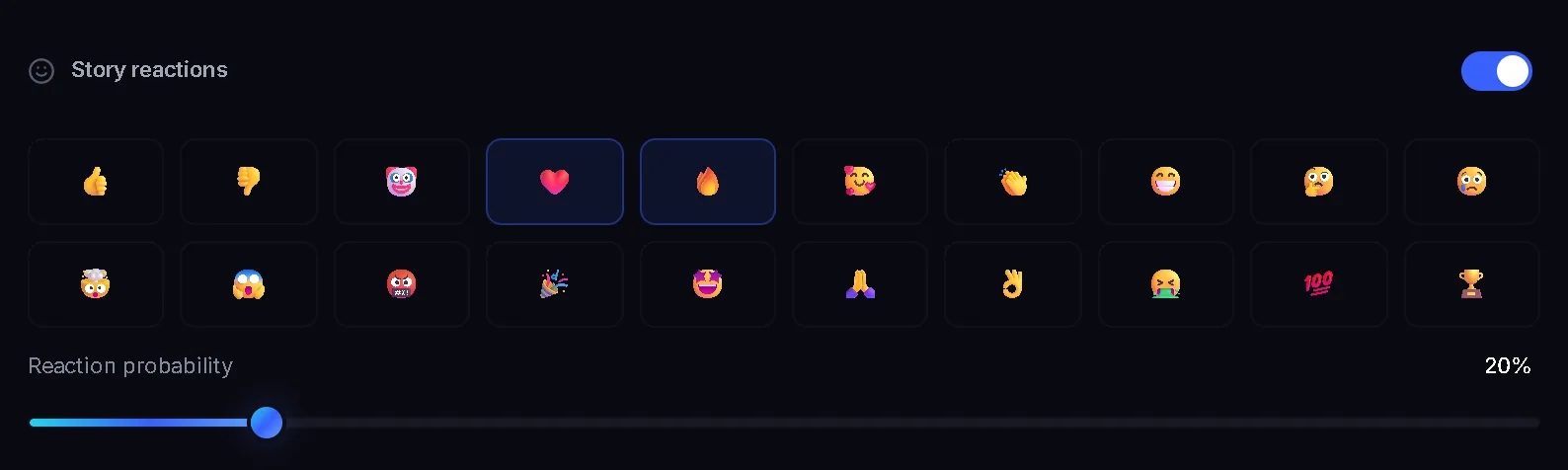
The «Likes and reactions» block has two switches. «Heart ❤ on stories» is on by default, «Story reactions» is off. The difference is where it lands: per the panel's description, the heart does not reach their DMs, while a reaction lands in the recipient's DMs and has a far tighter limit.
- Each switch has its own slider: «Like probability» and «Reaction probability». So not every story gets marked.
- «Like limit per account» and «Reaction limit per account» cap their number. Zero means no limit, but then they are not counted.
- You choose the emoji set for reactions. By default it is 👍 and 🔥.
How do you set the viewing pace?
The pace comes from the «Protection» block. It has four profiles: «Auto», «Fast», «Balanced» and «Careful», plus «Pause between views». «Auto» currently runs at the Balanced pace. «Fast» gives short pauses, «Careful» the longest and most varied ones. How to work out speed and threads is shown on the page about masslooking limits.
What does the run result show?
- During the run each account has its own lane with a view counter.
- The run summary has a «People in the list» row and a «People» tab. If a person has no fresh stories, the reason is recorded: «There are no new stories.»
- «Viewing history» keeps the people who really had stories and were watched by an account. The table shows «Peer», «Stories», «Likes and reactions», «Visits» and «Last viewed».
- There is «Search by name» and an «Export CSV» button.
How do you set up the profile people land on?
- 1
Open the account
Go to the account manager and open the card of a viewer account.
- 2
Set an avatar
Click «Change the avatar». The photo should match the bio and the niche.
- 3
Fill in the name
The «First name» and «Last name» fields are what a person sees in the list of views.
- 4
Write a bio
In the «Bio» field say in a line or two what you offer and add a link to your channel. If the account has a channel of its own, set it in «Personal channel».
- 5
Many accounts at once
Select several accounts and start «Profile generation». It replaces the whole profile, so check the preview.
How is masslooking used in arbitrage, crypto and dating?
- Arbitrage and gambling: an audience of commenters from channels in your niche and the «Only people who wrote in the chat» filter. The bio holds one line about the offer and a link to the channel.
- Crypto: an audience from trading chats and project chats. The profile says what your channel is about, for example market breakdowns, and carries a link. Leave reactions off, likes are enough.
- Dating: an audience from city and interest chats, a profile with a real-looking avatar and a short caption. The ❤ like on a story does not reach their DMs, so it fits this scenario.
- Info-products and services work the same way: an audience from students' or city chats and a bio that explains how you help.
FAQ
What is masslooking in Telegram in simple words?
It is mass story viewing. Accounts open the stories of people from your audience, and each view leaves the viewer's name in the author's list. In TeleTraff it is the «Mass story viewing» module.
How do I tell whether anyone came to the channel after masslooking?
Views show in «Viewing history». Visits to the channel are counted through funnels: a funnel is the link a module uses to bring people to your channel. Visits by day, module and funnel appear in statistics on the «Traffic» tab.
How is «Already published» different from «Watch for new stories»?
«Already published» is one pass over the stories that exist now. «Watch for new stories» waits for new stories in the watch window and does not walk the whole list: only those who posted a story in that window get a result.
Can I view the stories of everyone in a chat or channel?
Yes. Put the chat or channel into the dataset and keep «Collect people from channels and chats» on. «People per channel or chat» sets how many to take from each source. Channels keep their member list closed, so recent writers are taken instead.
How is a like on a story different from a reaction?
Per the panel's description, the ❤ like does not reach their DMs, while a reaction lands in the recipient's DMs and has a tighter limit. That is why the like is on by default and reactions have to be switched on.
What happens if a person has no stories or I already watched them?
If there are no fresh stories, the account skips the person and the reason is recorded: «There are no new stories.» To avoid watching the same people twice, turn on «Skip recently viewed» and set the period in «Do not repeat within».
Ready to open the panel?
Review the scenario constraints before launch.
Read next

Bulk story viewing
Accounts view the stories of people in your dataset. The view reaches the author by name, and that is a reason to open your profile.

Telegram parsers
Build datasets from Telegram: chat and channel members, channels and chats found by keyword, contacts from messages. A ready dataset goes straight to other modules.
 Guide
How to scrape a Telegram audience: members, authors, commenters
How to collect an audience from Telegram chats and channels: what the parser can see, how to keep only people who post, and where to send the dataset.