A mode for the task
Short modes only read, long ones unlock reactions, subscriptions and chats day by day. The mode sets the ceiling of actions, and you switch off what you do not need.
Warm-up software walks a new or long-idle account through a schedule: it reads channels, leaves reactions, subscribes and comes online at different times of day. Below is a checklist of what to demand from such a program, and the values set in the TeleTraff auto warm-up: modes, switches, scheduling rules and the screen that shows what the account actually did.
In short
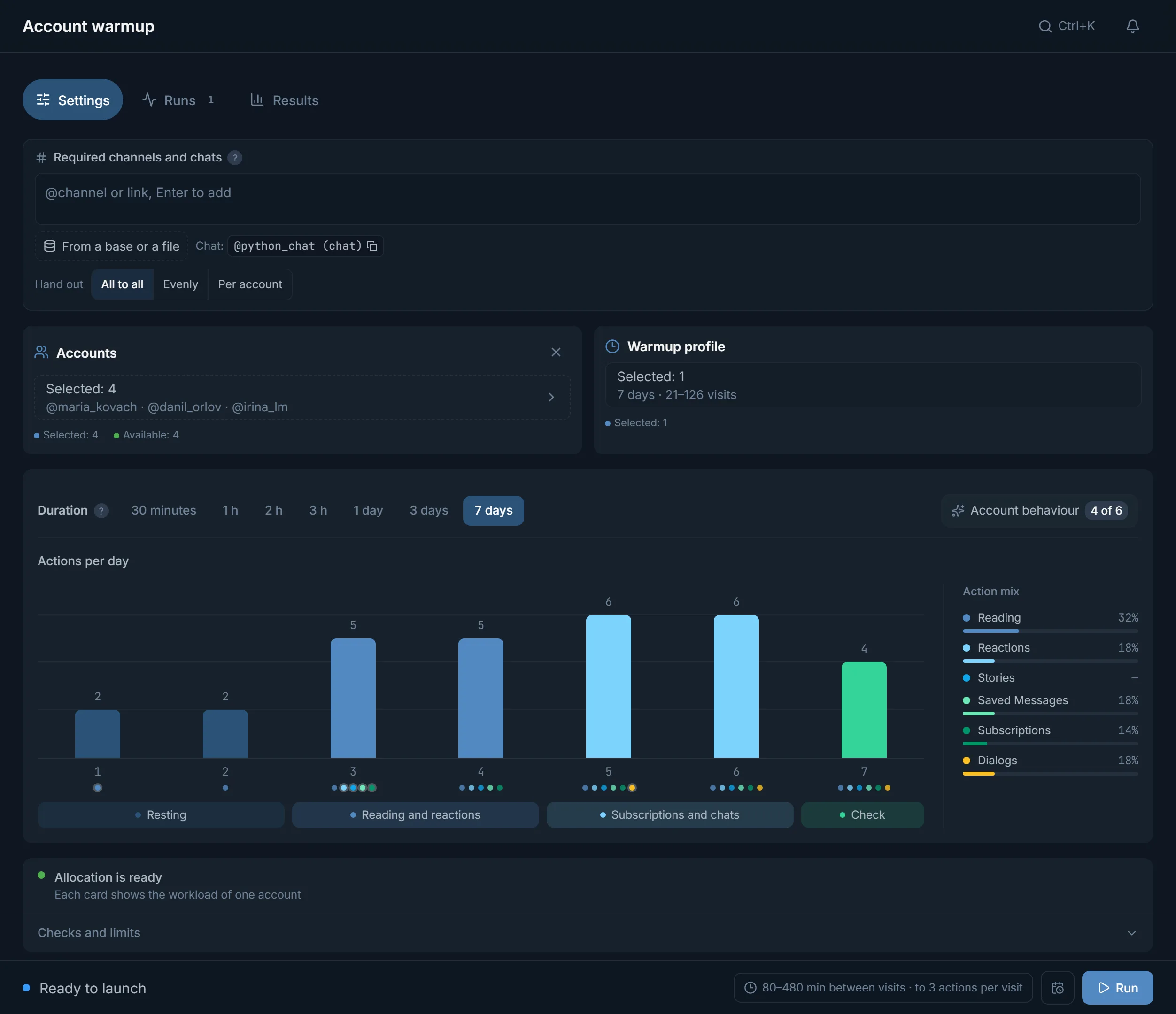
Warming up Telegram accounts before mailing takes up to 7 days in TeleTraff: two days of rest, then reading and reactions, subscriptions and chats on days 5–6, and a check on day seven. The software should run an account through such a programme in visits at different times of day. The Account warm-up module gives seven modes from 30 minutes to 7 days, six behaviour switches, a visit plan for every account and a journal of confirmed activity. Warm-up does not change an account's age.
TeleTraff editorial teamUpdated: Checked in the panel
Short modes only read, long ones unlock reactions, subscriptions and chats day by day. The mode sets the ceiling of actions, and you switch off what you do not need.
The day of visits is drawn in advance on a daily curve and differs between accounts and between days. After a restart the programme carries on with the same day.
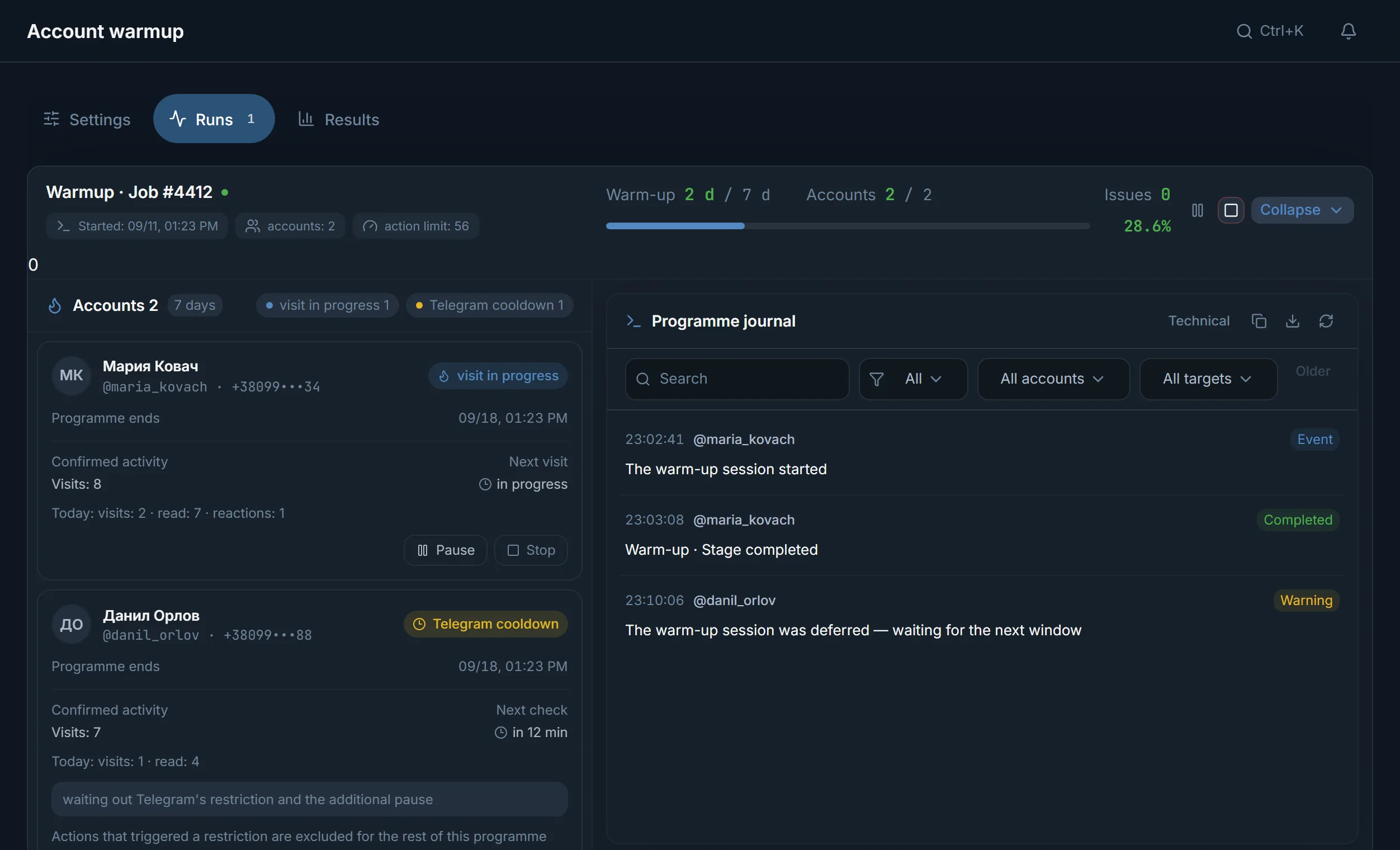
The account card shows confirmed activity and the next visit, and the programme journal keeps events behind a filter.
Warm-up is a series of ordinary account actions before you give the account work: reading channels, reactions, subscriptions, visits at different times. Telegram itself has no “warmed up” status and no program assigns one. The software walks the account through a schedule and shows what it did. It does not change the account's age or registration date.
In TeleTraff this is the Account warm-up module, and the article on warming up in a week explains a seven-day scheme day by day. This page covers something else: what to check in any auto warm-up program and which values this one uses.
| Requirement | Why it matters | What TeleTraff does |
|---|---|---|
| A start without actions | A new account in human hands reads first instead of joining dozens of channels | In the seven-day programme the first two days are the Resting phase: up to 2 actions a day |
| Actions unlock in steps | Reactions and chats are not switched on in the very first visit | The mode sets the ceiling: the half-hour mode only reads, while chats between accounts, comments and messages in chats exist from the 3-hour mode up |
| A visit instead of a stream | A person opens Telegram for a few minutes and leaves | Before launch the panel shows “up to 3 actions per visit”; between visits the account is offline |
| A shape for the day | Visits should not run on an even grid | The day is drawn in advance on a daily curve: no more than 12 visits a day and at least 22 minutes between them |
| A reaction to Telegram's answer | After a restriction the same series must not be repeated | The account gets the Telegram cooldown state, and the actions that triggered the restriction are excluded until the programme ends |
| Survives a restart | A restart must not bring a new rhythm | The plan for an account and a day is fixed, so the same day carries on |
| A report of real actions | A plan does not prove the account did anything | Confirmed activity, the number of visits, Next visit and the Programme journal |
| Mode | What is open | Time between visits |
|---|---|---|
| 30 minutes | Reading only: the account does nothing but read | 8–18 min |
| 1 hour | Reading, reactions, stories and joins | 12–28 min |
| 2 hours | The same as the one-hour mode: reading, reactions, stories and joins | 18–45 min |
| 3 hours | Talking opens: chats between accounts, comments, messages in chats | 24–60 min |
| 1 day | A day of visits on a daily curve, talking is open | 90–360 min |
| 3 days | Three days, talking is open, the plan by day is shown on screen before launch | 120–420 min |
| 7 days | A week, talking is open, it starts with two days of Resting, and the plan has a quiet day | 80–480 min |
The interval is an estimate that the panel shows before launch in the Cycle interval line. Modes measured in hours draw visits within exactly these limits. In modes measured in days the exact visit times come from the day plan, described below. If your plan limits the programme length, the long modes are unavailable and a note appears beside them: “The current plan supports warm-ups of up to N days.”
| Phase | Days | Actions per day, up to |
|---|---|---|
| Resting | 1–2 | 2 |
| Reading and reactions | 3–4 | 5 |
| Subscriptions and chats | 5–6 | 6 |
| Check | 7 | 4 |
The numbers are a phase ceiling, not a plan for the day. Before launch the panel draws bars by day and shows the mix of actions in percent: reading, reactions, stories, saved messages, subscriptions, chats. Under the bars there is a note that the actual actions depend on the account's state in Telegram.
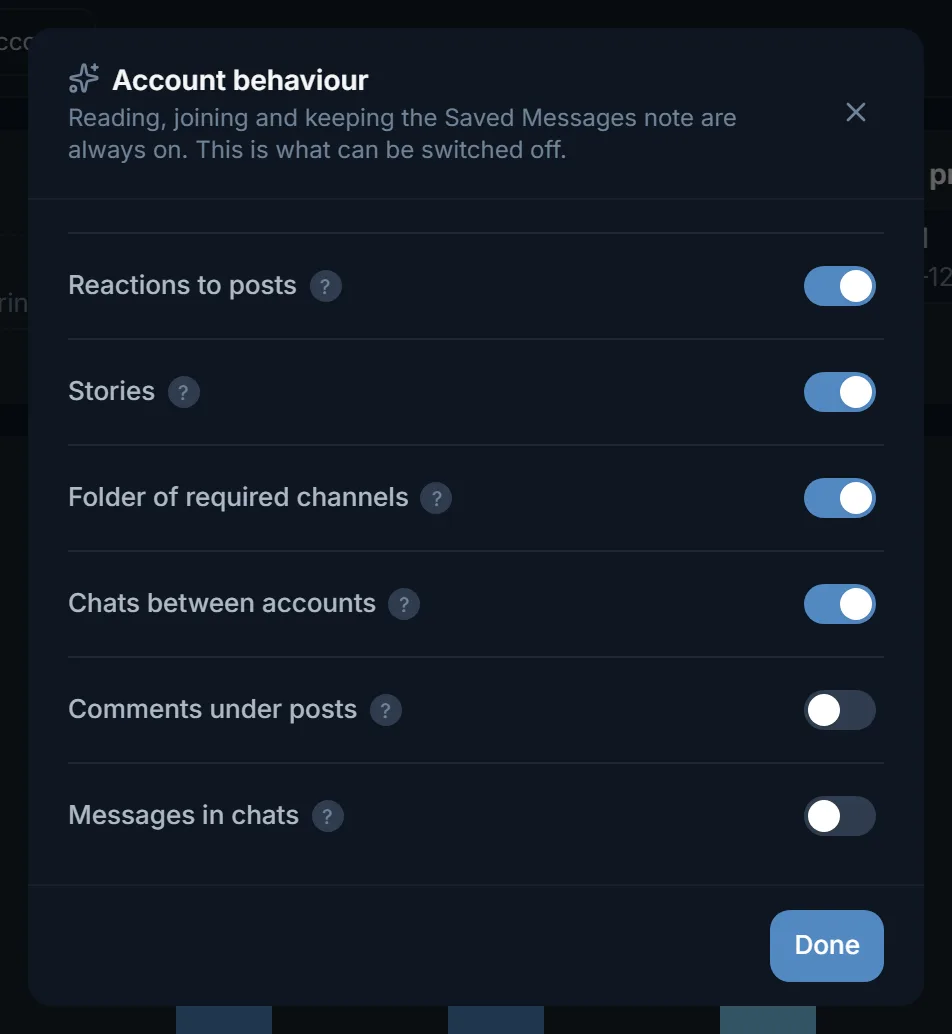
Reading, joining channels and keeping the Saved Messages note are always on for the account. The rest can be switched off in the Account behaviour window, and next to it the panel shows how many are on, for example “4 of 6”.
| Switch | Default | What it does |
|---|---|---|
| Reactions to posts | On | Reacts to a post it liked and sometimes takes the reaction back |
| Stories | On | Watches stories of the channels it follows |
| Folder of required channels | On | Puts the required channels and chats into its own folder |
| Chats between accounts | On | Short dialogs with other accounts of the same run |
| Comments under posts | Off | Leaves a comment in a channel's discussion |
| Messages in chats | Off | Writes to the required chats in the second half of the programme |
The Required channels and chats card sets where the account must be by the end of warm-up. Joins are spread over the days of the programme and chats go in the second half. The list is typed by hand, taken from a TXT file or from a parsed base, and from a base the first 300 records are read. A chat is marked with the word “(chat)” after the link. The list can be handed out in three ways: All to all, Evenly or Per account.
A programme shorter than a day draws visits inside its own window, with the interval the panel showed before launch.
The account's entire local day is drawn in advance on a daily curve with an evening peak and a shallow night dip that never reaches zero. The number of visits differs between accounts and between days.
Outside its window the account does not act. If you launch a programme at night, the panel offers to start in the morning: otherwise the deadline is already running and there are no visits.
Now and then, inside sleeping hours, the account comes online for 30 seconds to 2 minutes, looks at the list of chats and leaves.
The plan is fixed for an account and a day. After a restart the programme carries on with the same day instead of inventing a new one, while different accounts keep different rhythms.
What warm-up is as a technique and why it comes before mailing or neurocommenting is explained on the page about account auto warm-up.
Terms on this page
The panel names no single figure: there are seven modes, from 30 minutes to 7 days. The half-hour mode gives a reading visit for an idle account, and the seven-day mode starts with two days of Resting. The right length depends on the account's age and state and on what you will do with it next.
Yes. Accounts are chosen on the Accounts card, each has its own visit plan and its own card on the Runs tab. You can pause or stop any single account while the others carry on.
Telegram answered with a wait or a restriction. The programme sits out the period and adds a pause of its own, and the actions that triggered the restriction are excluded until the end of this programme.
Outside the activity window the account does not visit, while the programme deadline is already running. So the panel offers to start in the morning, and you can accept or keep the launch now.
No. A pause by your command does not change the deadline. After resuming there is less time left for visits than there would have been without the pause.
Comments under posts and messages in chats are off by default. Chats go only between accounts of the same run. Reactions, stories and joining channels from your list are on, and each of them can be switched off in the Account behaviour window.
Read next
More in this section
Other sections
Pick a mode, leave the switches at their defaults and open the Runs tab after a day: it shows the visits, confirmed activity and the journal.