Job automation
Schedules that launch your modules by themselves at a set time: one schedule, several modules, a live preview of upcoming runs and an execution log.
- A schedule launches ready modules on its own
- Several modules in one schedule
- Preview of upcoming runs and a log
Automation launches already-configured modules on a schedule, without you. Set up mailing or warmup once, choose a time, and the panel starts them itself every day, on weekdays or by your own rule. One schedule can launch several modules at once.
How to use it
- Create a schedule and add ready modules to it.
- Set the time rule, date, time and time zone.
- Check the preview of upcoming runs and activate.
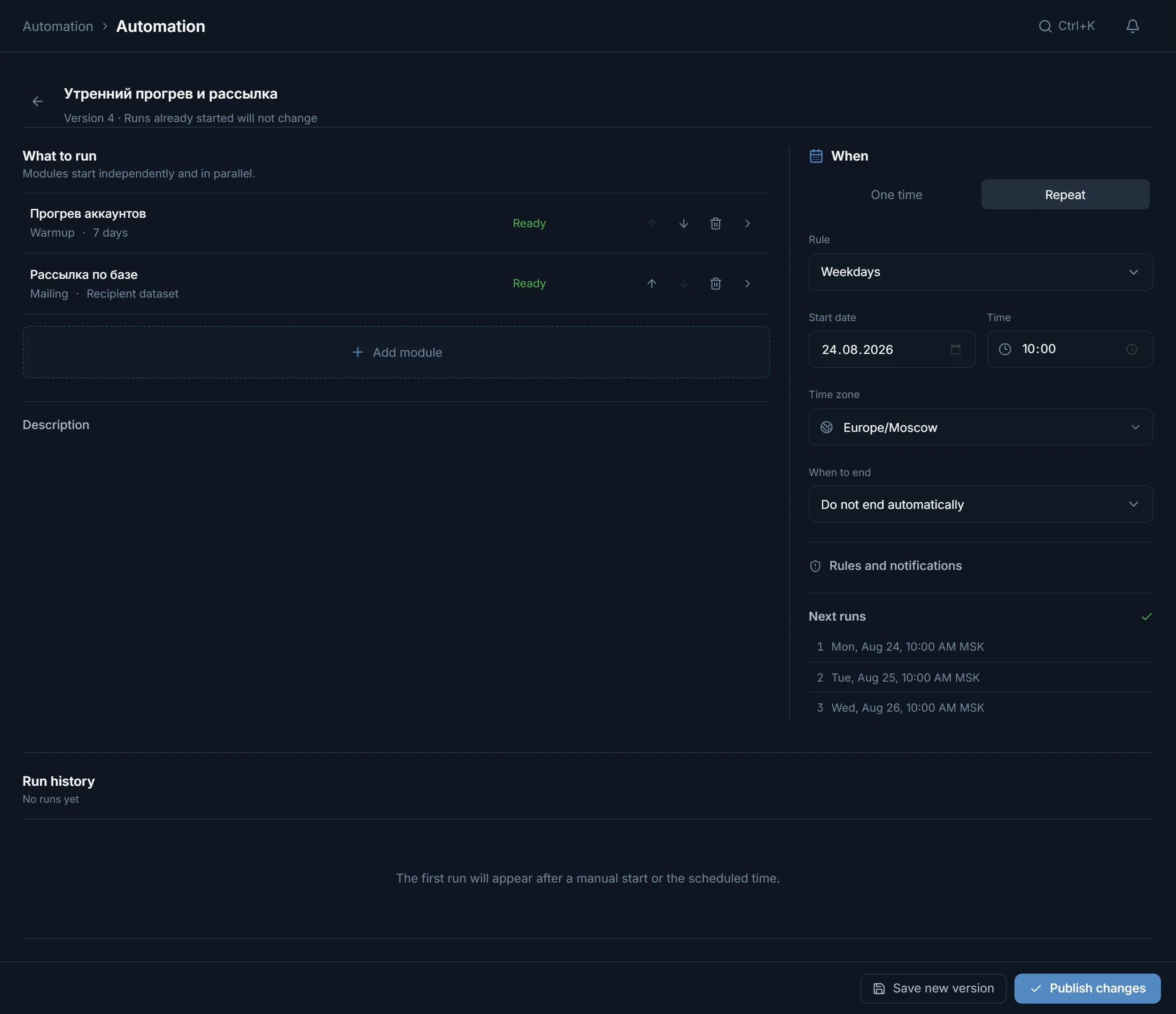
What can be scheduled
Almost all work modules can be scheduled: mailing, chat broadcast, the inviter, mass story views, reactions, the reporter, neurocommenting, AI chat, warmup and parsers. Only Dialogs are not supported: it is live conversation, not something you run by an alarm clock. One schedule can hold several modules, and they start independently and in parallel.
How the time is set
- 'Once' or 'Repeat'.
- The recurrence rule: every day, on weekdays, on chosen days of the week, monthly, or on an interval in hours, days or weeks.
- A start date, time and time zone. Your zone is filled in, and shifts from daylight saving are marked separately.
- 'When to end': do not end, until a given date, or after a set number of runs.
On the right a live 'Upcoming runs' preview lists the dates right away, and a 'Needs attention' block highlights anything blocking the start.
A module's settings in a schedule
Each module in a schedule is configured separately and takes its last saved settings as the base. An important point about membership: you can pin a specific list of accounts and targets, or take 'the pool's membership at launch time' or 'the current filter result'. Then each run pulls in the current accounts rather than the ones from when the schedule was created.
Overlap rules
- If the previous run is still going, a new one is marked skipped, while the already-running modules calmly continue. A schedule does not stack run upon run.
- If the server missed the time, you can skip that run or execute one missed run within a set window.
- Problem notifications are on by default, success notifications are optional.
The execution log
Every schedule has a 'Run history'. A row shows whether the run fired on schedule, manually, or was a retry of failed ones, and how it ended. Expanding it shows each module's job with the reason if something did not start: accounts busy with another run, the module's settings no longer ready, the plan's limit on accounts running at once exhausted. From there you can open the job itself in its module.
A schedule can be paused, run right now as a separate manual run, duplicated or sent to the archive. The archive stops future runs but keeps the whole history.
FAQ
Which modules can be scheduled?
Almost all work ones: mailing, chat broadcast, the inviter, mass story views, reactions, the reporter, neurocommenting, AI chat, warmup and parsers. Dialogs are not supported: it is live conversation, not a time-based job.
Can one schedule launch several modules?
Yes. Add several modules to a schedule, and they start independently and in parallel at the set time, each with its own settings.
Will a schedule take new accounts, not the ones from when it was created?
Yes, if in the module's settings you choose 'the pool's membership at launch time' or 'the current filter result'. Then each run pulls in the current accounts. Or pin a specific list, and the membership stays fixed.
What happens if the previous run has not finished?
The new scheduled run is marked skipped, while the running modules continue undisturbed. The panel does not stack one run on another.
How do I stop a schedule?
Pause it, and future runs stop. To remove a schedule entirely, use the archive: it stops runs but keeps the whole execution history.
Ready to open the panel?
Review the scenario constraints before launch.
Read next