Telegram Reporter
Accounts report a channel, chat, user or message: one target or a whole dataset, with a chosen reason and a breakdown of every submission.
- One target or a whole dataset
- Twelve complaint reasons
- A breakdown of every submission
The module files complaints from your accounts against a chosen target: a channel, chat, user or a specific message. You can report one target or walk a whole dataset, pick a reason from Telegram's own list, and see what Telegram answered for each submission.
Launch flow
- Select accounts and a target: a single one or a dataset.
- Set the target type, the complaint reasons and the number of submissions.
- Start the job and review results per submission.
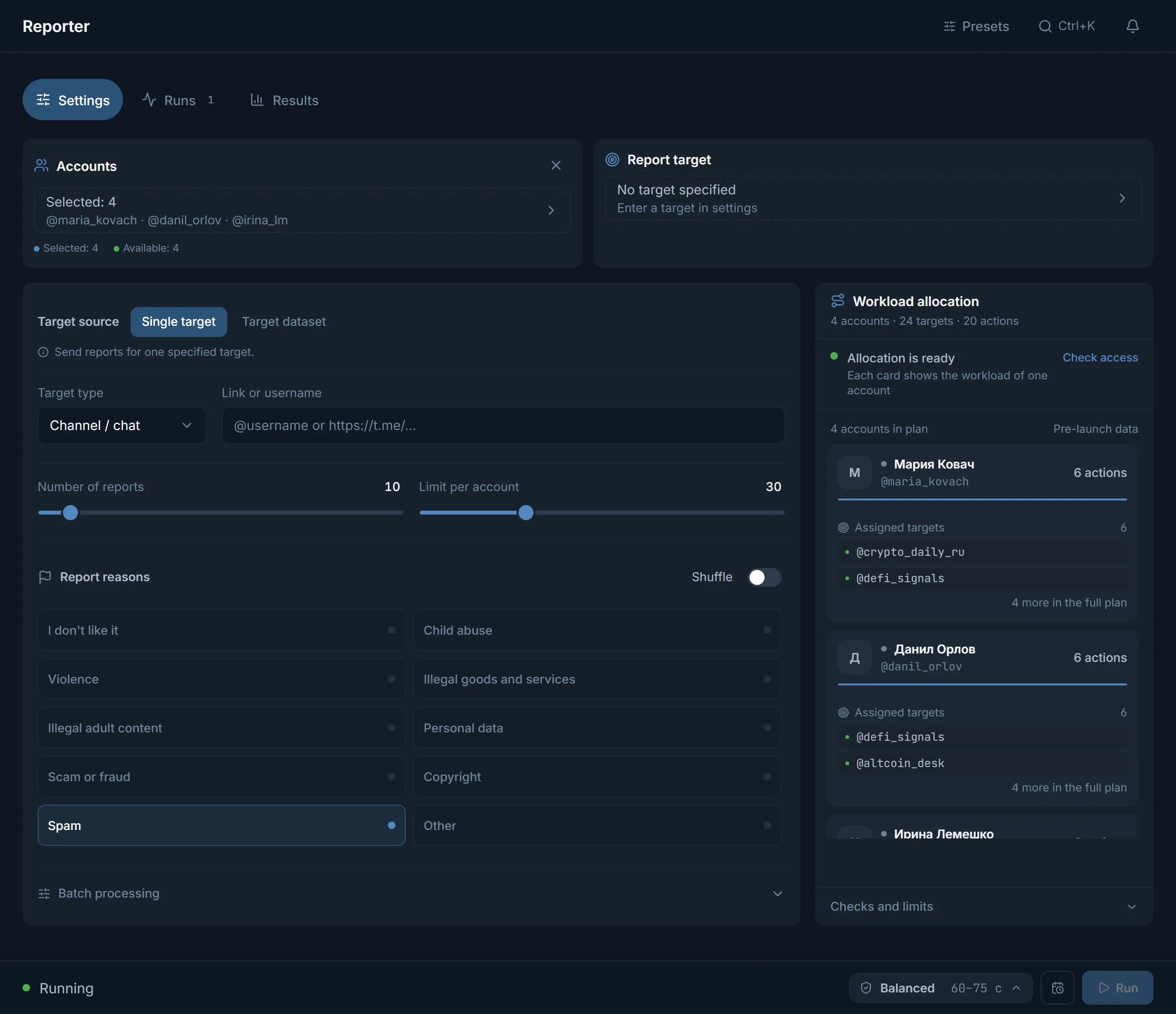
One target or a dataset
- 'One target': complaints go to a single object. The target type is chosen separately: a user, a channel or chat, a specific message. Below is a field for the link or @username.
- 'Dataset of targets': accounts walk a saved dataset in turn and file a complaint against each target. The dataset can be built by a parser or entered by hand.
Complaint reasons
The reasons are the same categories Telegram itself offers when you report. You can pick several at once; 'Spam' is checked by default:
- Spam, Scam or fraud: the most common reasons for ad and deceptive channels.
- Violence, Illegal goods and services, Illegal 18+ content: for the openly forbidden.
- Personal data, Copyright: for leaks and stolen content.
- Dislike, Not illegal but should be removed, Other: when a free wording is needed. 'Other' opens a field where you describe the reason in words.
Next to them is a 'Shuffle' switch: with several reasons chosen, submissions alternate between them rather than sending the same one.
How much and how
- 'Number of submissions': how many complaints to file per run, from 1 to 100.
- 'Per-account limit': how many complaints fall on one account, also up to 100. That spreads the load across the accounts rather than pushing from a single account.
- Before launch the panel checks access to the target, so accounts do not spend attempts on something already unavailable.
Results
After launch the 'Runs' tab shows how many complaints each account sent, and 'Results' collect the server-confirmed outcomes. As in the other modules, a refusal shows its reason rather than a generic error, and a run can be paused or stopped.
FAQ
What can be reported?
A channel or chat, a user, and a specific message. For a single target the type is chosen separately; for a dataset accounts walk through all targets in turn.
Can I pick several reasons at once?
Yes. Check the ones you need, and the 'Shuffle' switch will alternate them between submissions so complaints do not all go under one carbon-copy reason.
What does the per-account limit do?
It divides the total number of complaints among accounts so the load spreads more evenly. One account does not file every complaint in a row, which is calmer for the accounts themselves.
What happens to the target after a complaint?
The module files the complaint and shows what Telegram answered for each submission. The decision about the target itself is Telegram's, not the panel's.
Ready to open the panel?
Review the scenario constraints before launch.
Read next

Account manager
The workspace for all your accounts: tdata and session import, live statuses, a card for every account, and bulk actions over hundreds of accounts at once.

Telegram account warmup
Run a warmup profile for selected accounts with observable results.