The limit is stated first
The opening lines say that TeleTraff does not sell comments and explain what the panel runs instead.
TeleTraff does not sell comments. The panel runs your accounts, and they write under the channel's posts. Below: how that differs from buying, what a run on your own channel needs, and where the module's limits lie.
In short
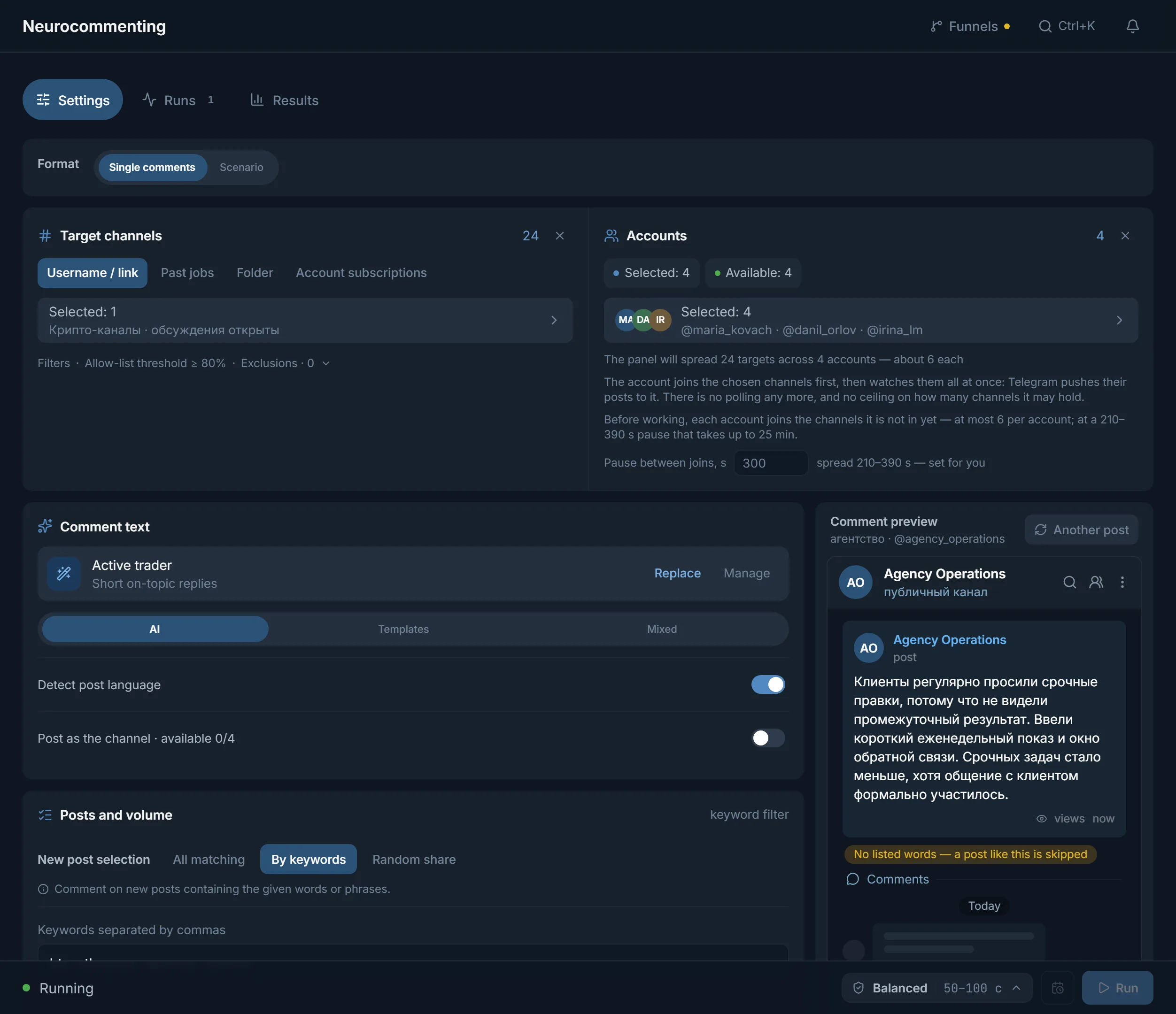
You can buy Telegram comments from separate services, but TeleTraff does not sell them: the panel runs comments from your own accounts. You set the channel, the accounts and the text, the accounts join the channel and write under posts with open comments. Your own channel can go into the target list, and the panel shows the outcome per comment, including a deletion check.
TeleTraff editorial teamUpdated: Checked in the panel
The opening lines say that TeleTraff does not sell comments and explain what the panel runs instead.
Buying and your own accounts are compared by text, control, report, payment and where the accounts come from.
Pauses, ceilings and joins come from the panel: ranges and defaults can be checked on the launch screen.
TeleTraff does not sell comments and does not recruit them for you. A plan gives access to the panel and a number of streams: a stream is one account currently working on a task. Nothing is charged separately per comment, per post or per module. Accounts and proxies are not part of a plan: they are your own or come from the panel's marketplace.
Comments under posts are written by the Neurocommenting module: your accounts join the channel and write in its discussion group. For a channel you promote, that means the commenter is under your control rather than with a third-party contractor.
| What we compare | Buying from a service (typically) | Your accounts in TeleTraff |
|---|---|---|
| Who writes the text | The contractor, from their own stock phrases | A neural network following your instruction, or your templates |
| What you set | A channel link and a number of comments | Channels, post selection, text, pace and ceilings |
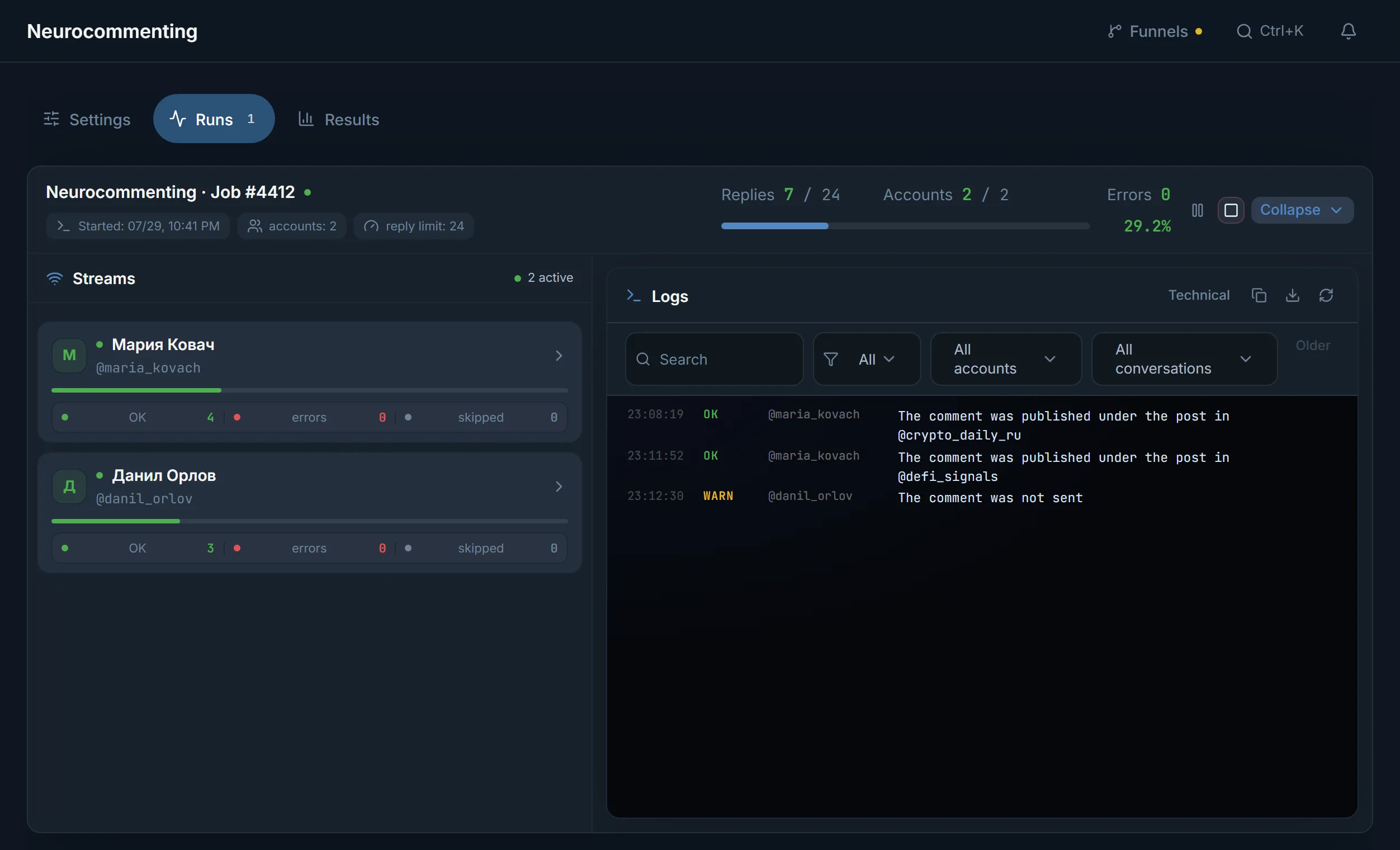
| What you see | A summary from the contractor | A run feed: every comment, skips with reasons, the deletion check |
| What you pay for | Comments or a package | The panel plan, accounts and proxies; nothing is charged per comment |
| Where accounts come from | The contractor | Yours or from the panel's marketplace |
If you need a few comments once and do not want to deal with accounts, a one-off purchase is simpler. Your own accounts pay off when comments are needed under every new post and the text and pace must stay in your hands.
The panel does not check whose channel is in the target list. The link or username of your channel goes into "Target channels" on the "Username / link" tab, like any other. There is one condition: the channel must have a discussion group with open comments. If discussion is off, the channel is skipped, and under a post with comments closed the account writes nothing.
For a run to start you need warmed-up accounts: Telegram restricts fresh, empty ones fastest. What else is required:
The "AI instruction" sets the tone and length of the comment, and the "Create your own" button makes a custom one. If the model does not answer, no comment is sent: a stock placeholder is not substituted.
"Template text" holds your ready-made comment, no neural network needed. If several accounts write under one post, with templates they will all write the same thing, and the panel warns about it.
The text type is chosen by the set "AI share" and kept in the result, so you can see which comment the model wrote and which came from a template.
In the "Format" field, "Scenario" is chosen instead of "Single comments": roles write in a set order, each with a sample line and a "Delay".
"Comment preview" on the right shows how the comment looks under the selected post, before launch. Post selection is set separately: "All matching", "By keywords" or "Random share".
Select accounts in the "Accounts" block. How many is determined by your plan and the task plan, not by the number of comments.
Add your channel on the "Username / link" tab. The "Past run", "Folder" and "Account subscriptions" tabs are for when targets are not taken from a list.
"Which posts to comment": "New only" is the default, "Existing" takes the channel's latest posts (1 to 100 per channel), "Existing first" works through the archive and then moves to new posts.
Choose "AI", "Templates" or "Mixed" and check the "Comment preview".
"Accounts per channel" sets how many accounts work in the channel, "Comments per post" how many of them write under one post. Each next one writes 1-2 minutes after the previous one, with its own text. The panel advises starting with 2.
Set the limits and the protection profile, then press "Launch".
| Setting | Value |
|---|---|
| Pause between comments, "Fast" profile | 3-7 s |
| Pause between comments, "Balanced" profile | 50-100 s |
| Pause between comments, "Careful" profile | 280-520 s |
| "Comment limit" per run | 1 to 500 |
| "Per account" | 0 to 500, 0 means no limit |
| "Per hour, per account" | 0 to 200 |
| "Recent posts per channel" | 1 to 100 |
| New joins per run | at most 30 per account |
An example for a crypto-signals channel: four accounts, "Accounts per channel" 4 and "Comments per post" 2. Under each new post two of the four write, the second 1-2 minutes after the first. The plan (prices) limits how many accounts work at once, not how many comments are written.
Terms on this page
No. TeleTraff sells access to the panel: a plan gives a period and a number of streams. Comments are written by your accounts in the Neurocommenting module, and nothing is charged separately per comment.
The panel does not check whose channel is in the target list, so your own channel is added the same way as any other. A discussion group with open comments is needed: without it the channel is skipped.
Warmed-up ones, each with its own proxy. The plan sets the number: Starter at $24 for 30 days gives 10 streams, Pro at $59 gives 50, Ultimate at $117 gives 100. Trial lasts 3 days and lets you import up to 10 accounts. Accounts and proxies are not part of a plan.
Yes. In "Templates" mode your ready-made text is sent, and in "Mixed" mode the model writes part of the comments following your instruction. Templates need no neural network.
No. Premium and a channel linked to the account are needed only for the "As the channel" mode.
The account writes nothing under that post, and in the run results it is marked as skipped. If discussion is off for the whole channel, the whole channel is skipped.
Read next
More in this section
Other sections
Sign up and connect your accounts: Trial gives 3 days free, and you can import up to 10 accounts into it.