Telegram AI commenting: setup, folders and why accounts should join channels in advance
A step-by-step look at launching AI commenting: how the module picks posts, why accounts need preparing in advance and how folders save join limits.
- Three modes: new only, existing, existing first
- Joins take most of the launch time
- A folder subscribes an account in one request
AI commenting writes comments under posts in the channels you pick. A first launch usually looks like this: the job is running and there are no comments. That is normal, the accounts are busy joining channels. This guide covers how the module works, where the time goes at launch and how to prepare accounts in advance so a run starts with comments right away.
How the module picks posts
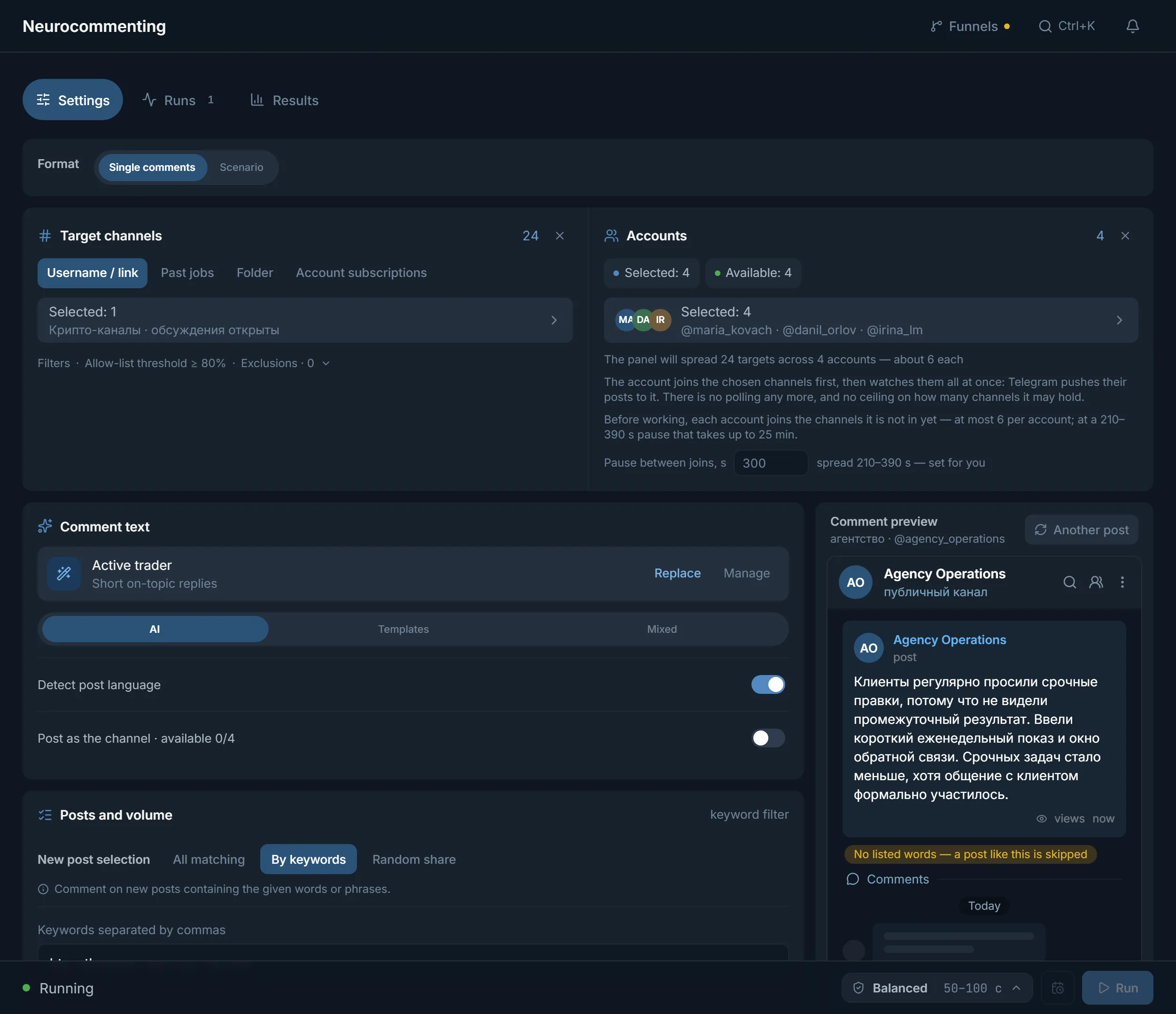
By default the module runs in «New only» mode: at start it records what the channel has already published and then waits for fresh posts. The point is that a comment under a fresh post sits at the top of the discussion and collects views, while a reply under yesterday's post gets far fewer readers. If the channels on your list post once a week, a short run in this mode can end with zero comments. That is not a bug, there were simply no new posts. When you need results right away, switch «Queue» in the «Under which posts» block to «Existing» or «Existing first» and set «Recent posts per channel», up to 100.
- All matching: a comment under every new post.
- By keywords: only posts containing the words or phrases you set.
- Random share: a share of new posts gets a comment, you set the share.
No subscription, no posts
Telegram delivers new posts only to channel members. An account without a subscription sees no posts at all. Polling the channel instead of subscribing is a bad idea too: restrictions arrive fast for that, and the account drops out of the run. So the module joins every channel on the list first and only then starts listening.
Why joins eat so much time
Joining a channel is the action Telegram limits hardest. So the panel keeps a pause: 300 seconds between joins by default, spread between 210 and 390 seconds. Six channels per account turns into 25 minutes of waiting. All that time the account is not commenting, and the posts published during those minutes are gone for it. Hence the main point of this guide: move the joins out of the working run and into preparation.
- A prepared account starts with comments, not with subscriptions.
- Joins can be spread over a few calm days instead of burning them all on launch day.
- If a join limit arrives, it arrives during preparation, where nothing is on fire.
- Repeating the preparation is free: channels the account is already in are skipped without a request.
A folder: one join instead of ten
A t.me/addlist link works not as a list of channels but as a single Telegram object. One request and the account is subscribed to everything inside. The same ten channels one by one means ten joins with pauses: almost an hour against a couple of seconds. Most importantly, the account spends one join from its quota instead of ten.
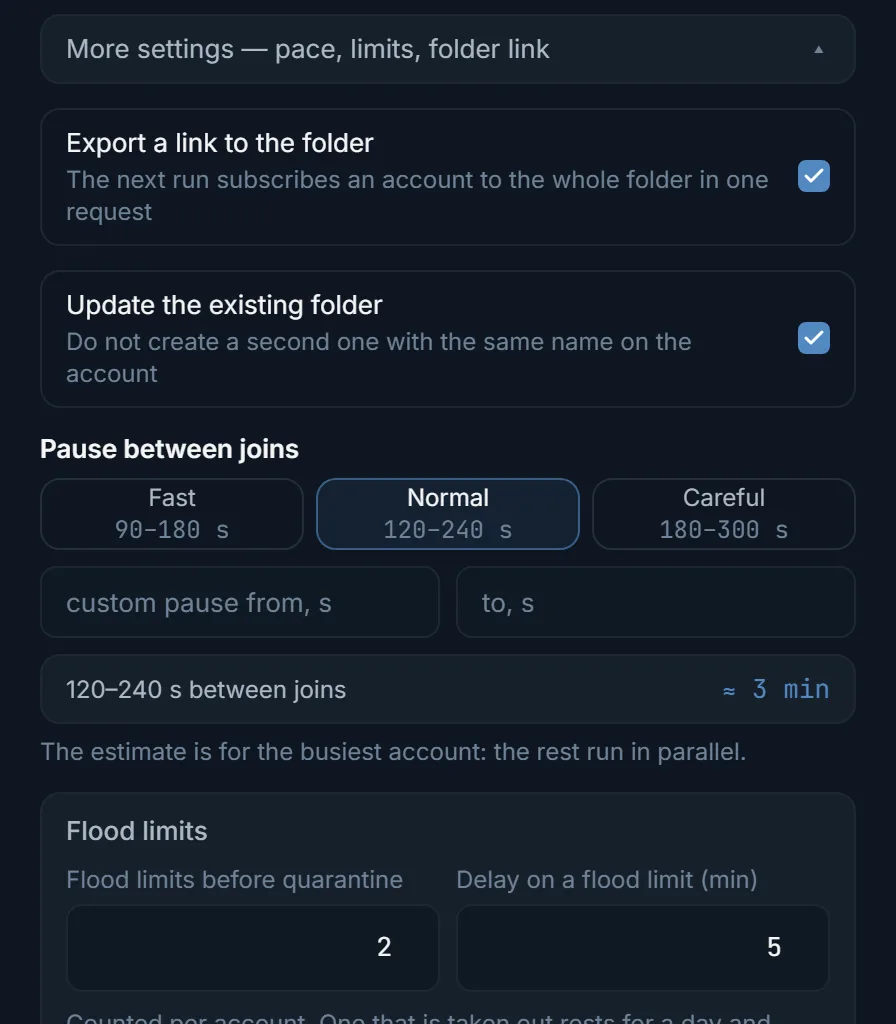
AI commenting has the «Folder» tab in the «Target channels» block for exactly this. Paste the link, the panel reads the folder and takes every channel in it. A folder mixes fine with a plain list: the run recognises the channels that came from the folder and does not join them twice. The folder itself is easiest to build in the account manager, the dialog is on the screenshot below.
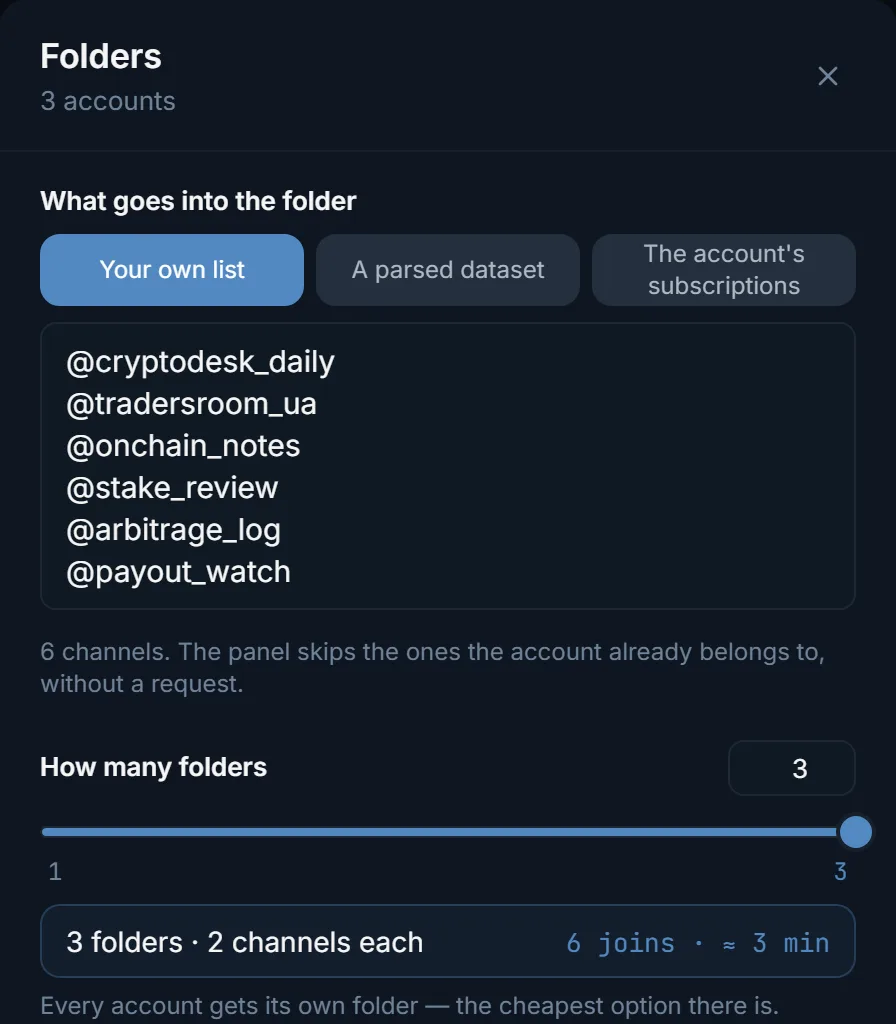
- «What goes into the folder»: your own list, a parser dataset or the account's own subscriptions.
- «How many folders»: one shared across all accounts or each account gets its own share of the list.
- «Export the folder link»: the very link the next run uses to subscribe an account in one request.
- «Maximum channels per account»: a hard ceiling. Telegram itself allows up to 100 chats in a folder, 200 with Premium.
- The join pace and the flood-limit threshold live right there, under «More settings».
«Account subscriptions»: a run with no joins at all
The fourth tab in «Target channels» works the other way around. The target list is ignored: every account comments in the channels it is subscribed to itself. There is nothing to join, the account is already a member of its subscriptions, so this mode has no join phase at all. The module enters the discussion group on its own at the moment of the comment, and only where a new post actually appeared.
An important detail about folders. A folder on the account filters nothing: its channels are ordinary subscriptions. Launch «by subscriptions» and the run takes every subscription with comments open, including the channels from all of the account's folders. If you want one specific folder only, paste its link into the «Folder» tab: then the run takes just that folder and ignores the rest of the subscriptions.
The panel counts subscriptions but comments only in channels where discussions are open. There are always fewer of those. The estimate is visible before launch: how many channels across how many accounts have been counted and which accounts have not been asked yet.
Launch order
- 1
Collect the channels
Usernames, links or a parser dataset. Comments live in the channel's discussion group, so a channel with discussions switched off will not work.
- 2
Build the folder in the account manager
Select the accounts, press «More», then «Folders». Pick the channel source and enable the link export. Set a calm pace: this is preparation, there is no hurry.
- 3
Let the joins finish
The day before launch is best. While preparation runs, do not use the same accounts in other modules: an account has one join quota shared by everything.
- 4
Launch AI commenting
Paste the folder link into the «Folder» tab. Or switch on «Account subscriptions» if the accounts are already subscribed to the right channels.
- 5
Check the first hour
The «Runs» tab shows what every account is doing. On a prepared account the first comment appears with the first new post, not half an hour later.
Common mistakes
- Fresh accounts straight into battle. An unwarmed account catches restrictions first, and a pile of joins only speeds that up. Warm-up first, comments after.
- Joining and commenting in one run on a big list. The first flood limit lands mid-work and stops the account.
- The whole list on one or two accounts. Channels are split between accounts, and a big list needs more accounts, not a faster pace.
- Channels with closed comments on the list. The panel skips them and writes the reason into the results, but there will be no comments there.
- One text template for every account. Identical comments under a post give the whole thing away instantly, to readers and to antispam alike.
- Links in comments. The fastest way to collect reports. The account's profile should carry the link, not the comment text.
- Expecting comments from channels that post once a week. The module works on new posts only: no posts, no comments.
- Expanding a folder into a plain list by hand. That throws away the folder's only advantage: one join instead of dozens.
FAQ
Does the discussion group need a separate join?
No. Comments live in the discussion group and the module joins it itself. In subscription mode that happens at the moment of the comment, in the other modes together with the channel.
What happens to a channel the account could not join?
The run does not listen to it, and the target gets its own reason in the results: a private channel, a limit, a refusal. The panel will not poll a channel without a subscription, that is a straight road to restrictions.
How many channels fit into one folder?
Up to 100 chats, up to 200 with Telegram Premium. The plan in the «Folders» dialog is already counted against that ceiling.
I launched by subscriptions and the account has folders. What goes into the run?
Every subscription with comments open, including the channels from all of the account's folders. The folder filters nothing here. If you want just the folder, paste its link into the «Folder» tab.
Can a folder be mixed with a plain list?
Yes. The panel expands the folder into channels before launch, joins it through the link in one request and works the other targets as usual.
Ready to open the panel?
Review the scenario constraints before launch.
Read next

Telegram AI commenting
Configure comments for new posts with selected accounts, sources, and a prompt.

Account manager
The workspace for all your accounts: tdata and session import, live statuses, a card for every account, and bulk actions over hundreds of accounts at once.
 Guide
GuideWarming up Telegram accounts: from the purchase to the first real run
Which accounts to buy and which to skip, why an account should rest for a day, and how to pick a warmup programme in TeleTraff.