A number at every stage
Live accounts in a pool, recipients and Sent in mailing, channel joins in statistics. You can read the chain from top to bottom and find the stage where people drop off.
Pouring Telegram traffic to a gambling offer is a chain of five stages: accounts, audience, touch, channel or bot, offer. TeleTraff covers the first four and counts something different at each. The offer, the tracker, the landing page and the payouts stay with you. Below, stage by stage: what the module does, which number it gives and where the count stops.
In short
A Telegram traffic funnel for a gambling offer runs in five stages: accounts, audience, touch, channel or bot, offer. In TeleTraff the first four are covered by pools and warm-up, the base and parsers, mailing, neurocommenting and Dialogs, and a funnel that counts joins to your channel. The panel counts what was sent and who joined the channel. Registrations, deposits and offer payouts it does not see: your tracker counts those.
TeleTraff editorial teamUpdated: Checked in the panel
Live accounts in a pool, recipients and Sent in mailing, channel joins in statistics. You can read the chain from top to bottom and find the stage where people drop off.
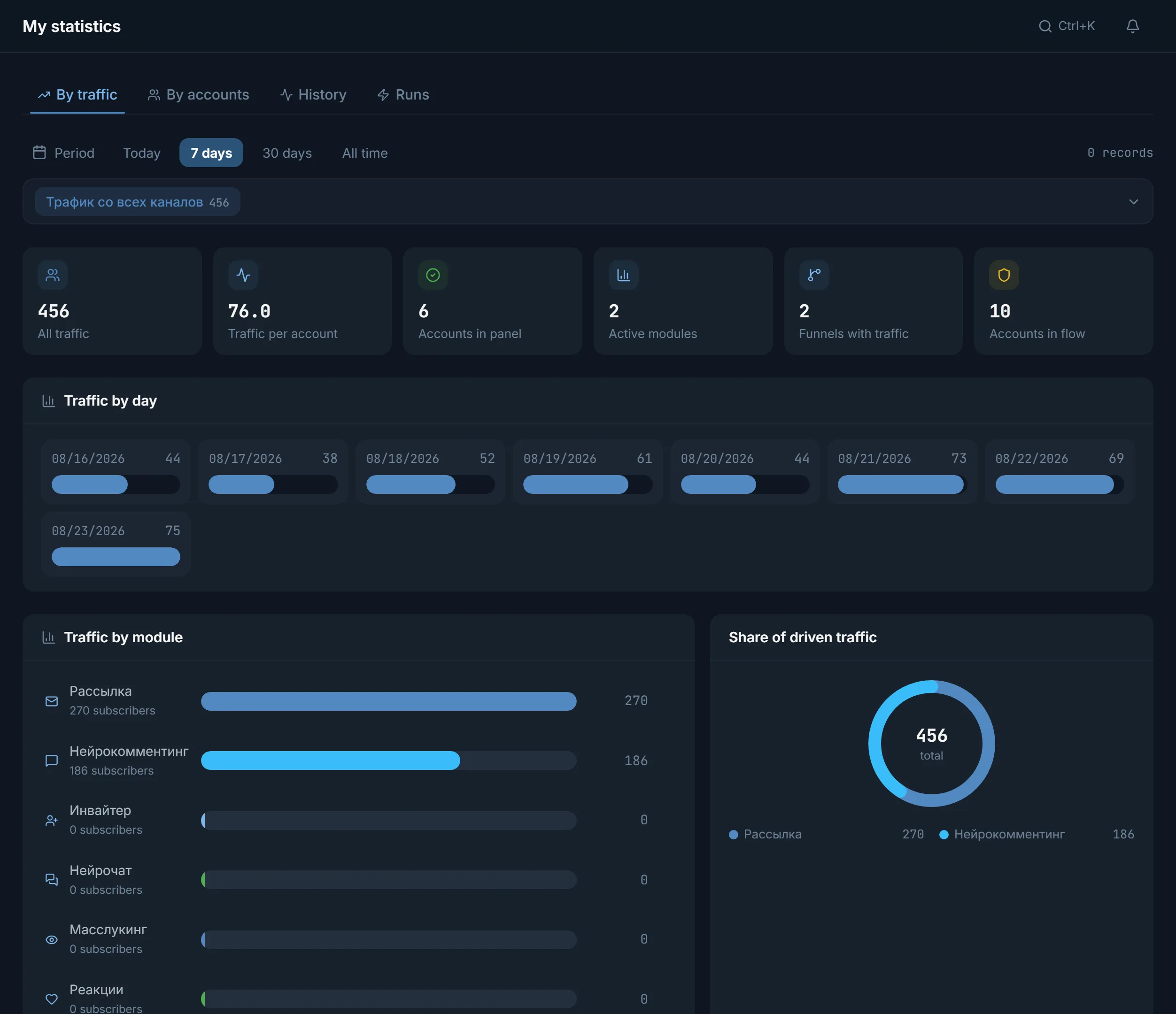
A funnel is an invite link to your channel. The panel records a person's join through that link once and ties it to a module and a funnel.
The panel shows mailing reads and clicks as unavailable, and the offer is counted outside it. You know what to connect to the tracker instead of hunting for those numbers in the panel.
An arbitrage team pours traffic into Telegram like this: it takes accounts, finds an audience, writes to it, leads people into its own channel or bot and from there to a casino or bookmaker offer. Every stage loses someone, so the count has to happen at every stage and not only at the payout.
Inside the panel the word «funnel» means something narrower. A funnel in TeleTraff is the link a module uses to bring people to your channel. Until there are funnels, the Traffic tab has nothing to count. Who the product suits is covered on the page about gambling traffic; this page is the mechanics of the stages.
| Stage | What happens | Where in TeleTraff | What the panel counts |
|---|---|---|---|
| 1. Accounts | A farm for the geo: accounts with proxies, warmed up | Pools, account manager, auto warm-up | In a pool: total, ready, working, warming up, issues, proxies |
| 2. Audience | The places and people you can reach | Open base, parsers | Channels and chats, collected lists, source quality over 14 days |
| 3. Touch | First message, comment, reaction | Mailing, neurocommenting, neurochatting, masslooking | Recipients, Sent, Delivered, errors |
| 4. Channel or bot | The person lands where you lead them next | Funnels, Dialogs | Joins to the channel through the funnel link, leads by your own condition |
| 5. Offer | Registration, deposit, payout | Outside the panel | Nothing: tracker, landing page and the offer cabinet |
The table follows the order in which people are lost. The same order tells you how to read the numbers: check the stage where the number fell hardest first.
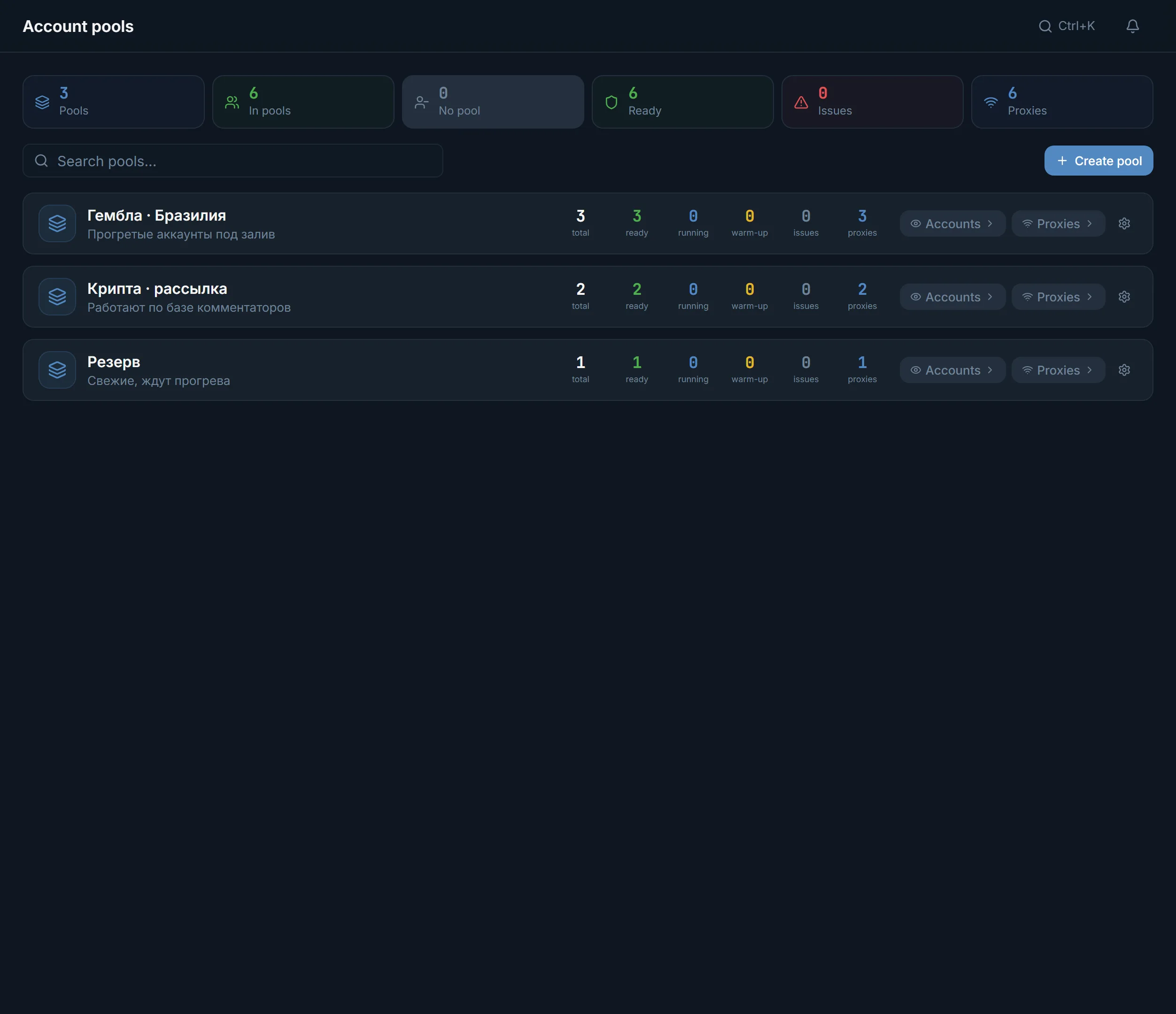
Each pool row carries six numbers: total, ready, working, warming up, issues and proxies. Above the list are the tiles Pools, In pools, No pool, Ready, Issues and Proxies. If issues grow, the touch at stage three starts from fewer accounts.
Warm-up is covered on the page about auto warm-up, and the channel base is browsable in the open base. For sources there is a Source quality block: the panel keeps an allow list, an On pause list and a block list from confirmed attempts over 14 days. A manual decision always overrides the automatic one.
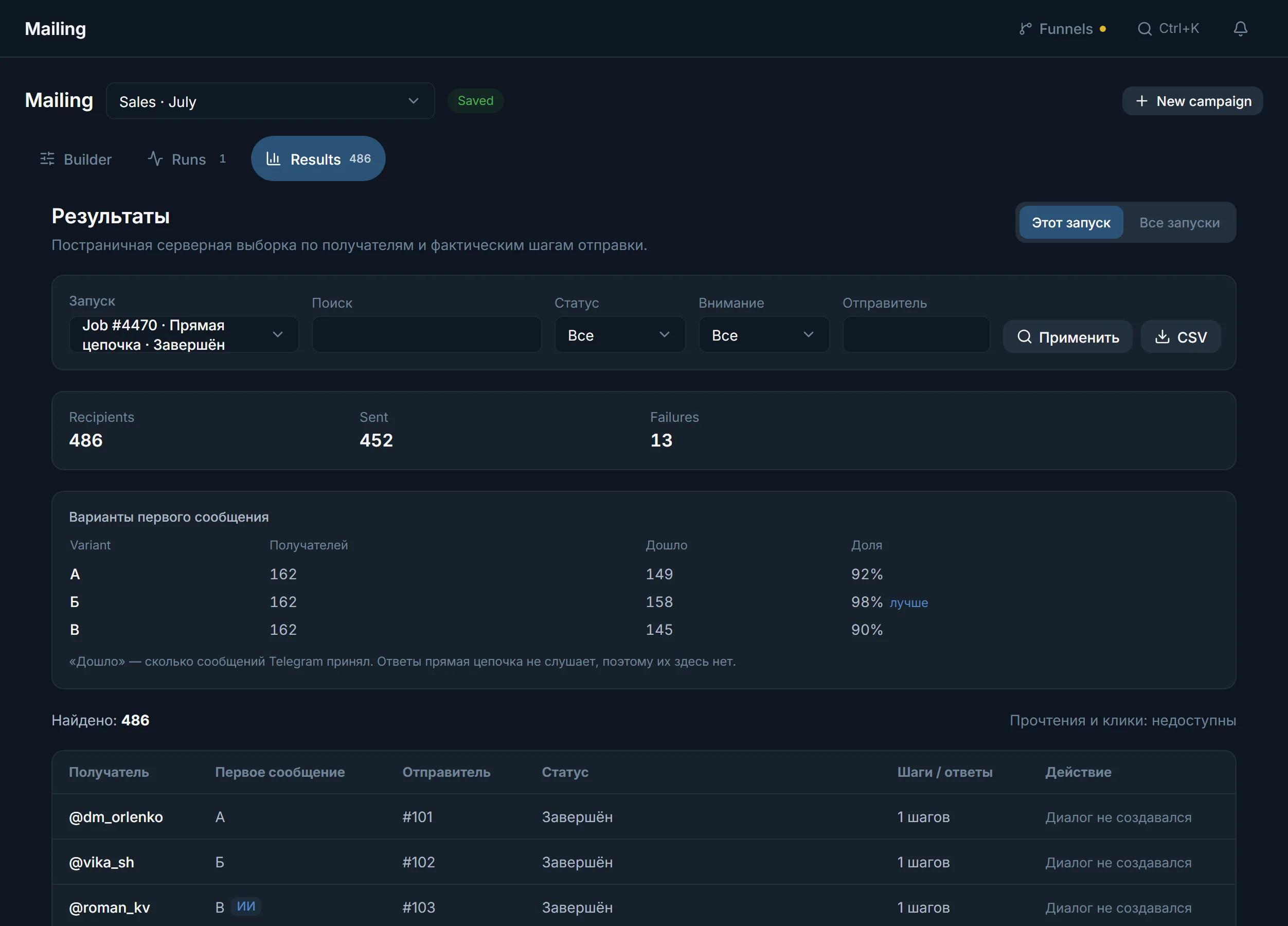
Each module has its own touch, and it is counted from that module's results. In mailing the results tab shows Recipients, Sent and Errors. For first-message variants there is a Delivered column: it shows how many messages Telegram accepted.
Replies in private messages are handled by Dialogs. A campaign card has a Leads list and a Who counts as a lead field: you describe in your own words what the person has to agree to. A person lands on the list once, at the first agreement, and only after Telegram accepted the reply. The tiles above the list are Messages sent, Contacts processed, Leads and Nothing sent.
The panel bot needs one permission in the channel: creating invite links. In the bot's settings it is the item “Invite users via link”.
A funnel is created in a module that leads people to a channel: mailing, masslooking, neurocommenting, neurochatting, reactions. The funnel gets its own invite link.
The module tags visits with the funnel link. Each join by a person through that link is recorded once, and the same person joining again is not counted a second time.
The Traffic tab shows All traffic, Traffic per account, Active modules, Funnels with traffic, traffic by day and traffic by module.
Conversion in the panel is the number of joins divided by the number of completed actions of the module. It is the share of touches after which the person joined the channel. That figure never reaches registration or deposit: it ends at the channel join.
| What you want to know | Visible in the panel | Where to count it |
|---|---|---|
| How many people opened a mailing message | No: Reads and clicks: unavailable | Not counted anywhere in the panel |
| How many joined the channel | Yes, by funnel, on the Traffic tab | In the panel |
| How many replied in private and agreed | Yes, the Leads list by your condition | In Dialogs |
| How many paid through a conversation | Only the Paid mark that you set yourself | Your own records |
| How many registered on the offer and deposited | No | Tracker and the affiliate cabinet |
| How much the payouts brought | No | The offer cabinet |
One setup, one funnel, one channel. That way joins do not mix.
The period on the tab is shared, for example 7 days or all time.
Add from 2 to 5 funnels. The criteria are Traffic, Traffic per account, Accounts running, Account losses, Conversion and Average activity.
If Conversion is almost the same and Traffic per account differs, the difference is in how many actions ran. If it is the other way round, the difference is in the touch text and the places.
What counts as a good conversion depends on the geo, the offer and the places you work. The panel names no single figure; compare your own setups with each other.
Terms on this page
No. The panel counts module actions, channel joins by funnel and leads in Dialogs by your own condition. Registrations, deposits and payouts are counted by your tracker and the offer cabinet.
Connect the channel, create a funnel in mailing and run it. Joins through the funnel link appear on the Traffic tab of statistics as a separate Mailing row.
The inviter invites people directly and bypasses the funnel, so the Traffic tab does not count it. The inviter's work is visible in the action log and in the module itself.
It is the share of a module's completed actions after which the person joined the channel. Joins are divided by actions. It has nothing to do with deposits or registrations.
A funnel counts joins to the channel the panel bot is connected to. Clicks on a link to a third-party bot or site are not visible to the panel; for those you need your own tracker.
From 2 to 5 funnels or modules with funnels. Comparison needs at least two items with traffic data for the chosen period.
Read next
More in this section
Other sections
Load your accounts, create a funnel in one module and open the Traffic tab in a few days: it shows how many people reached the channel.