A base from your own source
Paste a list of usernames into the Users block or upload a TXT file. A parser can collect it from other people's chats and channels.
Inviting moves people from a ready base into your chat or channel: an account adds them itself instead of waiting for them to subscribe. Below: the definition, how it differs from mailing and from buying subscribers, who adds whom and with which rights, six steps to a launch and the reasons an invite does not go through.
In short
Telegram inviting means adding people from a ready base to a chat or channel with inviter accounts: the person becomes a member at once, with no private message. In TeleTraff the Inviter module does it: you name the chat, load usernames, pick accounts and limits, and the panel adds people with a 75–150 second pause in Balanced mode.
TeleTraff editorial teamUpdated: Checked in the panel
Paste a list of usernames into the Users block or upload a TXT file. A parser can collect it from other people's chats and channels.
If the chat does not let members add people, a bot or the main account grants the accounts their rights while the run works.
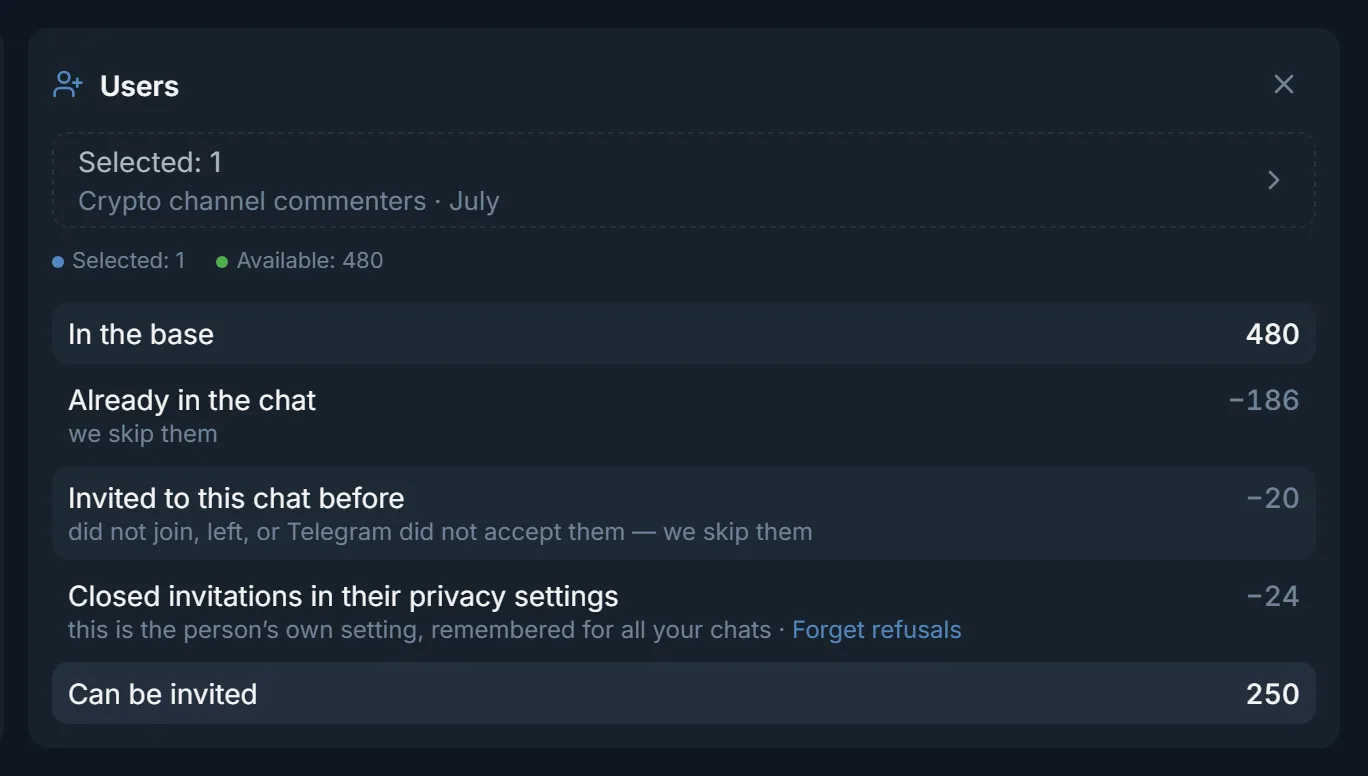
The panel does not call again those who are already in the chat, were invited before or closed invitations in their privacy settings.
Inviting in Telegram: an account adds a person to a chat or channel. The person receives no message and clicks nothing. They land in the member list and the chat shows up in their dialogs. That is how Telegram itself behaves.
The raw material for inviting is a base: the Telegram usernames of people. You collect it with a parser from other people's chats and channels, for example from commenters of crypto channels or from a traffic arbitrage chat. In the panel you paste the list into the Users block or upload a TXT file. The work itself is done by the Inviter module: it splits the base between your accounts and adds people one at a time, with a pause.
| Inviting | Mailing | Buying subscribers | |
|---|---|---|---|
| What the account does | Adds a person to your chat or channel | Writes the person a message | Nothing: a third-party service brings the subscribers |
| What the person gets | The chat in their dialog list, already a member | A private message | A subscription from other people's accounts |
| What you need | A username base, accounts, a chat, sometimes rights | A base, a text, accounts | Payment for the service |
| What limits it | The person's privacy, the pause, the account's daily limit | The recipient's private message settings, account limits | The supplier's terms |
| Module in TeleTraff | Inviter | Mailing | None: the panel has no such service |
Inviting fits when people have to be gathered in one place: a chat with funnel reviews, a crypto club, an infoproduct channel. If one text has to reach each person in private, that is a job for mailing.
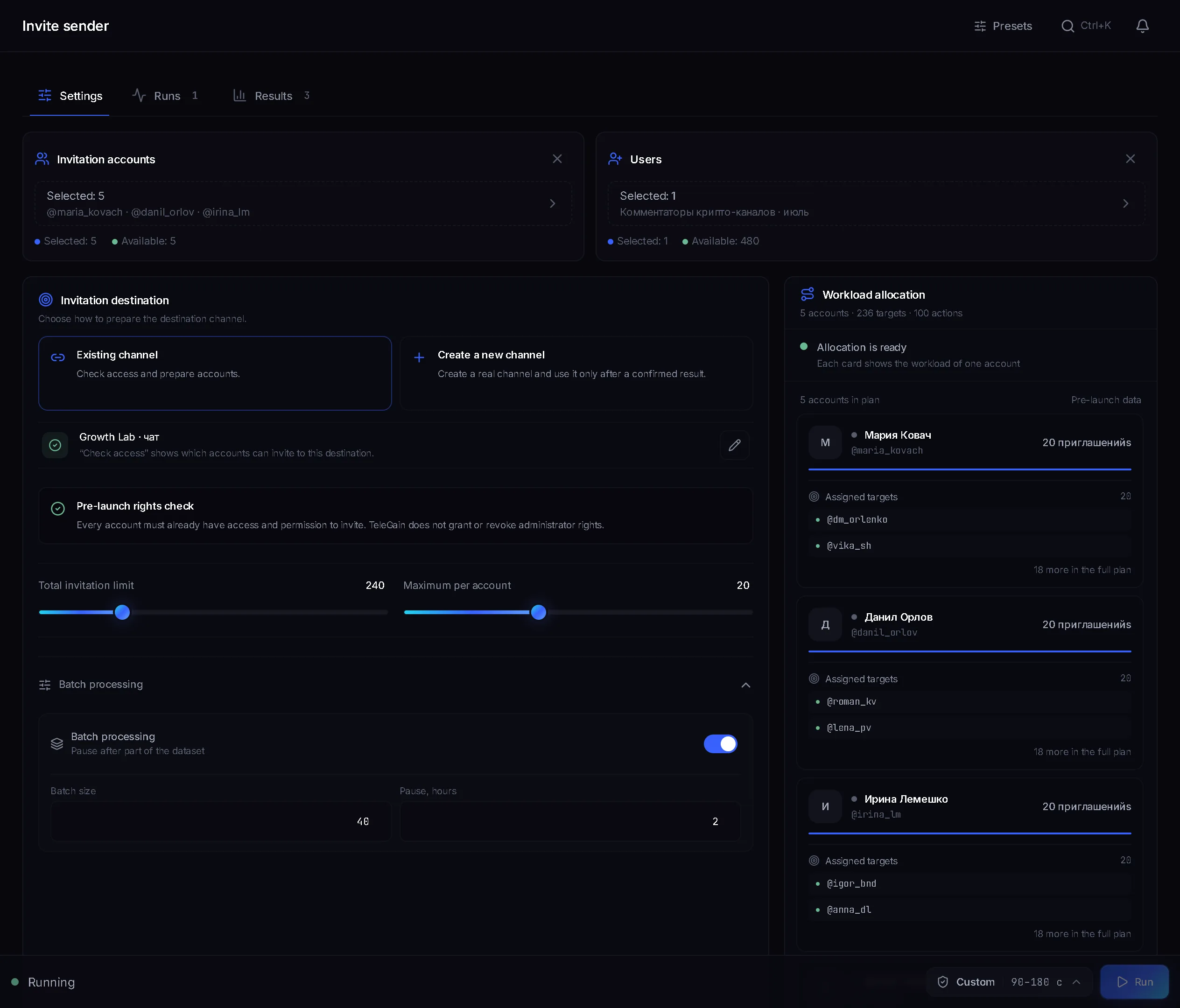
In the Invitation accounts block you choose which accounts work. In the Workload allocation each one gets its own card with a number of targets, for example 20.
The default method. The account adds the person itself. If the chat lets members add people, no rights are needed. If not, the Add members right is needed.
The account makes the person an admin and removes the role right away. This needs the Add new admins right.
Rights are granted by the Bot (a token from @BotFather, the Add a bot button) or by the Main account. The Admins line in the Chat passport shows how many of the 50 places are taken and how many more the run needs while it works.
In the Invitation destination block paste an @name or a t.me link and press Check. The Chat passport shows the type, the member count, the age, the admins, whether members can add people and whether the chat is found in Telegram search.
If members cannot add people, pick Bot or Main account under Who grants the rights.
In Users paste usernames or upload a TXT file. Channels and groups do not fit here: the targets are people.
In Invitation accounts tick the ones that will invite.
Total invitation limit is 200 by default, up to 1000. Per account per run is 20 by default, up to 50. Per account per day is empty by default, No limit, and can be set from 1 to 500.
The Balanced preset is set at the bottom: a 75–150 second pause between invites. Fast gives 30–60 seconds, Careful 150–300. Then press Run.
Chat preparation and a week-by-week ramp-up are covered in the inviting guide. What is known about daily numbers is collected on the Telegram limits page.
Terms on this page
Your account adds people from a list to your chat or channel. The person becomes a member at once, with no private message and no click on a link.
Mailing writes the person a private message, while inviting adds them to a chat. In the panel these are two separate modules: Inviter and Mailing.
It depends on the chat. If it lets members add people, no rights are needed. If not, a direct invite needs the Add members right and an invite via admin promotion needs Add new admins. A bot or the main account grants them for the length of the run.
Telegram publishes no such number. The panel sets no daily limit by default: the Per account per day field is empty and can be set from 1 to 500. The limits page collects practice from open sources, not a Telegram rule: 10–20 a day for a new account and 50–150 for a warmed one.
It is usually collected with a parser from chats and channels of your niche. It reaches the Inviter as a list of Telegram usernames or a TXT file.
That is how the panel marks people already called into this chat: they did not join, left, or Telegram did not accept the invite. With Continue the dataset using previous run results on, the panel skips such people.
Read next
More in this section
Other sections
3 days, no card: every module, 3 threads in each, up to 10 accounts. The clock starts with the first account you add.