How to get members for a Telegram group: inviting and AI chat
How to grow a Telegram group: collect the audience of similar chats, invite people, keep the talk alive with AI chat and hold on to newcomers. The TeleTraff way.
- A base from similar chats: only the people who write
- Inviter: direct invites and invites via admin promotion
- AI chat keeps the conversation alive, reactions bring people from other chats
To get members for a Telegram group you need three things: a live conversation, a base of people from similar chats and accounts that invite and keep the talk going. In TeleTraff the inviter adds people, AI chat holds the conversation and a parser builds the base. Below is the order from an empty chat to a live group.
How to grow a Telegram group: what are the ways
A group grows in three ways: you invite people, you draw them in with activity and you keep the ones who came. In a channel people read, in a chat they talk, so the logic differs. Channel methods are covered in a separate guide; this one is only about what works for a chat.
- Inviting: your accounts add people from a base straight into the chat.
- Presence: accounts talk in the chat like ordinary members, so a newcomer does not land in an empty room.
- Reactions: accounts react to people's messages in niche chats, the author opens the profile and finds the link to your chat.
- Retention: a pinned message, order in the chat and a conversation that does not fade.
Before you start
A person who has just been added looks at the chat for a couple of seconds. An empty feed pushes them away. Create the group in Telegram, write the rules and the topic, bring in the first live members and only then drive people in. In our experience, Telegram treats new members more calmly where live people are already present.
How to collect the audience of similar chats
You need people who care about your topic. Take the ones who write, not the ones who sit silently on a member list. For a traffic-arbitrage chat take arbitrage chats, for a crypto chat take trader chats, for an info-product chat take chats in your niche.
- 1
Find similar chats
Open the “Chats” parser. It looks for chats by keywords, links and related discussions. You can keep public chats only and set a minimum of members.
- 2
Widen the list
A saved chat dataset has the “Find similar” action: it looks for similar sources and extends the dataset.
- 3
Collect the people
Open the “Members” parser, pick the chat dataset in the “From dataset” tab and turn on “Only people who wrote in the chat”. What remains are the people who write now. More in the parsing guide.
- 4
Hand the base to the inviter
In the dataset list press “Hand off to work”. A dataset of people opens the inviter.
How to invite people into a chat with the inviter
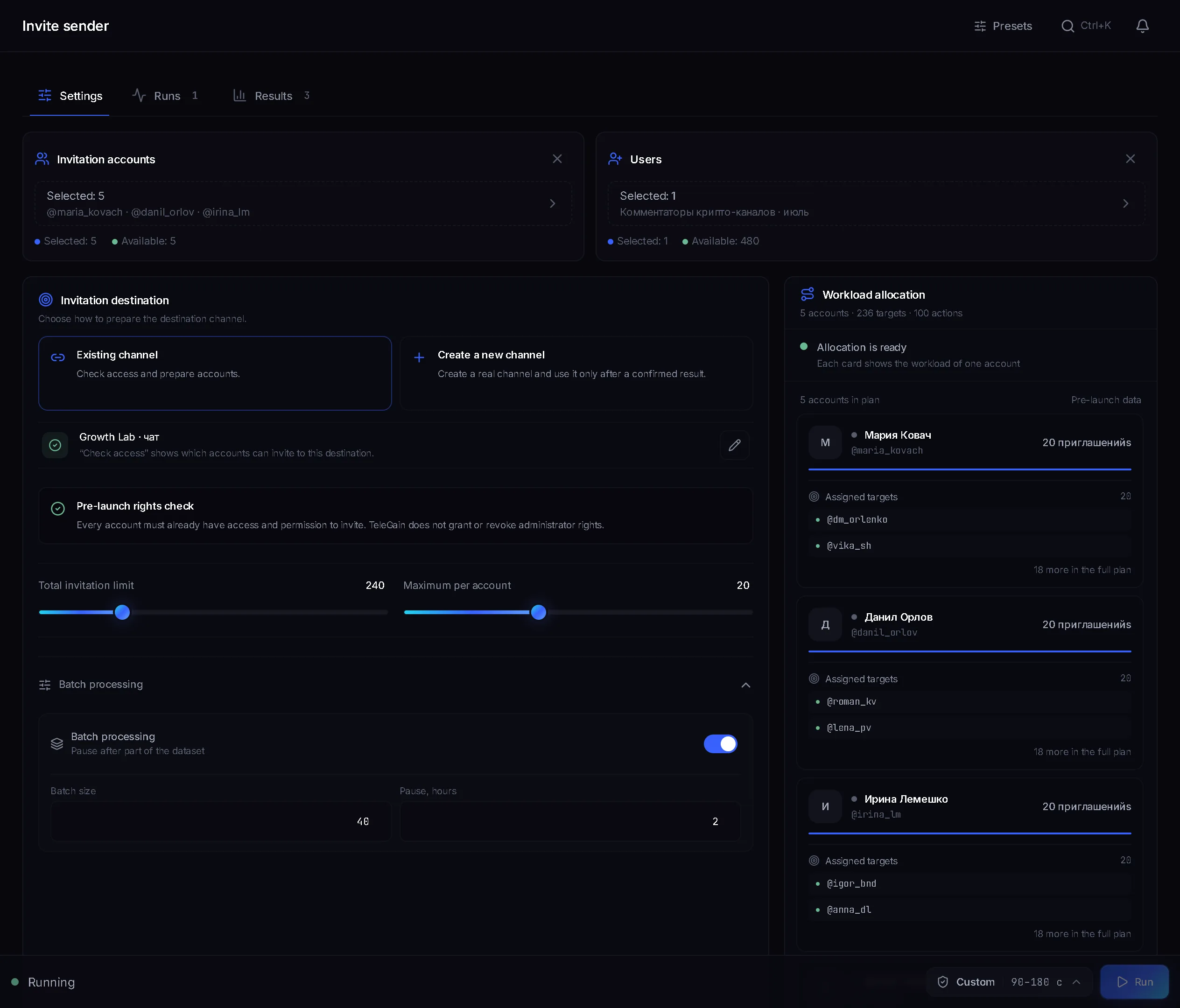
The inviter adds people from the base to your chat with your accounts. All its settings are covered in the inviting guide. For a chat, this matters:
- “Your chat or channel”: enter the @name or a t.me link and press “Check”. The panel shows the chat passport: type, members and age. It tells you whether the chat is ready before you launch.
- “Direct invite”: the account adds the person itself. For an open chat where members may add people, no rights are needed and the panel says “No rights needed”.
- “Invite via admin promotion”: the account promotes the person to admin and demotes them right away, then the panel checks whether the person got into the chat. Rights are needed for this method and for chats where members may not add people.
- “Who grants the rights”: “Bot” (your own bot, by its token from @BotFather) or “Main account” (your account, a chat admin with the right to add admins). Only accounts that are working right now hold the rights.
- Pace: you set how many invites an account makes. The “Fast”, “Balanced” or “Careful” speed changes the pause between invites.
- Dataset memory: the panel does not invite again people who are already in the chat, were invited before or closed invitations in their privacy settings. The “Who we skip from the base” block shows this before launch.
How to keep the conversation going: AI chat
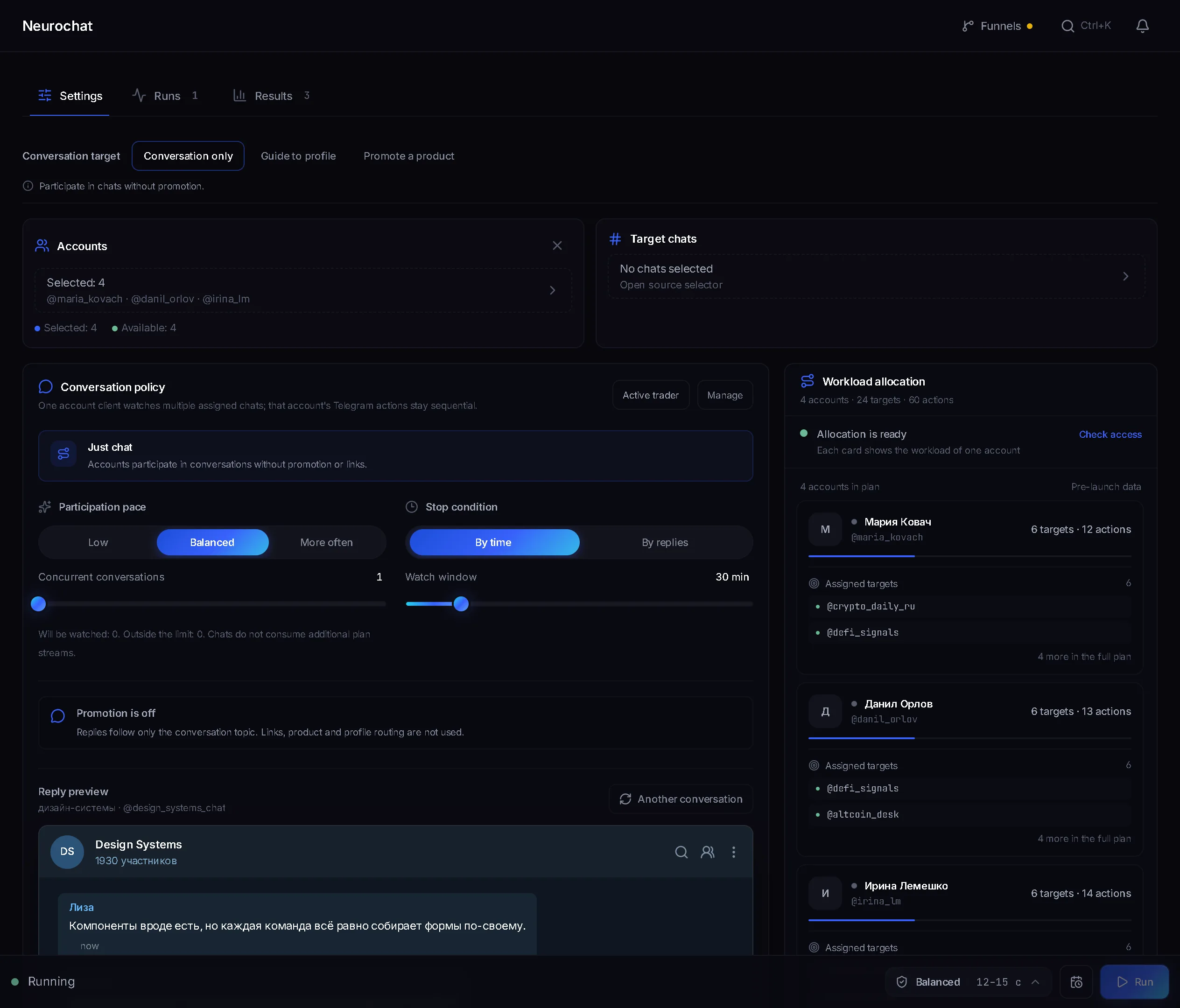
A chat where nobody writes empties fast. AI chat puts your accounts into the chat as ordinary members: they answer on topic, keep the talk going and start new topics by your instruction.
- “From a list”: you give the chat link and the accounts join on their own. If the chat admits by request, the account waits for approval. “Existing memberships”: accounts work where they already are.
- When to write: “On triggers”, “Join conversations” and “Start discussions”. The modes can be combined.
- “AI instructions” are shared by the campaign: who to be in the conversation, what to talk about, in what manner. In “Account instructions” each account gets its own persona.
- “Let several accounts into one chat”: a live conversation runs in the chat, and one account answers each message from a person.
- “Reply preview” shows what the account would do and sends nothing to Telegram.
Example for a crypto chat: a trader persona who answers newcomers briefly and to the point about stops and funding and sells nothing. The memory of conversations survives between runs, so the next run remembers what the account has already said.
How to draw people in with reactions
Mass reactions go on people's messages in other niche chats. The author sees the reaction in notifications and can open the account's profile. If the profile carries a link to your chat, some of those people will come.
- “Target dataset”: chats collected with the “Chats” parser, or “Account subscriptions”.
- “New messages”: for a set time the module watches the chats and reacts to fresh messages. “Published messages”: a one-off pass over what people have already written.
- “Reaction probability” leaves part of the messages without a reaction, like an ordinary reader.
- The account profile: name, avatar and a link to the chat in “Description”. It is edited in the account card in the account manager.
How to keep new members in the chat
- Pin a message with the rules, the chat topic and a link to what you gathered people for: a breakdown of setups, a free lesson, a signals channel. In the account “Console” open the chat and choose “Pin” on the message. The item appears only if Telegram gave the account the right to pin, so the account must be an admin.
- Keep order: in the “Console”, on the “Members” tab, each person has “Mute in the chat” and “Ban”. You need an admin account with the right to restrict members. If the right is missing, the panel says so.
- Do not let the conversation fade: AI chat keeps working on the following runs and remembers past talks.
Where to start: the order of steps
- 1
Create and set up the chat
In the account “Console” press the pencil at the bottom of the dialog list and choose “New group”, or create the group in Telegram itself. The group is created empty: write the rules and the topic, bring in the first live members. The account that created the group stays its owner and can pin the message and keep order.
- 2
Prepare the accounts
A profile with a link to the chat, a proxy and warm-up. A fresh account burns first on invites.
- 3
Build the base
The “Chats” parser, then the “Members” parser with the “Only people who wrote in the chat” filter.
- 4
Start AI chat
Let the talk run in the chat before people arrive. Check the answer in “Reply preview” first.
- 5
Start inviting
Hand the base to the inviter and check the chat: the chat passport and the “Who we skip from the base” block show how many people will really go into work.
- 6
Add reactions
In parallel send accounts with reactions through the chats of your niche. Each profile should carry a link to your chat.
- 7
Check the result
On the inviter “Results” tab, only a person whom Telegram confirmed in the chat on a repeat check counts as invited. A stopped run can be continued with “Retry”.
Where the panel will not help
- The content of the chat. You write the rules, the topic and the first messages yourself: the group is created empty.
- Buying ads. Seeding and Telegram Ads happen outside the panel; they are covered in the channel promotion guide.
FAQ
How do I get members for a Telegram group from scratch?
Set up a group with rules and a topic, collect a base of people from similar chats with a parser and start the inviter. Meanwhile AI chat keeps the conversation going and reactions bring people from other chats through the account profile.
Do I need admin rights to invite people into a chat?
Not for a direct invite into an open chat where members may add people: the panel says “No rights needed”. For invites via admin promotion and for chats where only admins may add people, your bot or main account grants the rights.
Where do I get people to invite into a chat?
From chats on your topic. The “Chats” parser finds them by keywords, the “Members” parser collects people and the “Only people who wrote in the chat” filter keeps the active ones. The “Hand off to work” button passes the finished base to the inviter.
How do I make the chat feel alive?
Start AI chat: accounts answer on triggers, join conversations and start new topics by your instruction. Each account has its own persona, and several accounts can work in one chat.
How do reactions bring people into a chat?
An account reacts to a person's message in a niche chat. The author sees it in notifications and can open the profile. The link to your chat in the account profile is set in “Description”.
What about people who closed invitations?
No method gets around that setting of the person, admin promotion included. The panel remembers such people and spends no attempts on them in any of your chats. The “Forget refusals” button clears that memory.
Ready to open the panel?
Review the scenario constraints before launch.
Read next
 Guide
Telegram inviting: how to prepare the chat, where to start and how not to burn your accounts
How to prepare the chat for inviting, how to ramp the volume up week by week, which method to pick, why you need your own rights bot, a channel network instead of one channel, and what to do about people who closed invitations.
 Guide
Neurochat in Telegram: from group chats to DMs, with gambling, model and crypto setups
How an account becomes one of the group in a topic chat and brings people to DMs, where a Dialogs campaign takes over. Which chats to pick, how to write the instructions and personas, and four ready setups: gambling, a model's private channel, crypto and leads from media buyers.
 Guide
How to scrape a Telegram audience: members, authors, commenters
How to collect an audience from Telegram chats and channels: what the parser can see, how to keep only people who post, and where to send the dataset.