A list from four sources
Your own list, a folder with one link, the accounts' own chats, or the outcome of an earlier run.
One message to sixty groups by hand takes a day: join, wait for the right to write, send, check whether it was deleted. In TeleTraff's «Chat broadcast» it is a single run: you set the chat list, the accounts and the text, and the panel joins, keeps the pauses, posts and records the outcome for every chat.
In short
To send a message to multiple Telegram groups you need a list of chats, accounts that are already in those groups or can join them, and a pause between groups. In TeleTraff that is the Chat broadcast module: the list is split between accounts, each account posts to its own chats in rounds, and every chat shows whether the message stayed or was deleted.
TeleTraff editorial teamUpdated: Checked in the panel
Your own list, a folder with one link, the accounts' own chats, or the outcome of an earlier run.
The panel shows how many messages one account will send and how many hours the run will take.
«Results» shows where the message was posted, where it was refused and whether it stayed in the chat.
Telegram itself lets you forward a message to several chats at once: you tick the recipients in the forward window. After that everything is manual, and only in chats where you are already a member and allowed to write.
Forwarding is enough for two or three groups. When there are dozens of groups and several accounts have to write, the parts that manual work cannot carry begin: joining, the restrictions of each chat, pauses and keeping track of results. The Chat broadcast module takes that part.
| Source | What goes in | Joining |
|---|---|---|
| «List» | A list, a parsing base, a folder or a t.me/addlist link | The panel joins only where writing is otherwise impossible |
| «Account chats» | Groups the selected accounts are already in. Channels and private chats do not count | Not needed |
| «From history: delivered» | Chats where earlier runs delivered a message | Links are taken, membership is not carried over |
| «From history: failed» | Chats where an earlier run did not finish. Only temporary causes are retried: a wait from Telegram, an exhausted join limit, an interrupted run | Links are taken, membership is not carried over |
A folder costs one request for its whole contents and is read at the moment of the run. Only groups go to work, channels in the folder are skipped. If there is no ready list, it is collected by parsing: how that works is described on the page about parsing chats and groups.
How to find chats with a parser, prepare accounts and write text variants is covered in the article on mailing to chats.
210–390 seconds between two joins of one account by default. Every 5–10 joins the account takes a long break, 2–3 times longer than usual.
The account solves the captcha right at joining, because bots remove members on a timer. If the captcha is not passed, the account leaves the chat. The setting «Leave the chat if the captcha was not passed» is on by default and applies only to chats the account joined in this run.
If a bot in the chat demands a subscription to a channel, such a chat is skipped by default. The «Subscribe» mode subscribes the account itself: up to 3 subscriptions per chat by default, 10 at most. Each subscription spends the same join.
The field «First round after, minutes» is 0 by default, meaning write at once, with a ceiling of 1440. The pause runs once, after all joins of the account.
No more than 30 joins per account per run. The rest stays for the next run, which finds the account already joined.
The flag arrives with the chat, and the panel requests the interval once per group and only where the flag is set. If the wait does not fit into the pause, the tail of the chain is postponed: the account posts to other chats and returns after the pass. The panel remembers its own sends, so later rounds do not run into the same slow mode.
In the results the chat carries the reason «Only administrators can post in this group.»
Separate reasons: «The topic is closed: messages cannot be sent to it.», «Plain text messages are forbidden in this chat.», «Sending photos is forbidden in this chat.»
If a chat admits only by request, the target gets the reason «The target is waiting for the request to be approved: the chat admits only by one.»
If the slow mode wait exceeds the run budget, the chat gets the refusal «Slow mode: the wait exceeds the run budget; messages already sent are preserved.»
Each chat is written to by one account: the list is divided between the selected accounts. In a round an account writes to the set number of chats, the next round takes the next ones, and the list goes around in a ring.
| Example | Accounts | Chats per account per round | Passes | What you get |
|---|---|---|---|---|
| 60 groups for an arbitrage course | 4 | 5 | 3 | 20 chats per round, all 60 in three passes, up to 15 messages from one account |
| The same 60 groups, too few passes | 4 | 5 | 2 | 40 of 60 chats get the message, the other 20 are marked «Not taken up: it didn't fit into this run's rounds» |
| The same 60 groups, the field set to «0» | 4 | 0, all chats | 1 | 15 chats per account in one round |
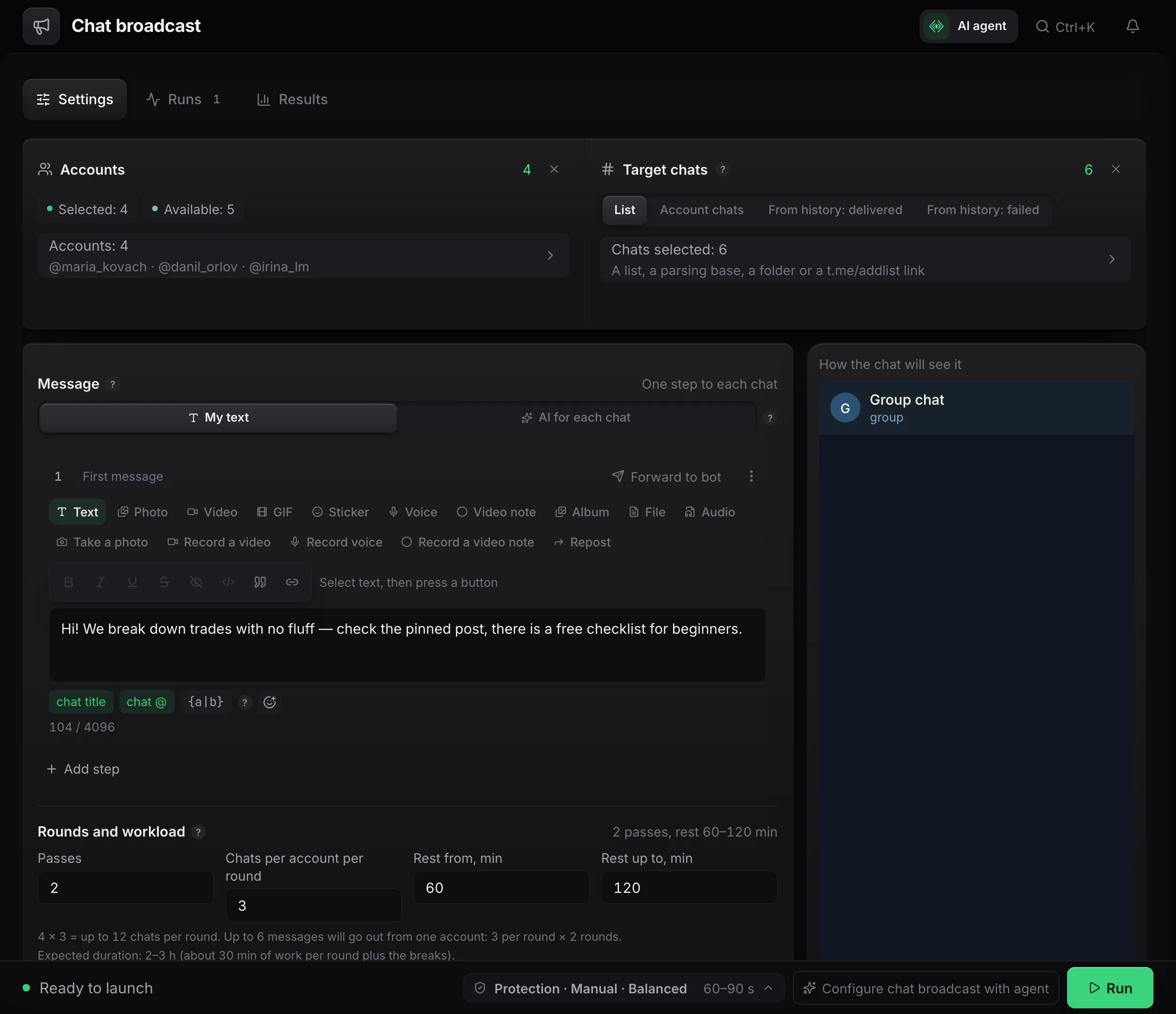
Before the launch the panel counts the workload out loud. For four accounts, three chats per round and two passes it writes: «4 × 3 = up to 12 chats per round. Up to 6 messages will go out from one account: 3 per round × 2 rounds». Next to it comes a time estimate, about 30 minutes of work per round plus the breaks.
Field bounds: passes from 1 to 48, rest between rounds from 1 to 1440 minutes, 60–120 by default. Chats per account per round at most 500: that is how many groups and channels Telegram lets one account join without Premium, up to 1000 with Premium. The other limits are collected on the Telegram limits page.
A chain of several steps goes into every chat, not a single message. The «Add step» button adds one. Step types: text, photo, video, GIF, sticker, voice, round video, album, file, audio and a «Repost» of a channel post. The text can take the chat's name and @, and variants are written in curly braces.
| Protection mode | Pause between groups |
|---|---|
| «Fast» | 30–45 s |
| «Balanced» (default) | 60–90 s |
| «Careful» | 150–210 s |
Between steps inside one chat the pause is 60 seconds by default and never faster than the chosen band. Chat broadcast posts in public rooms, where every member sees the message, so its bands are higher than those of a mailing to private chats.
The blacklist is one for all runs of the workspace, and there is no whitelist. If you stop a run and continue it, chats already written to in this round do not get the message again.
Terms on this page
Yes, if the chats are set through the «List» source: the panel joins by itself where writing is otherwise impossible. The default pause between joins is 210–390 seconds, with at most 30 joins per account per run.
The number of accounts multiplied by «Chats per account per round» and by «Passes» (up to 48). If the list has more chats, the extra ones are marked as not fitting into the rounds, and the next run can take them.
Nothing. The panel learns the interval itself and, if the wait does not fit into the pause, postpones the tail of the chain while the account posts to other chats. If the wait exceeds the run budget, it shows as a separate reason in the results.
In «Results» the chat shows «The message was removed after sending». If it repeats from different accounts, the chat goes to the «Chat blacklist» with the reason «Deletes messages».
Within one run a chat is written to by one account. If Telegram refused an account in a chat, on later runs it does not write there, while other accounts can still use the chat.
The text can take the chat's name and @, and variants are written in curly braces. For the first step you can pick «AI for each chat» and describe what to write about.
In the «Mandatory subscription» block you choose «Skip such chats» (the default) or «Subscribe». In the second case the account subscribes to the channel, up to 3 times per chat by default, and each subscription spends a join.
Read next
More in this section
Other sections
Open «Chat broadcast», pick the accounts, paste the list and look at the workload calculation before launching.