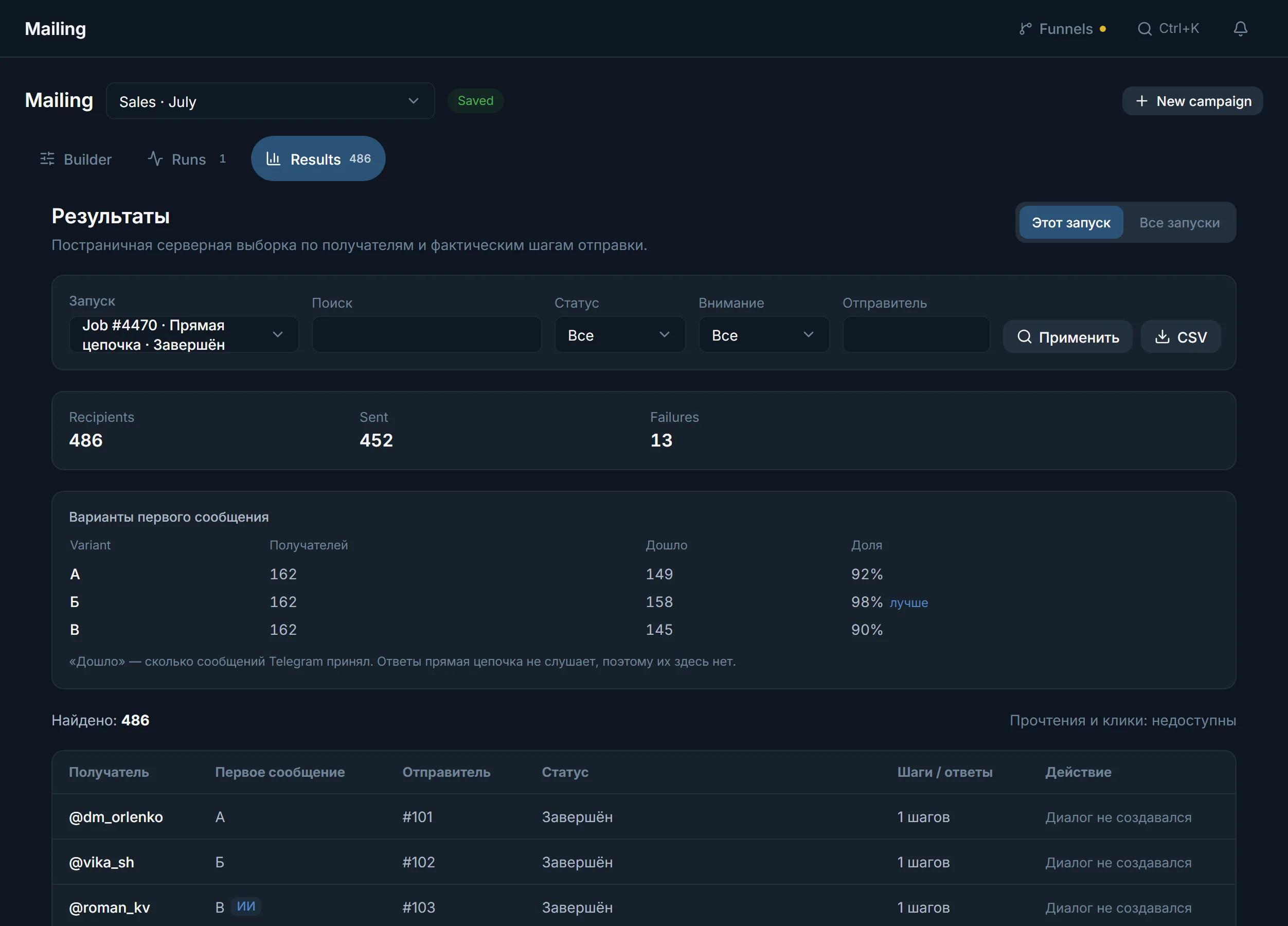
A reason for every recipient
Every row in the results has a status and a reason: closed their private messages, charges for messages, accepts Premium accounts only, no such @username.
A private message is stopped by one of four parties: the recipient, Telegram itself, your own run ceilings, or a send that was never confirmed. Each has its own signal in the panel and its own rule on whether to retry. Below they are taken in order, with the numbers and a calculation of how many accounts a base needs.
In short
A Telegram mass DM run is stopped in four ways: the recipient closed private messages or charges for them, Telegram puts a pause or a restriction on the account, a run ceiling is reached, or a send stays unconfirmed. In TeleTraff each case has its own record in the results, and only what can be repeated without writing to a person twice is repeated.
TeleTraff editorial teamUpdated: Checked in the panel
Every row in the results has a status and a reason: closed their private messages, charges for messages, accepts Premium accounts only, no such @username.
Recipient refusals are not counted as errors and do not bring the run closer to the «Failures in a row» stop. The run carries on with everyone else.
If Telegram refuses an account's first messages to strangers, that account leaves the run and the others carry on. The panel does not lock the account: its other modules keep working.
Closed their private messages, charges for messages from strangers, accepts only Premium accounts or deleted the account. This is the person's decision, and no pause changes it.
Asks the account to wait a named number of seconds (FloodWait), stops its cold work (PeerFlood), or applies a spam block or a freeze. This is the state of the account, not of the recipient.
The limits per run, account, hour and day, the «Failures in a row» field and the end time. These are boundaries you set before the start.
Telegram did not confirm it accepted the message. The panel does not count it as delivered and does not send it again, so as not to write to a person twice.
How the run itself, the pauses and the texts work is covered in the guide to mailing software and in the Mailing module. This page covers only the stops and what to do about them.
| Reason in the results | What it means | What to do next |
|---|---|---|
| «closed their private messages» | A privacy setting keeps strangers out | Nothing: a retry will not help |
| «charges for messages from strangers» | The first message is paid for the sender | Nothing: a retry will not help |
| «accepts messages from Premium accounts only» | Only Premium accounts can write | Write from a Premium account, if there is one among the senders |
| «does not accept messages from strangers» | Private messages are open to contacts only | Nothing: a retry will not help |
| «the account was deleted in Telegram» | The addressee no longer exists | Remove from the base |
| «no such @username exists in Telegram» | The name does not exist or has changed | Turn on «People Telegram does not know»: such names are dropped before the start |
These recipients get the status «Skipped», not an error. They do not bring the run closer to a stop on «Failures in a row»: an empty field means ten failures in a row, and any successful send resets the count. A second run over the same people gives the same refusal.
Telegram names the number of seconds the account has to wait. The run waits together with the account and carries on by itself. Retrying before the time is up usually lengthens the wait.
Telegram refused first messages to strangers. The account leaves this run, and a clean @SpamBot answer does not bring it back. The limits guide gives a day of rest for this refusal. The panel does not lock the account: you decide when to run it again.
The «Ask @SpamBot about the limit» switch is off by default. When on, after the account is stopped the panel writes to @SpamBot as that account. No limits: the account rests and returns to its recipients. A limit exists: the panel records it together with Telegram's own deadline.
The mark can be lifted by hand, but that lifts only the panel's own decision. Telegram's pause stays, and until it ends no run picks the account up. When the pause ends, the account returns to work by itself.
Telegram publishes neither a number of private messages per day nor the length of a FloodWait, so the panel has no number it could promise. It has pauses by protection mode (20–24, 45–56 and 90–113 seconds) and ceilings you set. For orientation, the Telegram limits reference gives the ladder of one mailing service: the ceiling grows with the age of the account.
| Account age | To strangers per day |
|---|---|
| up to 3 days | 8 |
| up to 7 days | 15 |
| up to 14 days | 25 |
| up to 30 days | 35 |
| up to 90 days | 50 |
| over 90 days | 80 |
This is an outside reference, not a TeleTraff setting. You set your own ceiling in the «A day per account» field (up to 5,000), and by default it is zero, meaning no ceiling. A pause sets the tempo, not the volume for a day.
An example for crypto arbitrage: a base of 3,000 strangers from parsing and a ceiling of 30 messages a day per account. One account covers 30 people a day, so the base needs 100 account-days.
| Accounts | Messages per day | Days for the whole base |
|---|---|---|
| 5 | 150 | 20 |
| 10 | 300 | 10 |
| 20 | 600 | 5 |
The number 30 is taken for the example: it depends on the age and history of the accounts. Part of the base will drop out for the reasons in the recipient table, so a real run is usually shorter. Accounts and their proxies are prepared in the account manager.
If Telegram did not confirm a send, the outcome stays unknown and visible in the results. The panel does not repeat such a row by itself. A new run skips the people already written to while the «People we already wrote to» memory is on.
Messages to groups rather than to people are covered on the page about sending to several groups.
Terms on this page
Most often the recipient closed private messages, charges for messages from strangers or accepts only Premium accounts. The reason is recorded for each recipient in the results.
No. They get the status «Skipped» and do not bring the run closer to a stop on the «Failures in a row» field.
The account leaves this run and the others carry on. The panel does not lock the account: it works in other modules, and you decide when to put it back on mailing.
The «Ask @SpamBot about the limit» switch is off by default. When on, after the account is stopped it finds out whether a limit exists and records Telegram's deadline.
The message is not counted as delivered and is not sent a second time. The outcome stays unknown and visible in the results.
Telegram does not publish that number. The panel has the «A day per account» field (up to 5,000); by default there is no ceiling and you choose the number.
They get a «run limit» or «expired» mark and stay free for the next run.
Read next
More in this section
Other sections
Run a small batch in Mailing and open the results: every recipient gets a status and a reason.