Pauses and ceilings before the start
The protection mode, the hourly and daily ceilings per account and the «Failures in a row» limit are set before the run. The count is kept per account.
Mailing software is tested around the third hundred recipients: what happens to the accounts when a proxy breaks and where the report went. A script, a desktop program, a bot and a web panel answer these differently. Below are six questions to put to any tool and TeleTraff's answer to each, including what the panel does not do.
In short
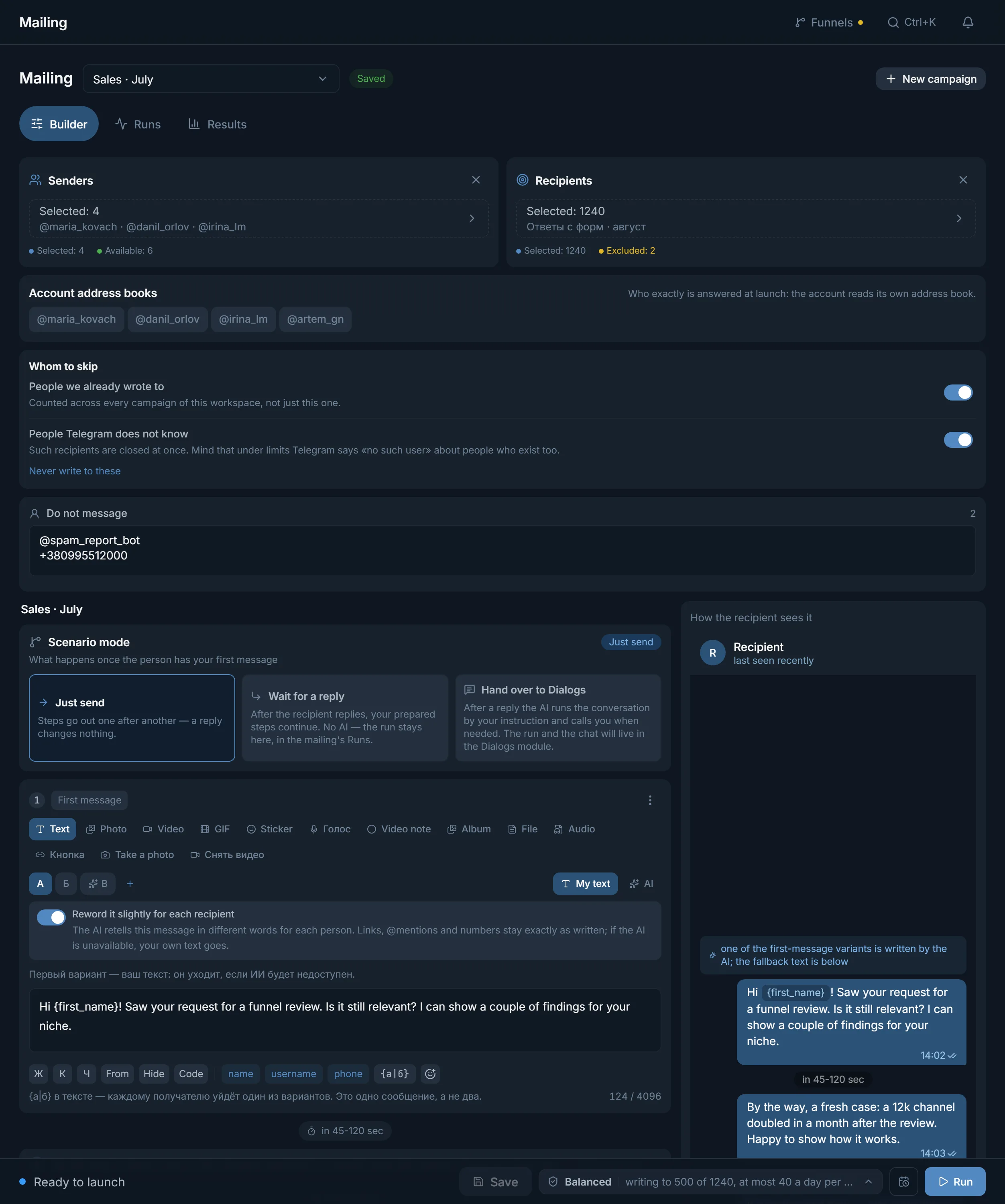
Telegram mailing software is chosen on six points: how it takes accounts and sessions, whether it binds a proxy before the first connection, whether it keeps pauses and ceilings, whether it varies the text, whether it shows the result for each recipient, and what it does after a failure. In TeleTraff the Mailing module covers all six. It is a web panel, so nothing is installed.
TeleTraff editorial teamUpdated: Checked in the panel
The protection mode, the hourly and daily ceilings per account and the «Failures in a row» limit are set before the run. The count is kept per account.
An account without a usable proxy does not enter the run. The panel does not connect from the server IP in order to bind a proxy later.
Results show a status, a sender and a reason for every recipient, with a summary by text variant and a CSV export next to it.
The query «mailing software» covers four different things. They differ in who is responsible for the accounts, the pauses and the record of results. The table shows the typical picture: any row can look different in a particular product.
| Kind | Where it runs | What you usually build yourself | Who it can write to |
|---|---|---|---|
| Script | On your server or laptop | Pauses, proxies, storage of the base and results, handling of Telegram waits | Anyone who has not closed their private messages |
| Desktop program | On your machine, usually from your IP, while the computer is on | Round-the-clock operation, a backup of the base and reports | Anyone who has not closed their private messages |
| Bot | On the bot owner's server | Almost nothing, but there is almost nothing to set up | Only people who started it, and chats it was added to |
| Web panel | On a server, around the clock | The recipient list and the text | Anyone who has not closed their private messages |
A bot does not suit a cold base: Telegram does not let a bot write to a person who never started it. That leaves accounts, and with them sessions, proxies and pauses. The rest of this page covers that class, using the Mailing module as the example.
The check takes an evening: load a few test accounts, give them a list of fifty @usernames and see what the report says to each of the six questions.
| Question | What Mailing does | What it does not do |
|---|---|---|
| Accounts and sessions | Takes a Telegram Desktop folder (tdata), .session and .json pairs, ZIP and RAR archives. In the builder the «Senders» block shows how many accounts are chosen and how many are available | Does not take an account that is not ready: the panel says one of the chosen accounts is not ready to work and asks you to check its proxy and status |
| Proxy | Assigns and checks the proxy at import. An account without a usable proxy does not enter a run | There is no connection from the server IP with the proxy bound afterwards |
| Pace | Three protection modes, the «An hour per account» and «A day per account» ceilings, a count that survives a panel restart | There are no ceilings by default: the fields sit at 0 and the operator sets them |
| Texts | Up to 5 first-message variants (A, B, C), the substitutions «name», «username», «phone», variants in curly braces, the «Reword it slightly for each recipient» switch | If the AI is unavailable, your written text goes out: the variant's own, or variant A's if it has none |
| Result per recipient | The «Results» tab: «Recipient», «First message», «Sender», «Status», «Steps / replies», filters and a CSV export | The panel does not show reads and clicks: the results say «unavailable» for them |
| Failure | «Pause», «Continue», «Stop» (with a confirmation), automatic closing of a stuck run | There is no silent restart of the part already sent: a new run skips the people already written to |
Import and checks are described in the guide to the account manager, and proxy binding and checks in the proxy center.
The protection mode sets the pause between sends. In Mailing the bands are:
| Protection mode | Pause between sends |
|---|---|
| «Fast» | 20–24 s |
| «Balanced» (default) | 45–56 s |
| «Careful» | 90–113 s |
Every 5–10 windows an account takes a long break, 2–3 times longer than usual. The ceilings sit separately, in the «Task settings» card: «Per run» (up to 100,000), «Per account» (up to 5,000), «An hour per account» (up to 1,000), «A day per account» (up to 5,000). Every one defaults to 0, that is, no ceiling.
An example for a crypto offer: a base of 1,240 people from parsing, four accounts, «Per run» set to 500 and «A day per account» set to 40. The panel shows an estimate: up to 500 messages go out in this run, and the other 740 people keep a «run limit» mark and stay free for the next one. Four accounts at 40 a day give up to 160 messages in 24 hours, so 500 people take about four days: after the daily ceiling an account continues the next day.
The numbers 500 and 40 in the example are the operator's choice. They depend on the age and history of the accounts and on the base, and Telegram does not publish daily numbers.
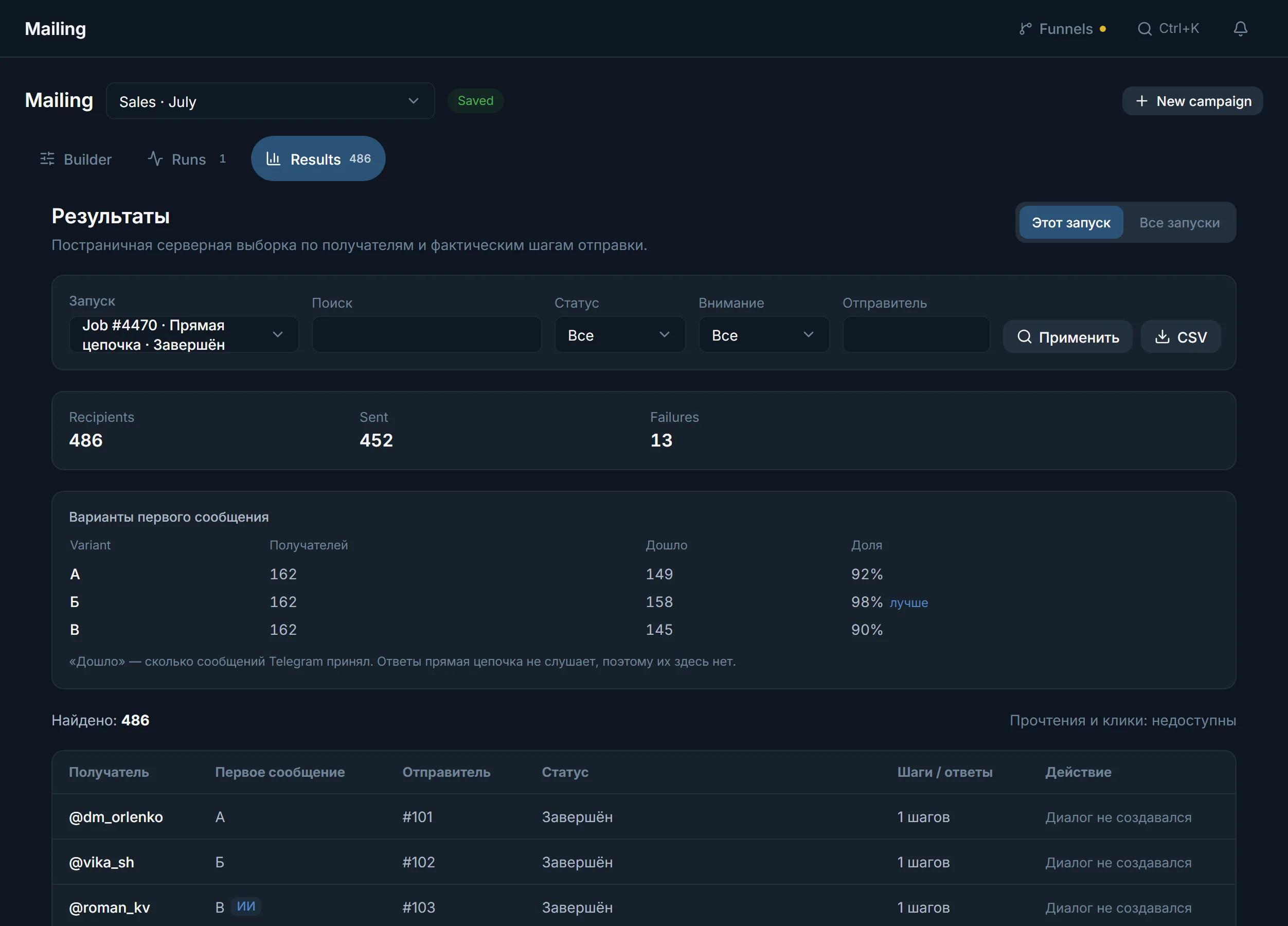
«Delivered» means Telegram accepted the message. If Telegram did not confirm a send, the panel does not count the message as delivered and does not repeat it, so as not to send twice: the outcome stays unknown and visible in «Results».
The «Failures in a row» field defaults to 0, which means 10. Errors are counted in a row, not in total: any successful send resets the count. This limit cannot be lifted.
«Pause» and «Continue» suspend and resume the run. «Stop» asks for a confirmation.
A run that has sent no signal for 120 seconds is closed by a check that runs every 30 seconds. The «Clear stuck runs» button does the same by hand and releases the accounts. It does not switch on automatic resuming.
A new run over the same base skips the people already written to. Those who were not reached keep a «run limit» or «expired» mark and stay free.
How to send a message to a whole list of groups is covered on the page about sending to several groups.
Terms on this page
No. TeleTraff works in the browser and the run happens on a server, so the mailing carries on while your computer is off.
A Telegram Desktop folder (tdata), .session and .json pairs, and ZIP or RAR archives are accepted. The proxy is assigned and checked at import, and an account without a working proxy is not taken into work.
It depends on the account and the chosen mode, so the panel promises no number. You set the «A day per account» ceiling, up to 5,000, and by default there is none.
Not to a cold base: a bot cannot write first to someone who never started it. Mailing has no send-through-a-bot mode, accounts do the writing.
Set up to 5 variants of the first message. In «Results» a table shows how many recipients each variant had, how many were delivered and what share that is, and the best one is marked «better».
Use the «Per run» (up to 100,000) and «Per account» (up to 5,000) fields. Whoever did not fit keeps a «run limit» mark and goes to the next run.
Turn on «People we already wrote to»: the memory is shared by the campaigns of the workspace. For other exclusions there is «Never write to these».
Read next
More in this section
Other sections
Open Mailing, choose the accounts and look at the estimate: how many messages go out in the first run and how many recipients are left for the next one.