The list is narrowed before the run
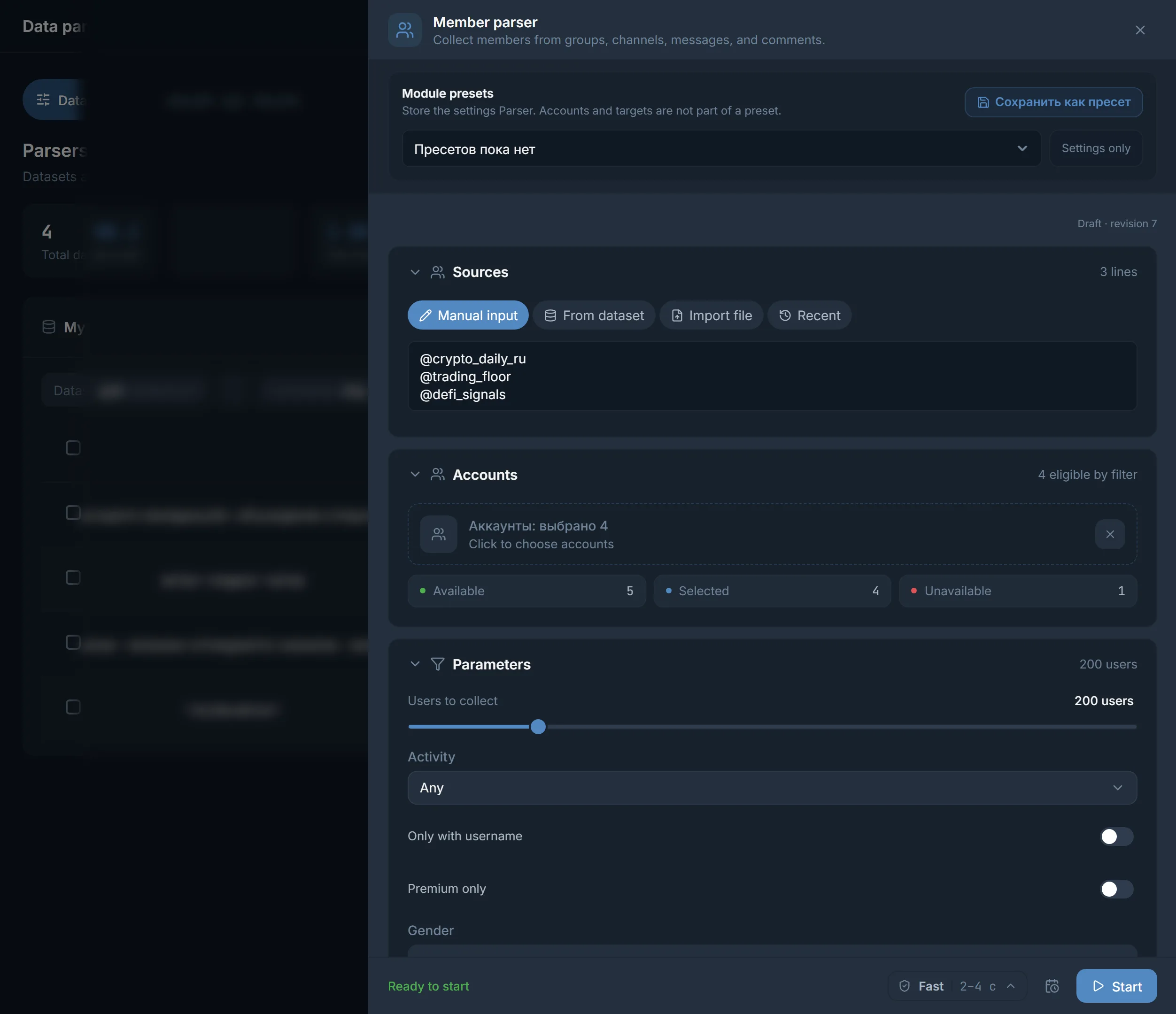
A size from 25 to 100,000 people and filters for last seen, username, photo, Premium and gender are set up front, not fixed later in a file.
Scraping Telegram contacts gives you a list of accounts, not a phone book. Below, in order: what the panel records about each person, which filters narrow the list, how to export it and where to send it next. Where to get the chats themselves is covered on the neighbouring page.
In short
A Telegram members scraper in TeleTraff is the Members parser: it collects people from chats and channels and saves for each one a username, name, numeric identifier, last seen, and Premium and photo marks. Phone numbers and profile bios are not in the record. Filters narrow the list, it exports to CSV, TXT or JSON, and it can go to the Inviter, Mailing or Masslooking.
TeleTraff editorial teamUpdated: Checked in the panel
A size from 25 to 100,000 people and filters for last seen, username, photo, Premium and gender are set up front, not fixed later in a file.
CSV and TXT give one value per person, JSON keeps the whole record. The Selection button hands over a file at once, without repeats.
The Use button passes a people dataset to the Inviter, Mailing or Masslooking. The Inviter can skip people who are already in the chat.
Each person in a dataset is one record. Its set of fields depends on what Telegram shows about someone else's account. The full list sits in the JSON file, and how the parser itself works is covered in the parsers guide.
| Data | How it looks in the record |
|---|---|
| Username | The name after @, if the person set one |
| First and last name | As in the profile. With no name, the username is used, and after it the numeric ID |
| Numeric identifier | The permanent account number: the panel tells one person from another by it |
| Last seen | One of the steps: online, recently, this week, this month, long ago, unknown. There is no exact date |
| Profile marks | Whether there is a photo and Premium. Bot, deleted account, scam, fake and admin are marked separately |
| Gender | Worked out from the name. If the name does not tell, the field stays empty |
| Source | The chat or channel the person came from |
| Message | Text, date and chat of the latest message. Present only for people found as writers |
| Filter | What stays in the dataset | Default |
|---|---|---|
| Number of people (slider) | No more than the number you set, from 25 to 100,000 in steps of 25 | 200 people |
| Only people who wrote in the chat | People who wrote in the chat during the chosen period, and in a channel those who commented | off |
| Wrote in the chat | The period for the previous filter: Within a day, Within 3 days, Within a week, Within a month | Within a week |
| Last seen | Any time, Recently — within 3 days, This week — within 7 days, This month — within 30 days | Any time |
| Username only | People who have an @username set | off |
| Photo only | People with a profile photo uploaded | off |
| Premium only | Accounts with a Telegram Premium subscription | off |
| Gender | Any, male or female. Anyone the name does not identify drops out of the sample | any |
| Collect admins | Adds the admins and moderators that the panel normally skips | off |
Only people who wrote in the chat for 3 days plus Last seen set to Recently — within 3 days. You get people who were alive in the chat this week. The narrower the period, the shorter the list.
Username only together with Photo only. Such an account looks like a real profile and has an @username, which makes it easier to message and invite.
The Gender filter together with last seen. The panel reads gender from the name, so some people with a neutral name drop out and the list comes out shorter.
All the sets work on the data Telegram returns at the moment of scraping, so the result depends on the chat. Which chats to take is explained on the page about scraping chats and groups.
Open the Members parser, add sources and set the number of people. Pick filters for the job instead of switching them all on: each one shortens the list.
Tick the accounts that do the collecting and click Start. The run status goes through In queue, Parsing, Ready.
The result lands in My datasets. Name it so that in a month you can see what it is, for example Crypto channel commenters, July.
The Collect more button adds records to the dataset.
One person often sits in several chats at once. Remove duplicates keeps them in the dataset once.
The Use button opens the Use dataset in a module window with a list of modules. More on choosing an audience is in the audience parsing article.
| Module | What it does with a people dataset |
|---|---|
| Inviter | Invites people to your chat or channel |
| Mailing | Writes to the people in the dataset in direct messages |
| Masslooking | Views the stories of the people in the dataset |
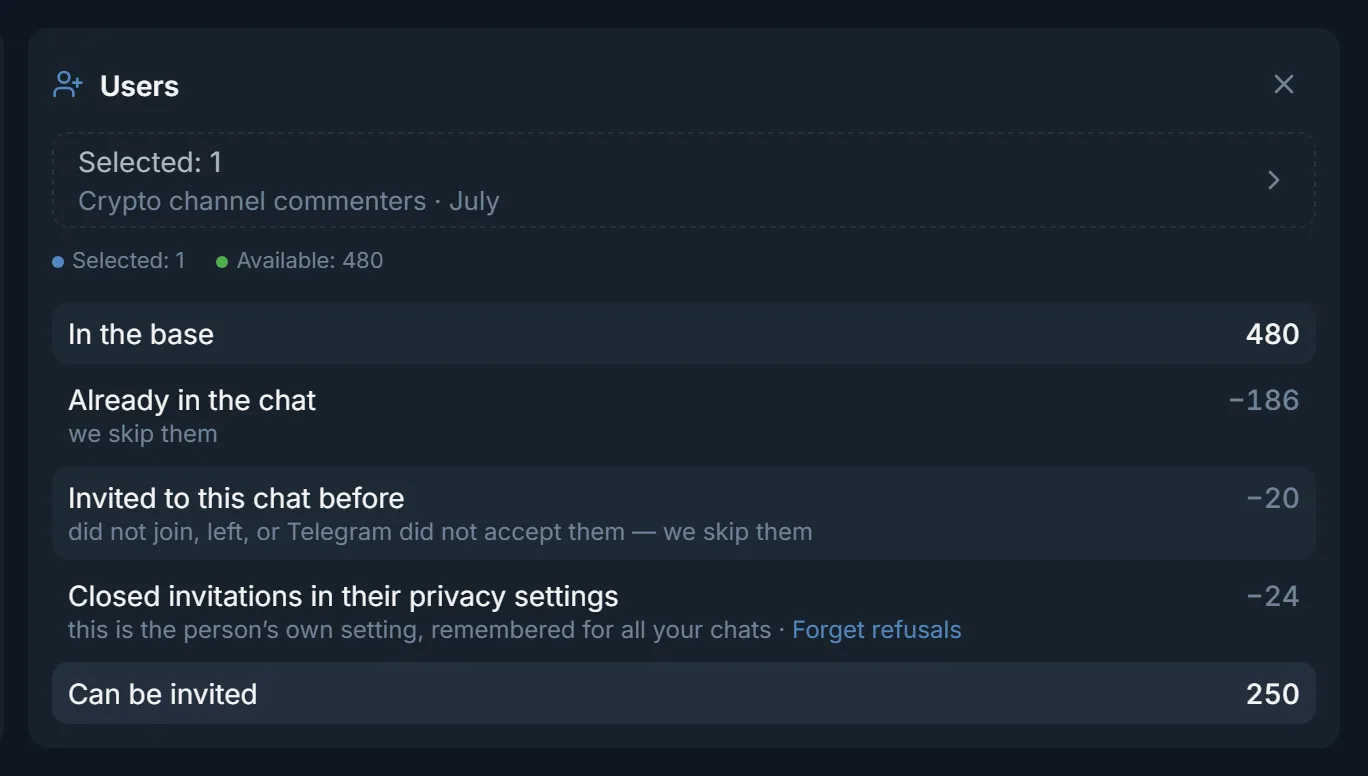
The Inviter gives the most detail: before the run it counts whom it can invite. In the screenshot at the top of the page a dataset of 480 people becomes 250: 186 are already in the chat, 20 got an invitation earlier, and 24 closed invitations in their privacy settings. That is one example, your numbers will differ. How the module works is described in the Inviter guide.
The Continue the dataset using previous run results switch skips people already invited to this chat and known refusals. Next to the line about closed invitations there is Forget refusals: it resets the remembered refusals if you need to try again.
A file from the Download members window downloads at once, no new dataset appears in the list, and duplicates are removed automatically. Your own ready list can be loaded back with the Upload file button. People who wrote in a chat are covered in more detail on the page about scraping messages.
Terms on this page
No. Telegram does not show other people's numbers in a member list, and the panel does not collect them in a person record. For contact there are the username and the numeric identifier. Numbers that people write in messages themselves are found by the Messages parser.
The number is set from 25 to 100,000 in steps of 25, 200 by default. How many you actually get depends on the chat and the filters: a closed or quiet group yields fewer people than it has members.
Switch on Only people who wrote in the chat and pick a period such as Within 3 days. You can also set Last seen to Recently — within 3 days. The first filter looks at messages in the chat, the second at the account status.
By default the panel skips bots, deleted accounts, scam, fake and admins. Then your own filters apply. If the member list is hidden, only message authors are taken.
To paste into another service, CSV or TXT will do: they hold one value per person. If you need last seen, source and gender, export JSON. The Selection button hands over any of the three formats.
Open the dataset in My datasets, click Use and choose a module in the Use dataset in a module window. For a people dataset the panel offers the Inviter, Mailing and Masslooking.
Read next
More in this section
Other sections
Open Data parsing, pick the Members parser and set a small limit such as 200. The first file shows which filters are worth keeping for your niche.