Handoff in three steps
Use on a dataset opens a window with the list of modules. In the inviter you pick the dataset in the Who to invite block on the Parsing tab.
The parser collects people and the inviter brings them into a chat. Between the two there are three places where time gets wasted: handing the dataset over, matching the limits of both modules and repeating after a stop. We walk through them on one example: a crypto chat filled with commenters of topic channels.
In short
The parser collects people into a dataset and the inviter invites them to your chat. The Use button on a dataset opens the list of modules, and you pick the dataset itself in the inviter, in the Who to invite block, on the Parsing tab. Three numbers set the volume: the total limit, the limit per account per run and the limit per day. Dataset memory skips people who are already in the chat or closed invitations, and a stopped run is repeated from Results.
TeleTraff editorial teamUpdated: Checked in the panel
Use on a dataset opens a window with the list of modules. In the inviter you pick the dataset in the Who to invite block on the Parsing tab.
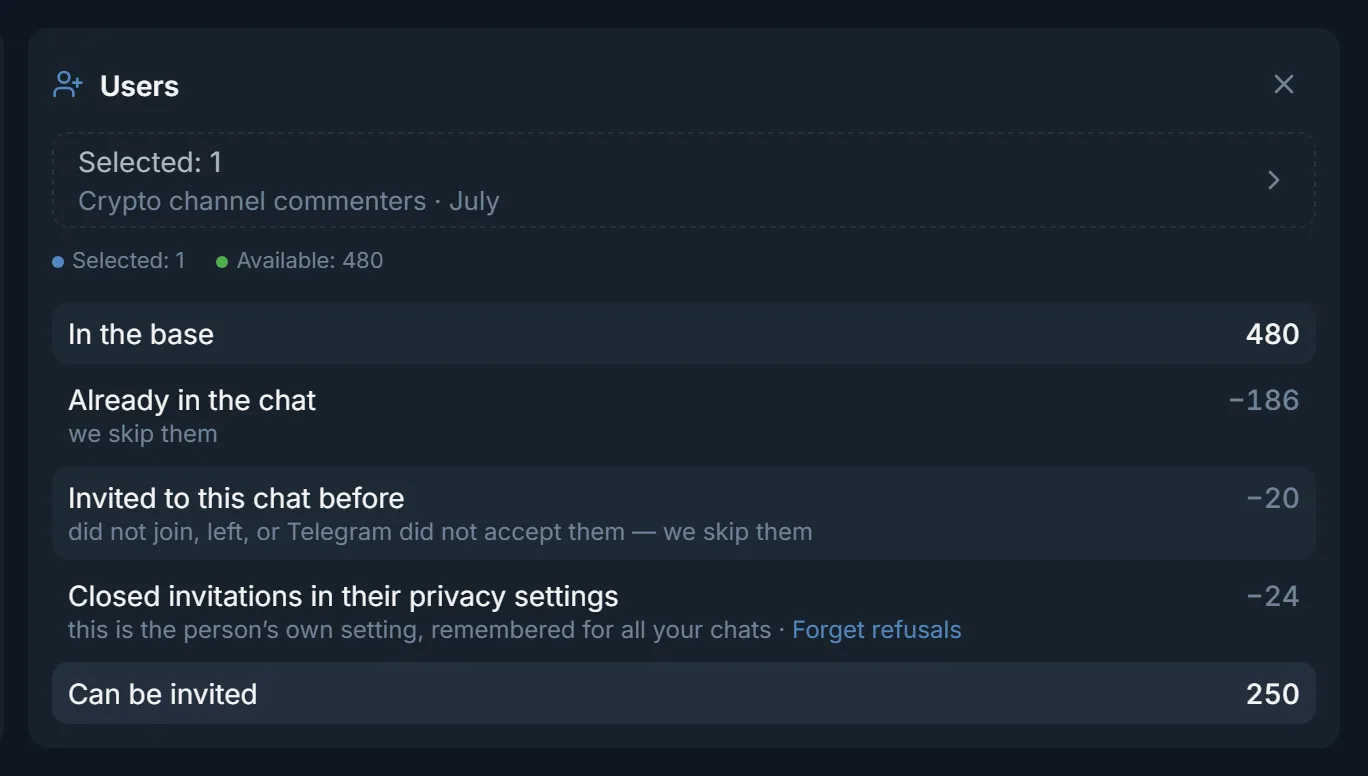
The Who we skip from the base block shows how many people are already in the chat, how many were invited before and how many closed invitations.
The Retry button in the results window invites only the people the run did not reach.
You run your own chat about crypto trading. You need people who already care about the topic. They sit in the comments under crypto channels: they read posts and argue in the discussions. The job splits into two parts: collect them into a dataset and invite them to the chat.
The numbers below come from real panel windows and serve as an example. Pick your own numbers for your accounts and your chat.
The Members parser writes the result into My datasets as a dataset of users. The default limit per run is 200 people and it can be raised. When a channel is the source, the parser takes commenters, because only administrators see a channel's subscriber list.
The button sits next to the dataset in My datasets. It opens the Use dataset in a module window.
For a dataset of people the list has three modules: Inviter, Mailing and Masslooking. The panel opens the page of the module you chose.
The dataset is not filled in ahead of time. In the Who to invite block open the Parsing tab and tick the dataset you need.
If the dataset you want is not in the list, look at its type. The inviter accepts only datasets of users, otherwise the block shows 'No suitable user datasets found'. A ready list of usernames can also be pasted without the parser, on the List / TXT tab.
The parser decides how many people the dataset holds. The inviter decides how many of them get an invitation in one run and in one day. For that it has three fields in the Volume section.
| Inviter field | What it counts | Example |
|---|---|---|
| Total invitation limit | Successful invitations in the whole run, from 1 to 1000 | 200 |
| Per account per run | Successful invitations from one account, from 1 to 50 | 40 on each of 5 accounts |
| Per account per day | All requests across all runs, refusals included, from 1 to 500. An empty field means No limit | 60 |
The hint on the field explains the difference in a line: a run counts successful invitations, a day counts all requests together with refusals. A run with a daily limit of 60 can therefore hit it before it hits the run limit, if many people refuse.
Before a run the inviter checks the dataset against what it already knows about the chat. On the screenshot at the top of the page this is the Who we skip from the base block. The dataset holds 480 people. Of them 186 are already in the chat, 20 were invited before and did not join, and 24 closed invitations in their privacy settings. That leaves 250 people in the Can be invited row.
The switch Continue the dataset using previous run results turns this check on. The panel remembers a privacy refusal for all your chats, because it is the person's own setting. If you are sure people changed their mind, the link Forget refusals sits next to the row.
You can stop a run by hand, and it can also stop on its own. The Results window shows the outcome on one screen. In the example below there are 200 targets in the list, 118 invitations, 14 failures, 23 skipped and 45 stopped. Five accounts worked in that run.
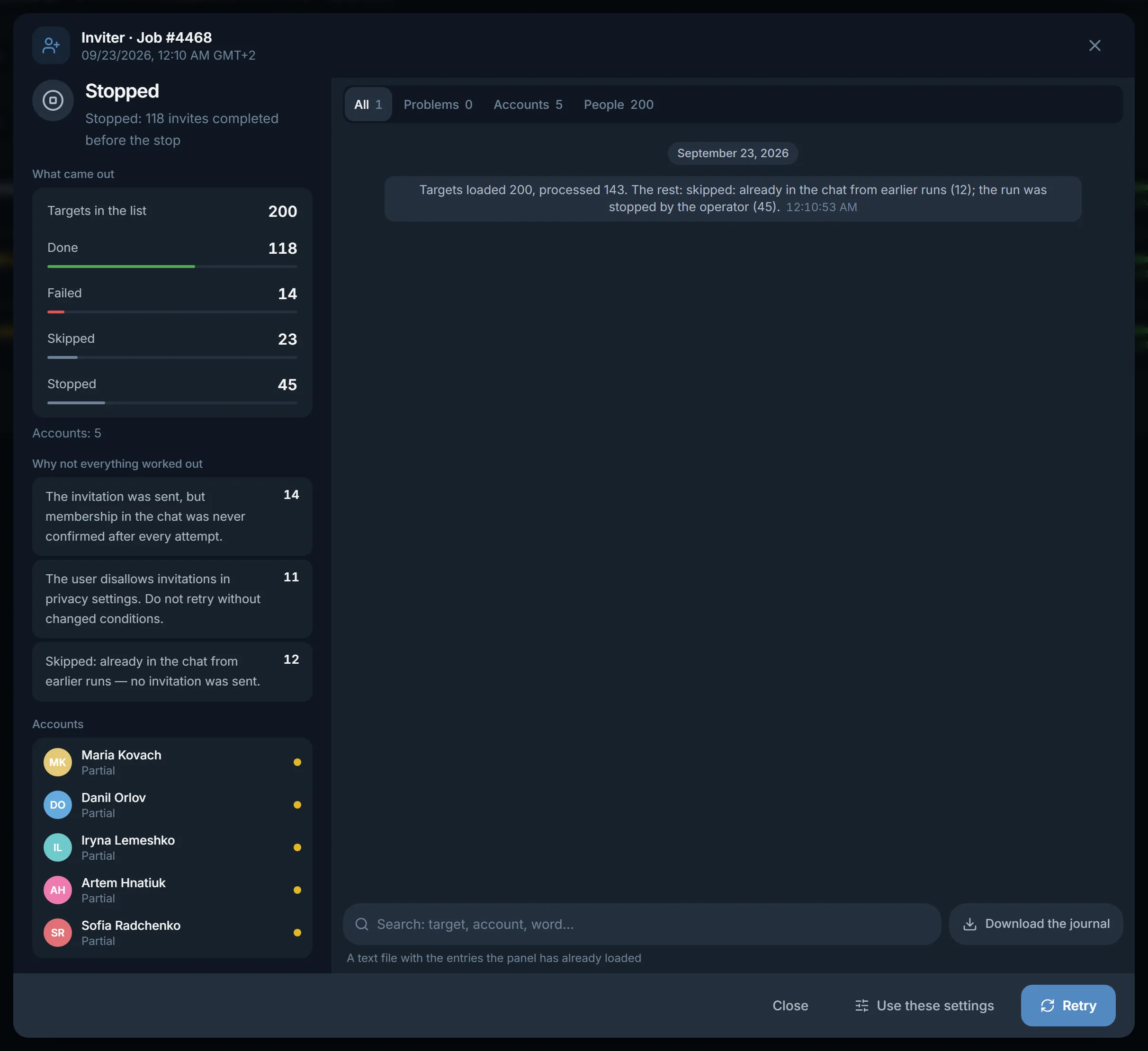
It sorts the misses by reason: invitation sent without confirmed membership, privacy closed, already in the chat from earlier runs.
The panel asks for confirmation and creates another run. The retry invites only the people the run did not reach.
The inviter form opens with the settings of this job. You can change accounts or limits there and start again.
Telegram pauses and stops are not written to dataset memory. A person the run did not reach lands in the next run, and people who closed invitations will not be bothered again.
Terms on this page
Open My datasets, press Use next to the dataset and choose Inviter. The dataset is not filled in for you: in the inviter open the Who to invite block, the Parsing tab, and tick it.
The inviter accepts only datasets of users. A dataset of channels or groups does not reach the block, and it answers 'No suitable user datasets found'. Collect people with the Members parser.
Yes. On the List / TXT tab paste the usernames of people or upload a TXT file. Channels and groups do not fit that list.
As many as you set in Total invitation limit, from 1 to 1000. One account can take from 1 to 50 per run and from 1 to 500 per day. An empty daily field means No limit.
Open the run on the Results tab and press Retry. The retry invites only the people the run did not reach. People who are already in the chat or closed invitations do not get into it.
No, while Continue the dataset using previous run results is on. The panel remembers a privacy refusal for all your chats. If you want to try again, press Forget refusals.
No. The same dataset stays in My datasets, and the inviter's memory skips the people already invited. If you run short of people, Collect more adds records to that same dataset.
Read next
More in this section
Other sections
Collect the dataset with the Members parser, press Use and choose the inviter. Check the Who we skip from the base block, set the three limits and run.