A funnel made of ready modules
A collected list goes to a module with the «Use» button, and mailing can hand a person who replied over to Dialogs. Nothing to export or import.
Leads from Telegram come in three steps: find placements where your audience is, get its attention, and turn the interest into a conversation in direct messages. In TeleTraff each step is a separate module, and the Dialogs module answers direct messages.
In short
Telegram lead generation means getting requests from people who became interested in your offer in channels, chats or direct messages. The scheme: find placements with the audience, get attention with a comment or by taking part in a chat, then continue the conversation in direct messages. In TeleTraff these steps are covered by the parsers and the open base, neurocommenting, neurochat, mailing and Dialogs, where the AI answers people who write to your accounts.
TeleTraff editorial teamUpdated: Checked in the panel
A collected list goes to a module with the «Use» button, and mailing can hand a person who replied over to Dialogs. Nothing to export or import.
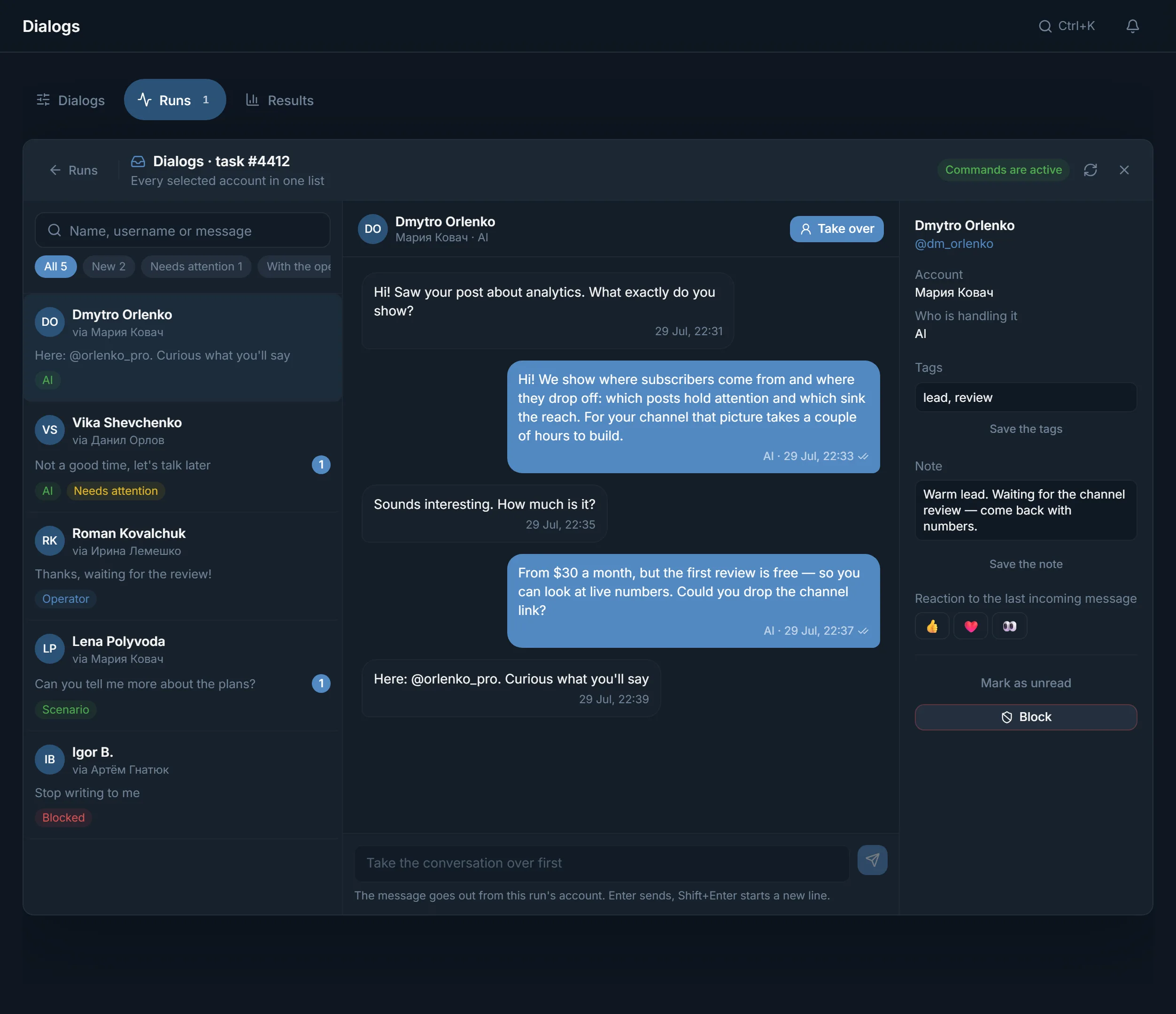
In a Dialogs run, the conversations of every selected account come in one list with the All, New and Needs attention filters. You can take over any of them.
The 3-day trial opens every module: 3 threads in each, up to 10 accounts. You can test the funnel without a card.
A Telegram lead is a person who showed interest and wrote to you or answered your message. Such people come from three places: comments under posts, topical chats and direct messages to a collected list.
Funnels differ by niche. An expert or an online school needs a warm conversation, services and B2B need to reach the person who decides, an online store needs a visit to the catalog. The mechanics are the same: placement, attention, conversation. The bigger picture is on the Telegram promotion page.
The order assumes you start from zero. If you already have some of the steps, skip them.
Import accounts into the account manager and give them proxies. Fill in the profiles, for example with the profile generator: someone who came from a comment opens the account first.
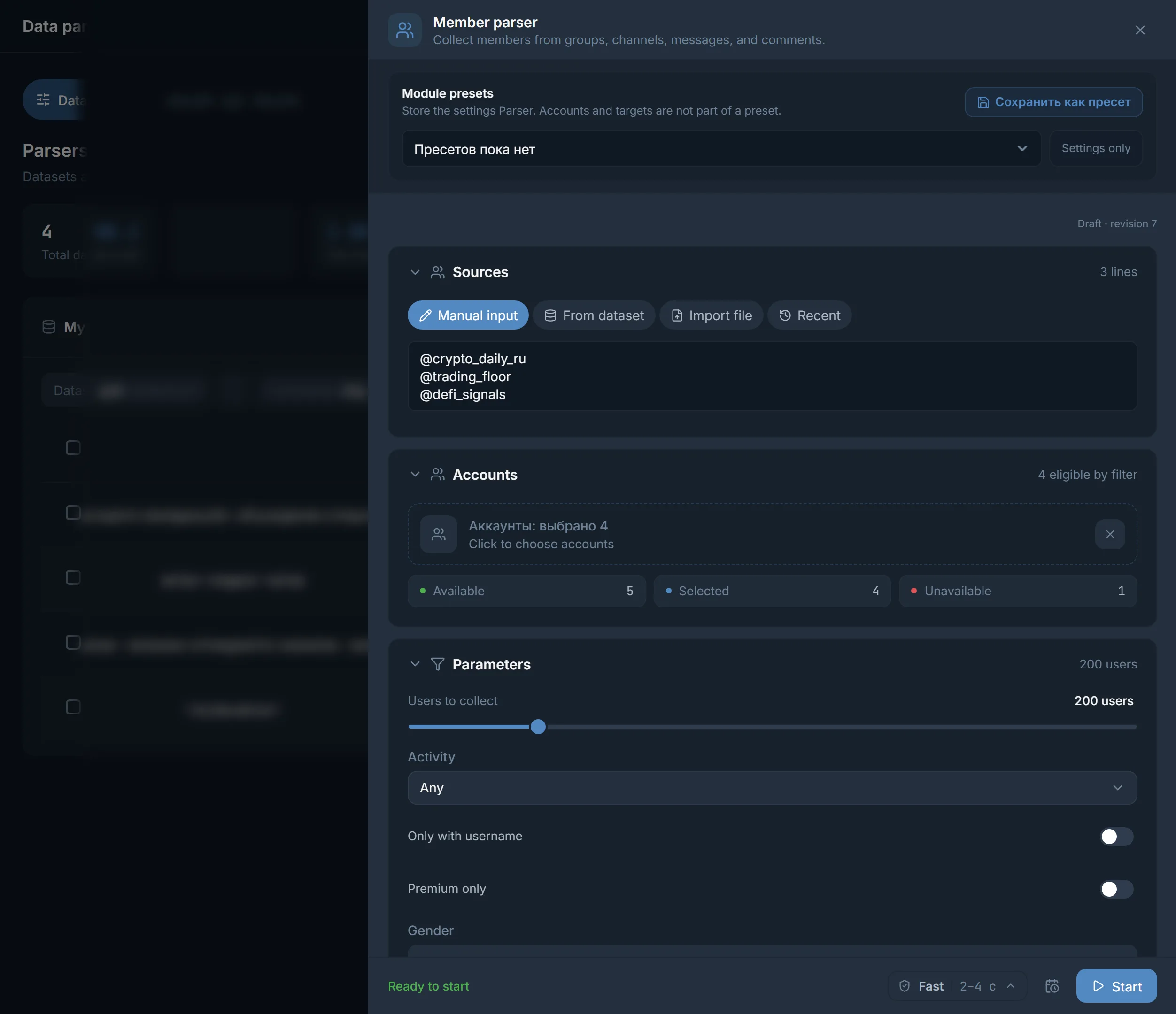
Take channels and chats on your topic from the open base, or collect them and their members with parsers.
Run neurocommenting on channels with open comments. In the What to write field, describe who you are and why you are useful.
Neurochat keeps your accounts in topical chats as ordinary members. Whoever wants to continue writes in direct messages.
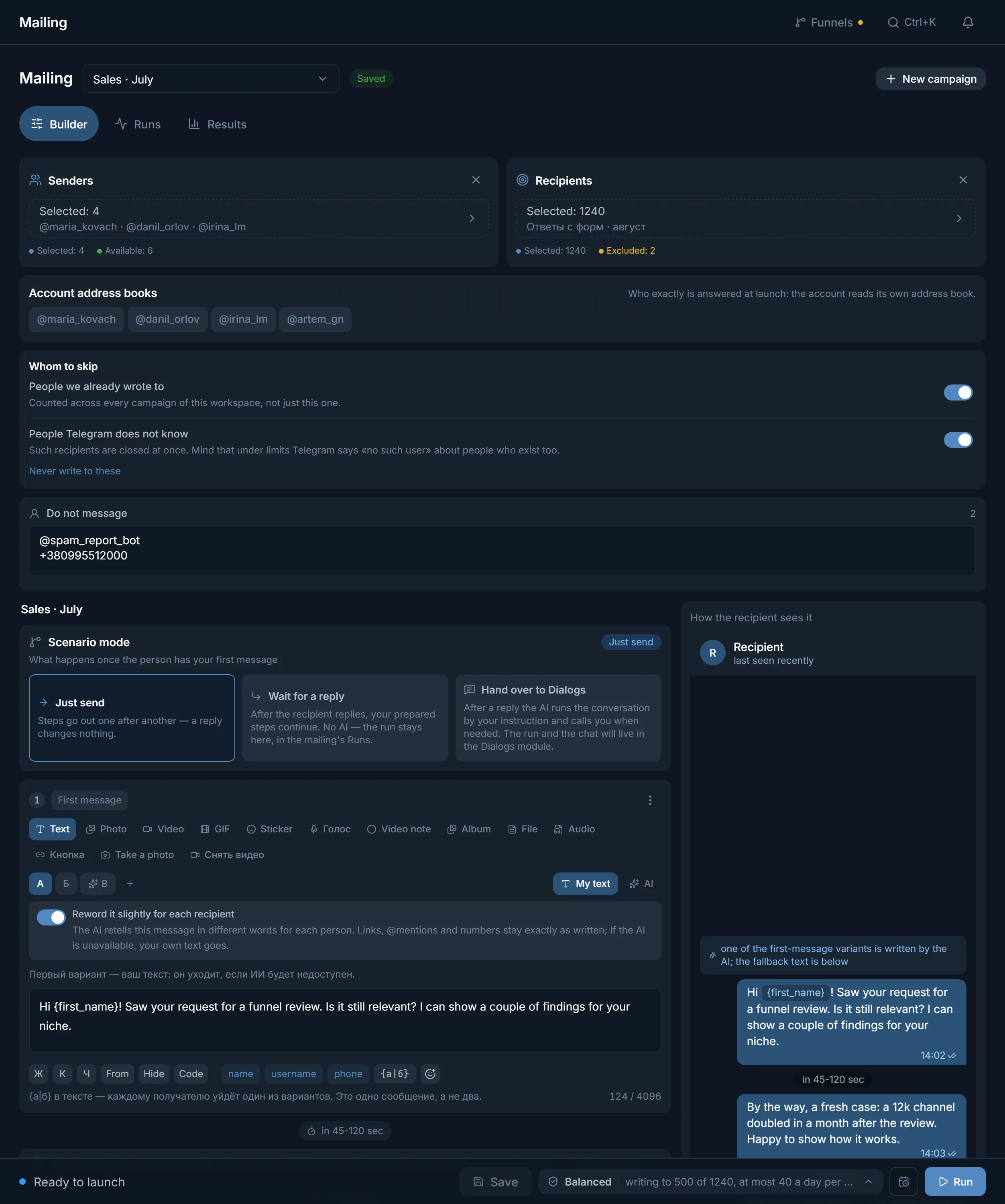
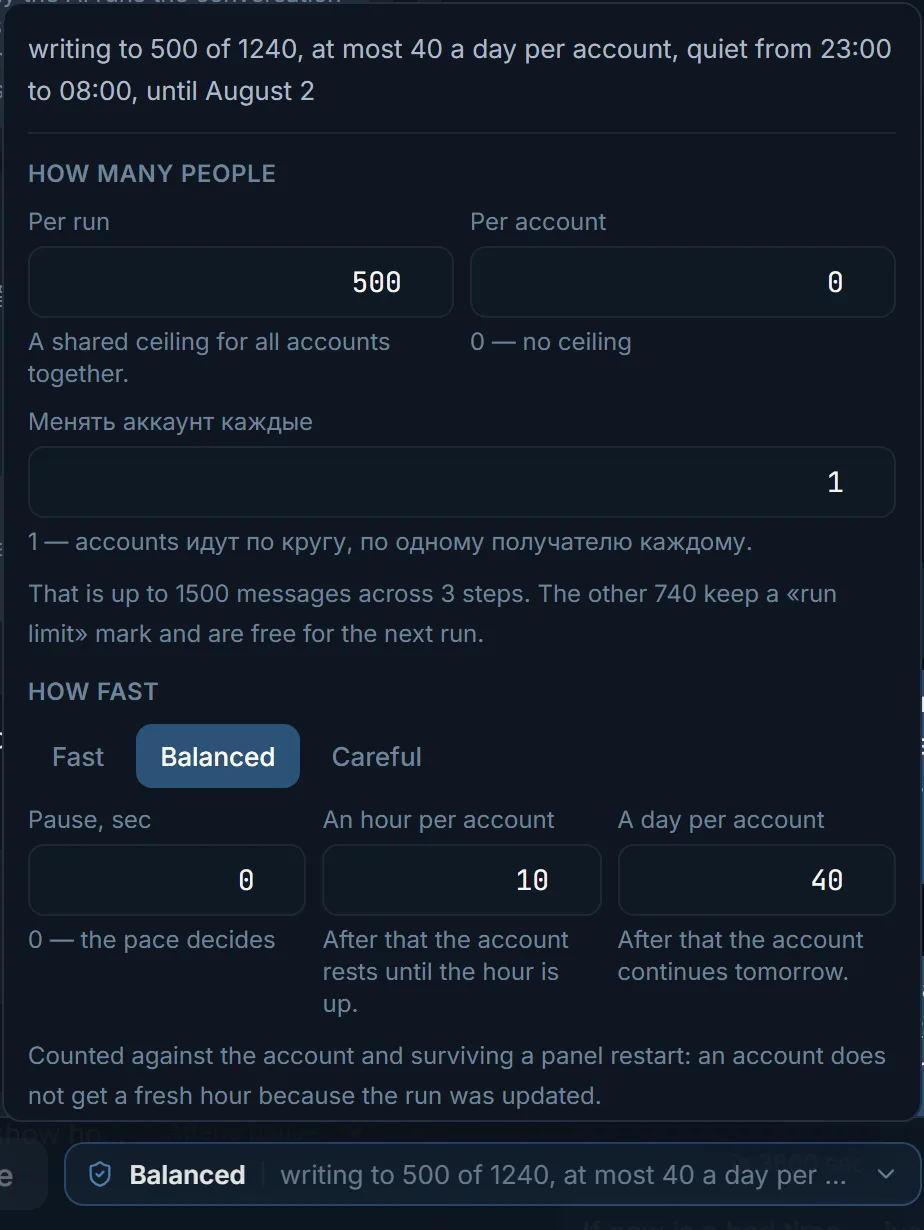
Mailing writes first to a list. In Whom to skip, mark the people you already wrote to, and in the scenario mode choose «Hand over to Dialogs».
Run Dialogs on the same accounts in Everyone who writes mode. The AI replies, and you can take over any conversation. Conversations where the AI asks you to look land in the Needs attention filter.
| Stage | Module | What it gives |
|---|---|---|
| Find the audience | Open base, parsers | Channels and chats by topic, chat members, your own lists in My datasets |
| Get noticed | Neurocommenting | Comments under new posts in the chosen channels |
| Join the talk | Neurochat | Your accounts in topical chats, replies that follow the conversation |
| Write first | Mailing | A first message to a list, Whom to skip, Do not message, text variants |
| Handle leads | Dialogs | AI replies in direct messages, the run's conversations in one list, AI dossier, Tags and note |
| See the result | Statistics | The Runs and Traffic tabs |
These are schemes, not a promise of results. Each one is tested on your own audience.
Neurocommenting in channels on your topic, with a link to your channel in the account profile. Dialogs in Everyone who writes mode answers whoever writes on their own, and you can take the conversation over.
A parser collects members of industry chats, mailing sends a first message with a clear offer. In Hand over to Dialogs mode the AI takes over whoever replied, and you mark the lead's status with a tag.
Neurochat takes part in discussions in topical chats, and the follow-up moves to direct messages. Mailing writes separately to the people you have already talked to.
Setting up AI replies is covered in the Dialogs guide.
One module does not make a funnel. What works is the chain: placement, offer, reply to the person. Most people are lost at the last step:
Dialogs and the Whom to skip block in mailing remove the first three. A filled-in profile closes the fourth. The first direct message is covered in detail in the article on Telegram DM mailing.
Terms on this page
Yes, if you get leads through your own accounts: comments, chats and direct messages. The panel covers finding the audience, the first contact and running the conversations. The offer and what happens after the conversation stay with you.
With placements and comments. Take channels on your topic from the open base, fill in the account profiles and run neurocommenting. Dialogs running on the same accounts answers whoever writes to them.
Yes. In a Dialogs run, every selected account's conversations come in one list. The New filter shows unread ones, Needs attention shows conversations where the AI asks you to look.
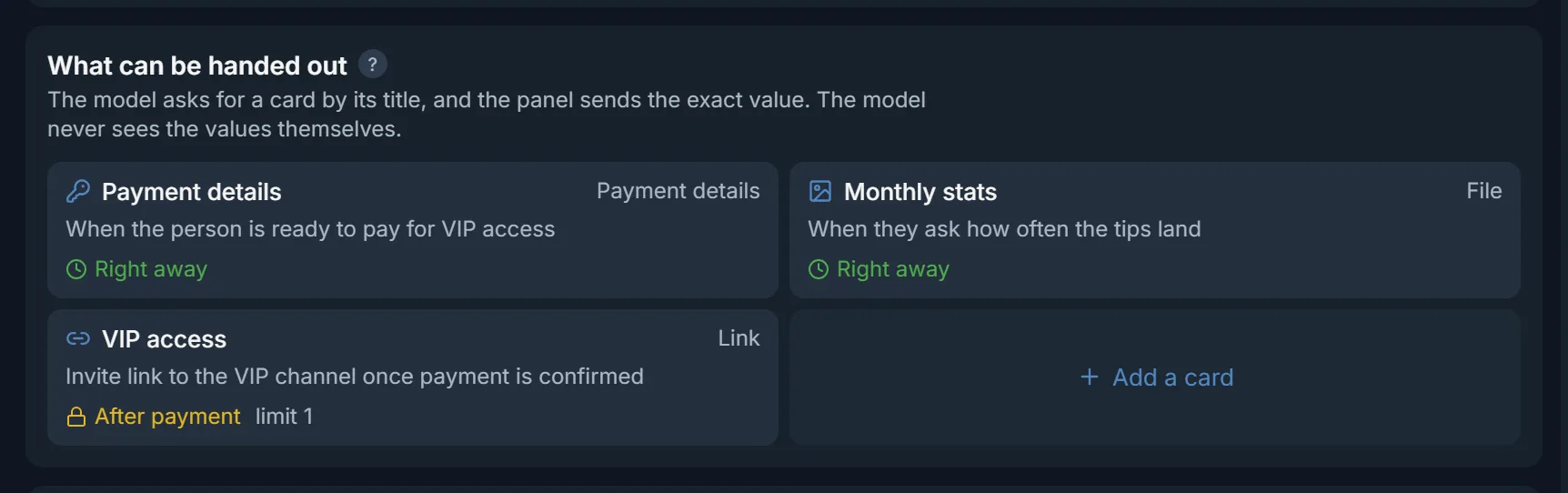
Yes, if you set it up that way. AI replies are labelled, and Take over moves the conversation to you at any moment. The AI never sees payment details or links: it asks for a card by name and the panel sends the value.
Mailing has a Whom to skip block with a People we already wrote to switch, and a Do not message list. The panel remembers whom the accounts have already written to.
The modules come with the plan; nothing is sold separately. The trial is free for 3 days. Paid plans start at $24 for 30 days, details on the pricing page.
Ready lists of channels and chats by topic: how many a section holds, how active they are and the top 20 by subscribers.
Read next
More in this section
Other sections
3 days, no card: every module, 3 threads in each, up to 10 accounts. The clock starts with the first account you add.